I have installed Venus 6.3.2 on one STAR within my fleet. The other STARs are running on 6.0.3. We have had no issues running any of our methods on the 6.3.2 STAR. However, when I try to run Weekly or Daily STAR maintenance, I get this syntax error:
This command is called multiple times and has a “too many arguements” error: MtcLib::MoveRight(ML_STAR, instrumentNr);
This same .hsl file can run on 6.0.3. My only explanation is that perhaps the new version of Venus needs a new Weekly/Daily Maintenance file? If this is the case, the new maintenance hsl’s may have been lost as I use a cloud to sync my method files across my fleet.
Has anyone had this same issue and resolved it? Is my operating theory possible?
*Not to add to the confusion but i also find it weird that the “MoveRight” command in the .hsl file has two arguments but the “MoveLeft” command has one.
Based on this information, it sounds like the maintenance method files for version 6.3.2 were overwritten by the files from your 6.0.3 systems. When using file syncing across multiple systems and multiple versions of VENUS, it is suggested to exclude any default VENUS files that are placed during install. This is to avoid situations such as this when modifications are made to these files in later versions of VENUS. Similarly, when exporting/importing methods between versions of VENUS, it is recommended to exclude default VENUS files (a toggle available during the process) to avoid such issues.
To fix your current setup and avoid potential future issues caused by file overwriting, I suggest one of the following:
Uninstall v6.3.2, delete the Hamilton folder (if still present) then reinstall v6.3.2. The files found in the Hamilton folder at that point should be considered the default files excluded from file syncing. Make a backup of the folder, setup syncing exclusions, then sync.
Install v6.3.2 on a PC without a VENUS install, then copy the Hamilton folder from that PC over to the v6.3.2 PC with the error, overwriting any currently existing files.
If you only sync specific folders in the Hamilton folder, then you can focus on just those when considering the above steps.
As for the MoveRight vs. MoveLeft note, this coincides with the syntax error you’re receiving. The v6.0.3 Maintenance Method is calling a MoveRight command with two arguments, but the v6.3.2 Maintenance Library it references was updated to use a MoveRight command with only one argument, leading to a “too many arguments” syntax error.
Thanks for the reply. This makes sense. I was surprised to have issues with this going from v6.0 to v6.3, but not have issues going from v4 to v6. Is there a way I can be provided the hsl/stp for the daily/weekly maintenance scripts?
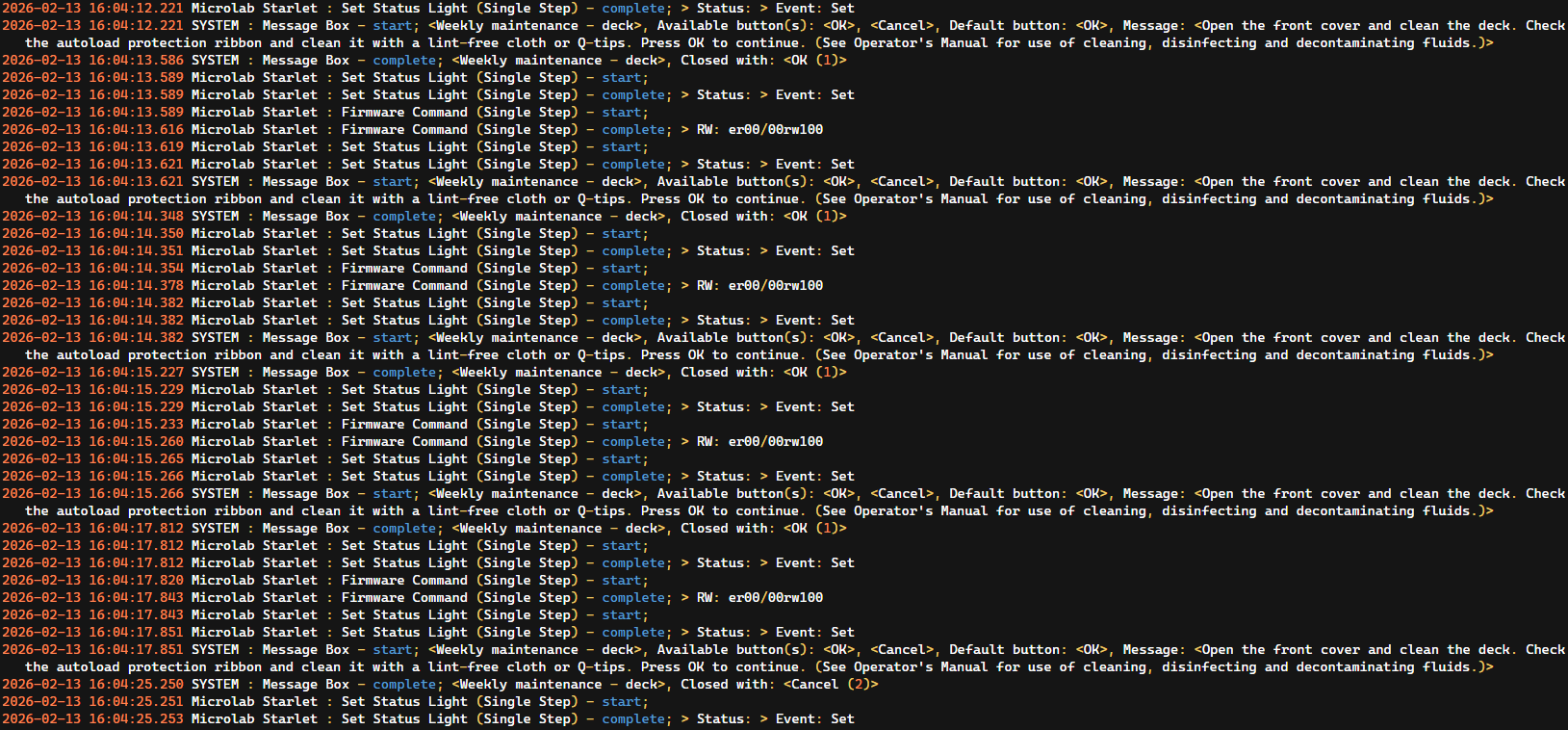
Hi folks, this isn’t a syntax error in the exact same way but it is a maintenance issue and I’m hoping it has a similarly simple fix. I’ve been running 6.3.2 on my personal machine for a while with no issues, but when I attempted to start putting it on the dedicated instrument PCs, I can’t seem to get through daily or weekly maintenance. Instrument connection/control runs fine, as will methods in general, but maintenance specifically keeps looping on the first user prompt to clean the deck. The same STARlet will complete maintenance with no problems when connected to a PC running 6.2.1.
Possibly helpful info:
Three different PCs failed to progress through the maintenance methods in the same manner
The PCs are running W11Pro or Enterprise, all with hardware that more than meets the recommended specs
The enterprise machine is a slightly older install, but the W11Pro PCs were both fresh installs within the last week or so
The STARlet in question is one of the older ones, like B-range serial number old. Recently PMed, but does not have the status light in particular.
I did try copying in the maintenance files linked above, no change.
Screenshot of the trace file, can provide further info if needed:
This sounds like a bug that has been identified in the Maintenance files for VENUS v6.3.2, but only for STARline instruments with 10 or more channels. If your STARlet does not have >=10 channels, let me know and we can look into other possible causes, otherwise try the steps below:
The fix for these bugs can be found in the updated files at this link. Download and extract the .zip, then place the two files in the “C:\Program Files (x86)\Hamilton\Library” folder, overwriting the existing files. It is suggested to make back ups of the original files beforehand (HslStarLineMaintMetLib.hs_ and HslStarLineMaintMetLib.stp).
We do in fact have 12 channels on this instrument, however that does not seem to have fixed things unfortunately. It’s still looping at the same prompt as it was before.
Please send me a copy of the two files on your PC from my original reply (HslStarLineMaintMetLib.hs_ and HslStarLineMaintMetLib.stp, in the Hamilton\Library folder) and a copy of a trace file with the loop so I can review.
Just uploaded, I hadn’t realized the file upload links trickled throughout the forum all went to the same central folder on your end. Just to double check, the files I sent were the ones I had backed up that were from my original install; those were what you were aiming for, correct? As opposed to the new/overwrite copies you shared yesterday
Either way, I’ll note that the trace file I shared was from the attempt after pasting in the new library files.
Thank you for uploading the files. On further review, everything looks good with the maintenance files themselves, and I realized that the infinite loop you’re stuck in is unrelated to the bugs I mentioned before.
The issue here is the maintenance protocol checks to make sure the system’s cover is open after clicking OK on the dialog, but the trace is showing that it is closed. If the cover is open in your attempted runs when clicking the OK button and you continue to have this issue, then you might have an issue with the door sensor itself and should reach out to your local support representative to come out and take a look.