Hello, I was running a method on the AutoLys and ran into a weird error that I have never seen before. It was for a capping step using the robotic channels and channel 3 produced a syntax error. The original error was 02/11, and following the attempt to repeat the error code was 01/40. When selecting repeat and execute the instrument would not do anything at all and just re-error with the same message. I tried ejecting caps from the robotic channels and this worked for the first couple but then channel 3 gave me an error while trying (a windows error type dialog box, not a Venus dialog box) saying “parallel commands not permitted” or something to that effect. A continue command instead of repeat caused the same dialog box. I aborted the run which aborted fine but the instrument still had tips on the pipetting channels and robotic channels 3 & 4 still held caps. I tried to run Daily Maintenance and got the same “parallel commands not permitted” message. Then I powercycled the instrument. I was then able to eject the caps by running daily maintenance again but eventually got another error during daily maintenance for robotic channel 4 from it’s robotic drive (I’m not sure this was related but wanted to mention just in case). I initialized the channel 4 robotic drive using STAR service and was able to complete Daily Maintenance. Has anyone run into this issue and know what might have caused this?
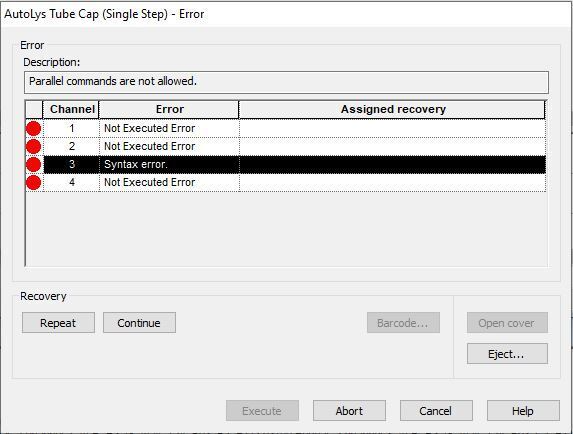
The robotic channel in question (3) induced a communication timeout error from the master controller. The channel was sent either a command or a query and didn’t respond within a defined amount of time. Subsequent commands to the channel trigger er40 (parallelity) immediately, as the controller had not received a response from the channel from the original command that errored, which the controller firmware does not allow.
This type of issue will typically present extremely intermittently at first, but can get more frequent over time. Typically the issue is a bad ribbon cable or connection. I would contact your local service representatives to have it checked out.
Thanks.
-Nick
Thank you for the information! We will take a look at the ribbon cable and replace it accordingly. Hopefully no more issues but will report back if there are.
Thanks!
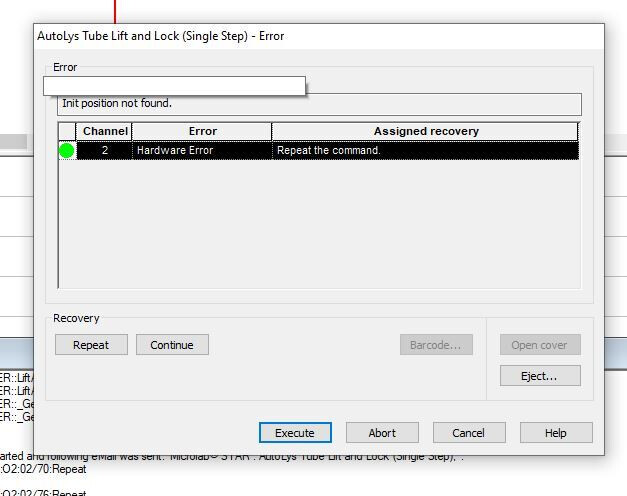
We had another issue with the same AutoLys but on a different channel. Channel was doing lift and lock and with the tube still in its grippers, it gave an error “drive not found”. Repeat/execute threw an “Init position not found”. Restarted the Hamilton and the method but received the same error. We have put in a service call for our FSE to come out and take a look and replace ribbon cables, but wanted to see if this issue is related to a ribbon cable or if it is something else entirely.
Thanks!
That looks like an entirely separate issue, just with coincidental timing. I’d recommend giving the scheduled service engineer a quick heads up so they can prepare for addressing both issues in the same visit.
Thanks.
-Nick
We’ve had issues with our autolys channels incresaing more recently. Struggles to recap, can’t lift and lock, or can’t replace the insert …. We had the FSE come and replace a channel, make adjustments etc…. that 100% helped with the lift and lock, and to some extent the struggling to recap. But there also seems to be some sort of plastics quality issues that makes things just off enough to cause this type of thing.