We’re beginning to use C# scripts extensively in our Cellario protocols and I’m running into the situation where I’m continually writing the same functions in multiple scripts because I can’t find a way to define these functions once and then use them in scripts. Chatbots tell me that Cellario should be able to load .dll files that are placed in the same folder as Cellario.exe, but I’m not finding this to be the case.
Certainly others have previously solved this problem? How did you do it?
Thanks for the reply. I’ve done that and just get compile errors when trying to use functions defined in the DLL. I’ve even tried using the Newtonsoft.Json.dll, which exists in the Cellario install folders and have the same issue.
I think so? Haha, that’s something that I’ve already had a pretty big battle with. I’m compiling with .NET 4.7.2, but I’m unsure how to determine the exact version for Cellario.
Thanks, I’m on Cellario 4.3 and with some Google-fu it looks like maybe it is also on .NET 8.0? I just recompiled with that version and will find out soon.
I think I found two pieces of evidence to show it is .NET 8.0, but my recompiled DLL against v8 is still giving the same issues. I suppose I’ll really dumb this down and make a very, very simple function to see if I can get something to work.
I have an instance of Cellario 4.4, and looking at the release notes, starting in 4.3,
//reference Newtonsoft.Json
would be valid in addition to //css_reference and ///css_reference. You should also be able to use the absolute path for a DLL outside the Cellario directory. For example,
//reference C:\Newtonsoft.Json.dll
However, I don’t think that’s the problem here. I think it will help to share your basic script and compilation errors.
I learned (thanks to @DanielS) that the .NET 8 schedulers can use dynamic loading to reference a .NET framework DLL as long as it’s compatible with the .NET runtime. I’m still able to use many class libraries targeting net48 for that reason, so I’m curious to see the exact errors.
First my DLL that’s been compiled using VisualStudio 2026 with .NET 8.0 and has the name Assembly.Test.dll:
namespace Assembly.Test
{
    public static class TestFunctions
    {
        public static string ReturnFoo()
        {
            return "Foo";
        }
    }
}
Now my Cellario script:
using System;
using System.Linq;
using HRB.Cellario.Scripting.API;
//css_reference C:\temp\Assembly.Test.dll;

namespace Customer.Scripting
{
    public class TestScript : AbstractScript
    {
                public override void AllocateResources(IScriptingApiAllocation api)
        {

        }

                public override void Execute(IScriptingApi api)
        {

			string returnString = "test";
			returnString = Assembly.Test.TestFunctions.ReturnFoo();
			api.Messaging.Notify("Notify User Example Script", string.Format("User response to warning was {0}.", returnString),
				"This is an example of displaying a simple, informational, message box.",
				ScriptMessageType.Information, ScriptMessageSeverity.Informational);
        }

               public override void ReleaseResources(IScriptingApiPostExecute api)
        {
        }
    }
}
This Cellario script does not compile because Assembly cannot be found. I can’t edit it when it’s part of a Cellario protocol, but I can save it when editing in the Script editor and then just drag it into a protocol. Just this morning I did exactly that and simulated it in the Analyze tab and now Cellario is locked up.
FWIW, I’ve tried the other ways of referencing an external library and get the same outcome. I’ve also tried having the assembly in the same folder as Cellario.exe and referencing it without the directory structure, you can assume the outcome.
I’m not sure if it is strictly necessary, but I put a using statement after the //css_reference. I also double quote the path to the .dll and don’t use a semicolon at the end of the line.
I usually do it like this:
//css_reference "C:\temp\Assembly.Test.dll"
using System;
using System.Linq;
using HRB.Cellario.Scripting.API;
using Assembly.Test;

namespace Customer.Scripting
{
public class TestScript : AbstractScript
{
public override void AllocateResources(IScriptingApiAllocation api)
{

    }

            public override void Execute(IScriptingApi api)
    {

		string returnString = "test";
		returnString = TestFunctions.ReturnFoo(); // <--- this can be shortened now
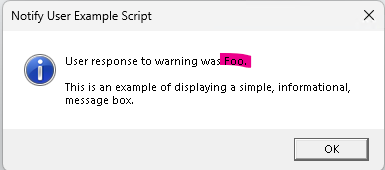
		api.Messaging.Notify("Notify User Example Script", string.Format("User response to warning was {0}.", returnString),
			"This is an example of displaying a simple, informational, message box.",
			ScriptMessageType.Information, ScriptMessageSeverity.Informational);
    }

           public override void ReleaseResources(IScriptingApiPostExecute api)
    {
    }
}

}
As to .NET versions, I don’t think it matters what version you use to write the assembly, once it is compiled it should work. I am building assemblies with .NET Framework 4.8 and C# 7.3 and they compile and run in Cellario scripts fine. I am running Cellario 4.2.
A couple of helpful hints:
You can debug Cellario scripts in Visual Studio (or VS Code). The Developer portal is listing a new api.SetBreakPoint(); method. If your version of Cellario is older, there was a more verbose way of doing this.
Cellario makes a copy of the script when you drag it into the protocol thread. If you ever change the path to the dll you will break all the protocols that the script is part of. You’ll have to go into each protocol and update the path in each script step that references it. Choose your paths carefully.
The addition of the quotes and the using directive (which I’d used before, but without the quotes it fails to compile).
Editing to add that it was actually just the omission of the semicolon at the end of the css_reference that is the key. Even without quotes it should work. I guess everytime I did it I was using a semicolon at the end and that’s incorrect. And, of course, that in addition to the using directive.
Glad you got it working! The target runtime definitely matters though. If I understand correctly, before Cellario 4.3, you won’t be able to use a DLL targeting CoreCLR (.NET Core and .NET 5+). After Cellario 4.3, you won’t be able to use a DLL targeting .NET framework if it needs a framework-specific feature (for example, System.Web API has no NuGet shim, so you’ll get TypeLoadException when trying to use its classes).