Hello! Sorry if this has been asked before but I couldn’t find anything on the forum. I wanted to know if there is a way to have the robot read a file, and then depending on the amount of samples there are, choose to use the 8 channels or the 96 MPH. We are going from 96 well plates into 384 well plates, where the samples in the 96 well plates need to be in triplicate on the 384 well plates, and sometimes the 96 well plates are full and sometimes they are not. Same with the 384 well plates, sometimes the plates are full and mastermix is added to every well using the 96 MPH, and sometimes the plates are partially full and we use the 8 channels. It would be great if I didn’t have to make a different protocol for each use case, but so far I haven’t figured out a way to do it. Thanks in advance!
You could introduce logic that states something like this after having Venus “count” the transfers:
if sample_count <= 8, pick up tips, aspirate, dispense and eject with the 8 probes. ### You can also change this sample count to be whatever number you like.

else sample_count >8, perform the steps with the 96 MPH.
Awesome I will try that thanks!
I’m not sure if you’re aware of the Hamilton Tip Support? It allows shifted tip pickup on the 96 MPH. You can pick up tips column or row wise. Say if you had 23 samples to transfer, just pick up 24 tips from the Tip Support and then pipette away.
@bowlineknot Thanks for the suggestion! We do have the tip support, but for this protocol we only want to use a reservoir if we have a full 384 well plate, and anything less we want to use a strip tube or a single column on a deep well plate.
If most of your plates are more than half full, my suggestion is to use 8-channels remove tips from those corresponding empty wells, then use 96 head loads the leftover tip box, much faster this way
Hi, I had a similar use case before, and although the approach was relatively complex, it was entirely feasible to implement on Hamilton Venus.
You can define a sample count threshold. If the number of samples is below this threshold, the robot uses the 8-channel head. Otherwise, it switches to the 96-channel MPH for higher throughput.
However, since plates are often only partially filled—and samples may be distributed across non-contiguous wells—the 96 MPH cannot always be used directly. To handle this, the 8-channel head is first used to pick up or place tips at specific positions on the tip rack, aligning the tip distribution with the sample layout on the plate. This ensures that the 96 MPH processes only the relevant wells, regardless of their positions.
To support this workflow, a separate application (e.g., written in C#) can be used to process the sample and tip layout data. The program generates intermediate files, which are then read by the Venus method to dynamically build the appropriate tip usage and pipetting sequences.
@Xianghua Thank you for the tip!
I know its been almost a year, but a question about using the tip support. I’ve loaded the tip support with the number/pattern of tips I need, and unselected the channels on the MPH that I don’t need, but I’m getting an error that all 96 positions are needed on the tip support in order to do tip pick up. Is there a way to bypass this error? Thanks!
I’ve been here. You need to select all channels. The 96MPH channel head doesn’t actually know if there is a tip at any position, it more acts like a stamp. It tries to pick up a tip and if one is there, hey great! If not, it just goes about it’s business.
If you have set up the correct tip pattern on the Tip Support it will pick up the pattern.
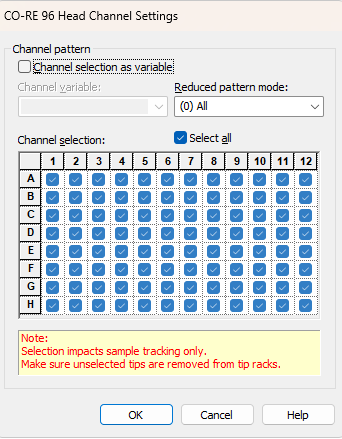
Thanks for the comment! I just tried doing that and it keeps giving me the same error unfortunately. It will only let me use the sequence I used to add the tips to the tip support, which is only 72 tips, so it keeps saying there are not enough unused spaces on the tip support
Does your tip support sequence also have 96 positions?
Should look like this, not like your pattern.
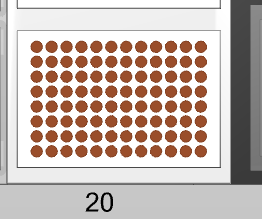
Yeah I have that, but it won’t pop up as one of the sequence options for where to pick up tips
Hmm that’s strange. Have all the positions been consumed, did you try resetting the Tip support sequence to 1? I don’t think that would be it but who knows.
Also are you using the Core 96 head Tip pickup step (not the individual channel tip pickup), the buttons look nearly identical.
Ok so I just thought about what you said regarding the tip support sequence, does your tip support sequence have tips filled in or is it just the positions available in the tip support?
Its just all possible positions on the tip support, so 1-96. For what you are doing you would have 2 sequences. 1 sequence of the tips in a certain pattern that the 8 channel made. Then you would have a second sequence of 96 positions (all positions) that the 96MPH uses.
Again, it could care less where the tips are, it just sort of stamps down and picks up any tips that happen to click into the channels.
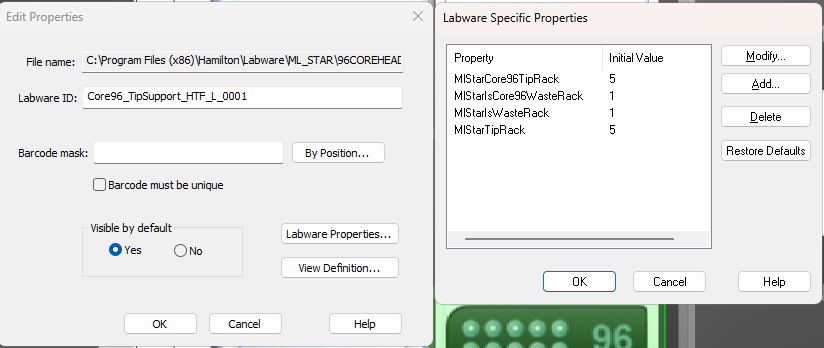
Can I ask what your Labware Specific Properties are for your Tip Support?
My MlStareCore96TipRack value is -1 and I’m wondering if thats causing issues
I didn’t set up this .lay, I’ve been modifying one that was already built for our use. But it doesn’t seem that I have any labware specific properties for the tip support.
Hi @InnerKK ,
If your tip support has a MlSTarCore96TipRack of -1, that means it is using the definition which is meant for STAR MPH Tools. That library will do the tip management for the tip support and will dynamically swap that parameter based on the tip type being used. If you are not using that library and are manually handling the tip sequences, you will need to adjust that parameter to match the tip type being used.
There are also specific labware pre-loaded with the different tip types like the one mentioned above by Christina that you can use.
Thanks for the explanation Brandon! I changed the values to match the 50uL tips and it works now.