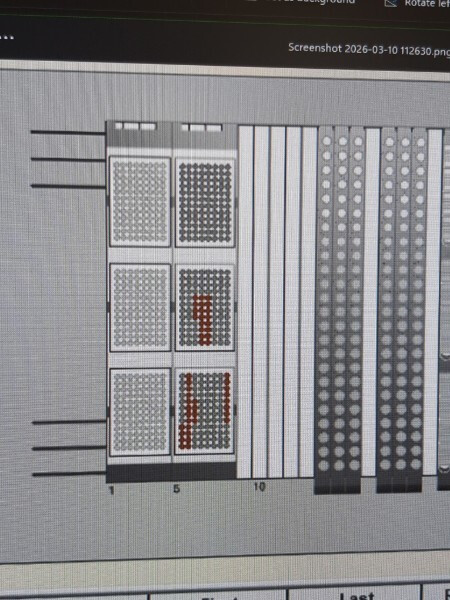
I have run into what seems like a moving target of a tip error, not sure where to start in trying to remedy this issue since it’s tied to one of the read-only/managed sequences. I’ve seen this on both a 16ch venus 4 STAR, and a 12ch venus 6 STARlet, in simulated and non-simulated runs, and it seems to vary from run to run whether we can proceed through the rest of the steps. The tip editor window shows tip usage that does not remotely reflect what was actually used in the run, and it errors out when trying to write the tips used to the global tip counter upon abort/method exit as well.
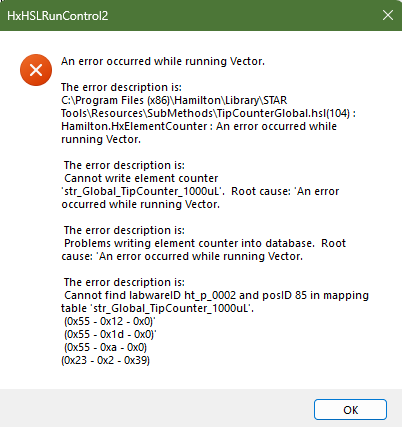
In-run error message:
This varies somewhat as to which tip position is failing to be written
Tip editor view:
(apologies for committing the ultimate sin of taking a picture of a screenshot here, this one didn’t get saved apparently)
This is one I unfortunately do not seem to have a screenshot of, but the table of sequence positions in the layout editor also looks off. In the case of the 12ch instrument/current problem child, the position table almost looked like it was written for 16 channels even though my config was set correctly for 12. The positions dipped into the second/middle rack for four tips before cycling back up to rack 1, continuing in that same manner throughout the position table. Normally I would re-sort the sequence to be oriented to the correct labware, but since the tips are a managed sequence I could not.
Any suggestions/fixes I can try? A fully fresh install including a windows reset has seemed to fix one of the 12ch instruments so far, but I don’t know which potentially corrupted files are causing this so I’m honestly a bit worried to import any other methods without knowing what’s unhappy.