I’m working in VENUS 6.2.1 with a Load Carrier command and I’m trying to access the step return / step recovery details for custom error handling. I want to detect specific Load Carrier errors, specifically these barcode-related errors:
Main Error 5 — Barcode Error
Main Error 109 — Barcode Mask Error
I see that HSLMlStarStepReturnLib provides functions such as GetMainError, GetBarcode, GetBarcodeMask, GetLabwareId, GetPositionId, and GetStepData, but I’m unclear on how to get the Load Carrier step-return string into a variable that can be passed into these functions.
Has anyone successfully done this with a Load Carrier Single Step? Specifically, I’m trying to understand which return value from the Load Carrier step needs to be bound. I have tried a few combinations of the binding the first few options into strings and I consistently get errors when plugged into various error functions or the Step Return Function that a parameter is the wrong type. Wondering if these libraries are intended to be used for only tip or channel step recovery details?
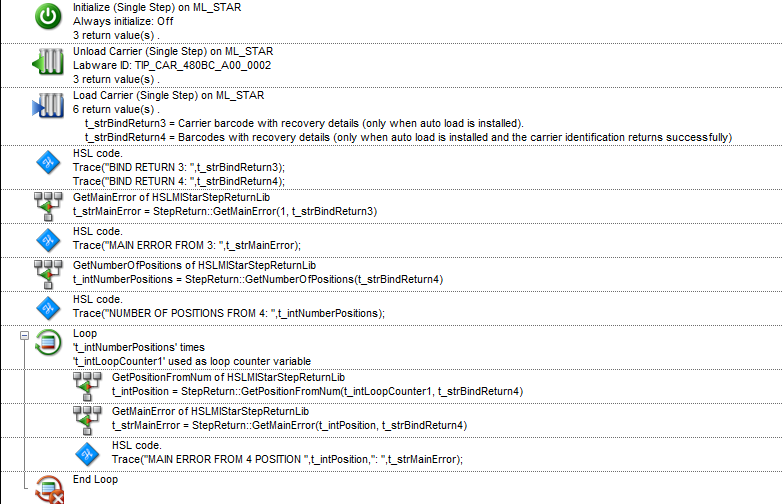
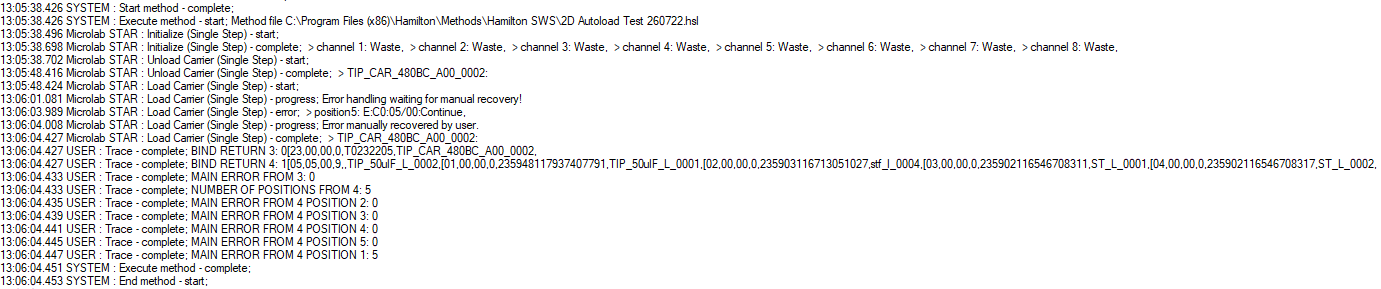
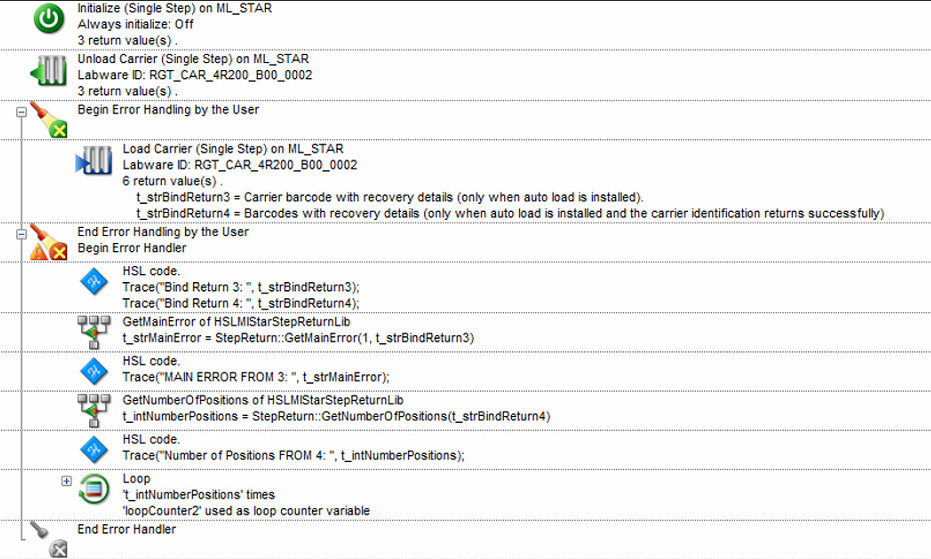
The step return library requires one of the possible bind return variables from a given ML_STAR step. It’s the other functions in the step return library which help guide you to get the parsed information that you need. In the above example I get the main error from the third bound return variable - it only has the one position since it’s the carrier barcode and it’s one possible error and recovery. The fourth bound return variable has 5 positions, 1 for each of the tip rack positions on the carrier, so ultimately we are going to have a loop of the number of positions times.
One thing to note, take a close look at the trace file where the main error for the 5 positions are traced. Notice how their positions are listed out of order (2,3,4,5,1)? That’s because the bound return variable is out of order when an error is encountered. So we utilize the GetPositionFromNum function in the step return library to make sure we are getting the error of the correct position.
This is incredibly helpful!! Thank you for taking the time to write a detailed response.
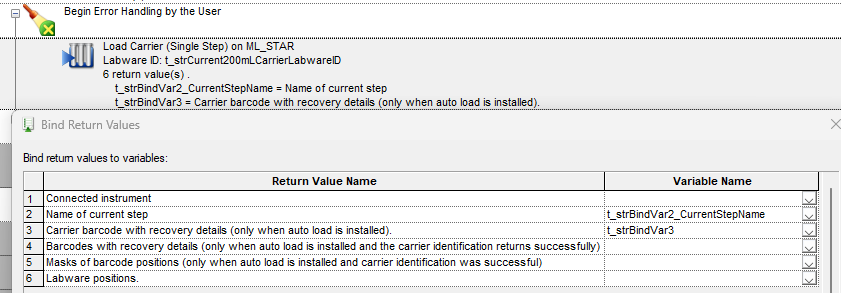
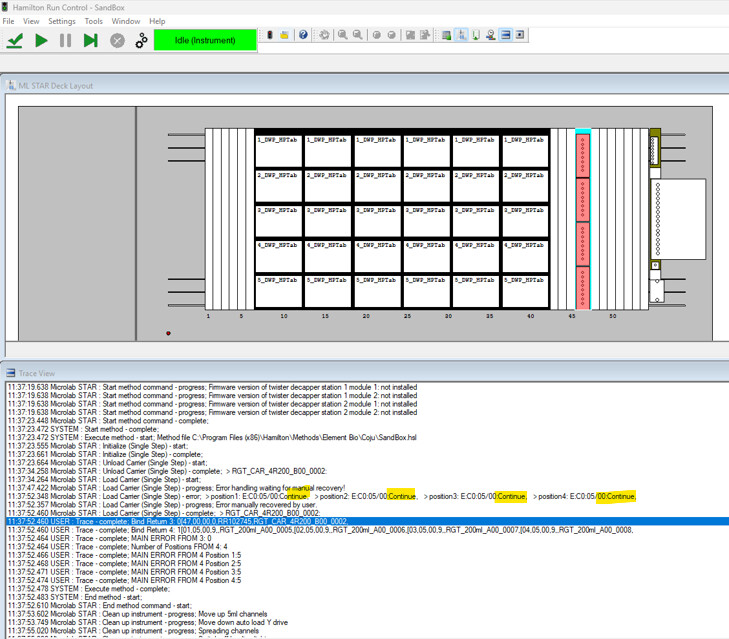
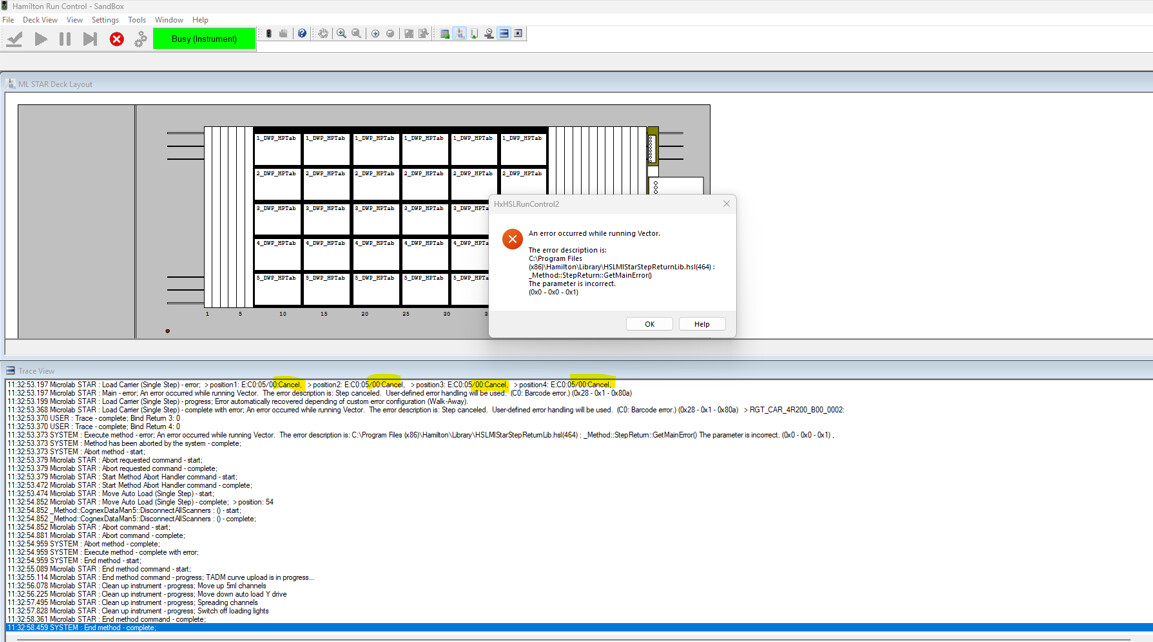
I am able to bind the step return variables and parse error codes following the setup in your screenshot, however, the trace commands only execute after I proceed through the default error handling. In the trace below, I had to click “Continue” on the default error handling prompt to be able to see the output of the step returns and main errors.
I want to be able to key off of these main errors without an operator having to interact with the default error screen so I can display more detailed instructions if they encounter that error. When I attempt to add these steps in the "Error Handling by the User” brackets, I get an error that a parameter is not correct, and the bound step returns variables are 0. I might be missing it, but this seems like the same format of your code above, just with the error handling by the user steps.
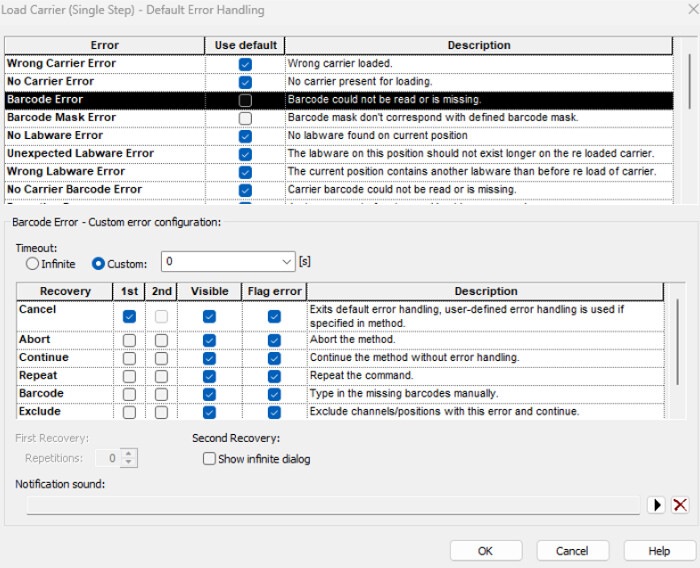
I was able to get around this error by selecting the “Continue” option as the custom error handling in the Load Carrier Error Settings, but I was curious why the approach of using the error handling by the user did not seem to work or if I was using the command incorrectly?
What you are seeing with your setup is pretty much expected. The step return library needs a return variable to parse - and unfortunately when you recover with Cancel for an ML_STAR command that command technically didn’t finish resulting in no bound return variables being generated. And then of course the “Error Handling by the User” command never jumps into the bottom clause unless you recover with cancel OR raise an error with the error library.
Thankfully with VENUS you have a ton of routes you can go to get the result you need.
For example:
You could set this up in an infinite loop (ie loop while 1 is equal to 1) where the Load Carrier command defaults to a Continue recovery in the event of an error. This will ensure you have bound return variables that you can parse the return like you and I have here. Set an overall boolean variable for whether or not an error was found and then have an if statement where in the event of no error you loop break, else you handle the error as you see fit. This would be a good way to have maximum and full control over all parameters and forces the step to keep trying until the desired result is achieved (all barcodes read).
Another example:
Don’t use an infinite loop. Instead recover your errors with Continue and parse the return all in the top part of the Error Handling by the User function. In the event of an error use the error library to raise an error thus forcing the method into the bottom clause of the Error Handling by the User function where you can handle the error as needed.
A third example:
No infinite loop and no Begin Error Handling by the User. Autorecover your errors with Continue and parse the bound return variables as needed. If their main errors (where on a 5 position carrier with two bound variables you’d have a total of 6 positions - 1 for the carrier in one return variable and 1 for each site totaling 5 in the other return variable) are ever anything other than 0 you have an if statement for if the error is not equal to 0 you handle it as you see fit.
Let me know if this helps! I can put together some examples if needed.
All of your examples make perfect sense. It was helpful to read the different approaches that could be utilized to achieve the same goal. I really appreciate your thorough and detailed responses! Thank you again, I will ping this thread if any other related questions arise