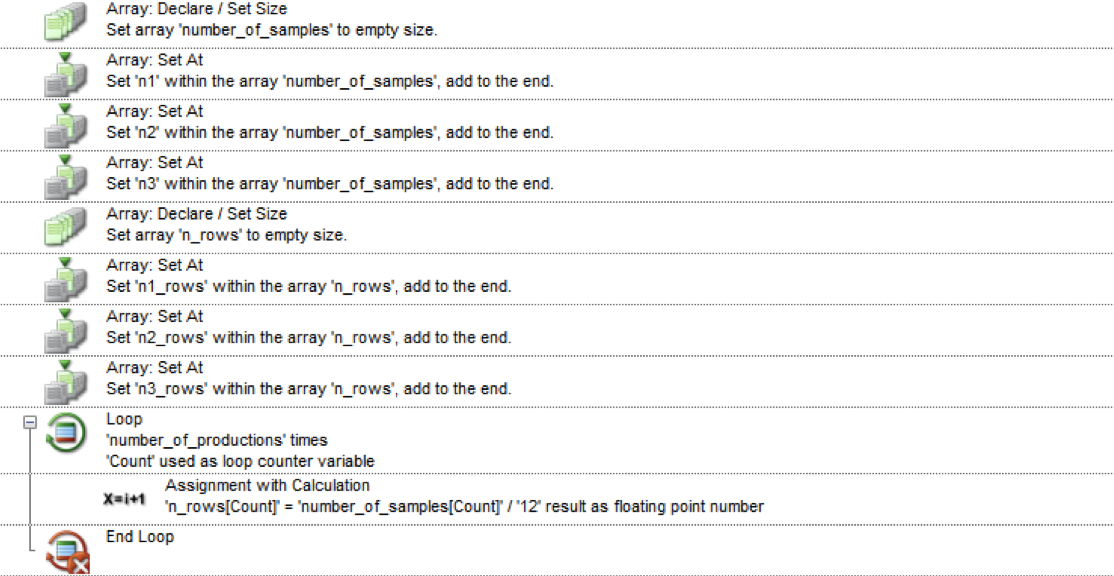
Number_of_samples[Count] is the input in which the values of n1, n2, and n3 are already predefined in a custom dialog. It should be noted that the value of each n and how many n is enabled dynamically changes in each run, which I already defined as number_of_productions. According to the traces, everything works fine except for the output n_rows[Count] since it appears that nothing is being stored in that array. When I replace the array of variables with a single variable, the calculation works but I need that dynamic feature. I also like to avoid copy and pasting the calculation three times for each output variable. To illustrate what I am trying to accomplish loop is this:
First loop: n1_rows = n1 / 12
Second loop: n2_rows = n2 / 12
Third loop: n3_rows = n3 / 12
I am not sure if I am missing an extra step or if this is a limitation of the software itself? Any help is appreciated.
I don’t see it in your screen shot, but is “number_of_productions” set to 3 or some other integer?
If n1_rows, n2_rows, and n3_rows aren’t defined and you are adding to the n_rows array, then it’ll be empty values. Since you are doing the loop after the array declaration and setting. Maybe try setting “n_rows” to size 3? Alternatively just empty size.
For your loop, maybe try
Loop start
temp_cal=number_of_samples[Count]/12
Array: Set At / Set “temp_cal” within the array “n_rows”, add to index “Count” (or add to the end of array)
Thank you for the response. The “number_of_productions” is defined but not shown in the screenshot and it works in my loop. Using an explicit size index does not work in my case because it will fix the value for all loops instead of changing it for each loop. The loop suggestion you provided also did not work. Obtaining the correct value of “temp_cal” does work but, unfortunately, it fails to set it within the “n_row” array either way.
I would also like to point out that I need to save each “temp_cal” to the respective “n_rows” variable since the value of “temp_cal” is overwritten after each loop. An example of what I want to achieve:
First loop: “temp_cal” = 6, set “n1_rows” as 6
Second loop: “temp_cal” = 4, set “n2_rows” as 4
Third loop: “temp_cal” = 8, set “n3_rows” as 8
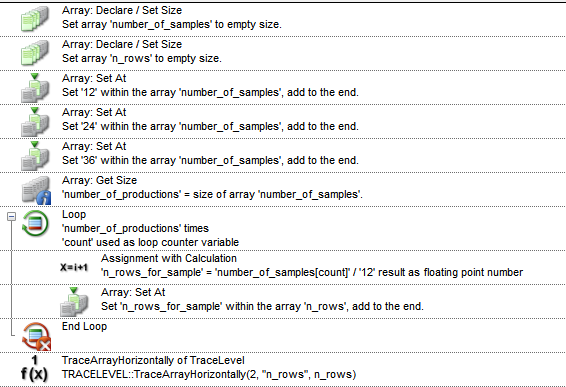
I might be misunderstanding what you’re wanting to do, but essentially, you have an array of numbers (number_of_samples), and you want to divide each value by 12, the outcome which is then added to the same index in another array (n_rows). I achieved this by the following:
This works perfectly for me! It really exciting to learn new tricks in the software and I’m even working if I could do the same with sequences Thank you so much!
@Gareth where can i find this library ‘TraceLevel’ that contains the ‘TraceArrayHorizontally’ function you used in your solution? I do not believe I currently have any functions that allow me to trace an entire array in one line.

 Thank you so much!