Finding the liquid height after aspiration and passing it on

I’m trying to find the height of my liquid after aspiration and pass that on as the dispense height in the next step. I’m trying to pull water from a reservoir for a multi-dispense into a 384 well plate. After aspiration, I do a dispense of the first aliquot back into the reservoir as suggested in the Liquid Handling Reference Guide. An issue that IU have been running into is that this dispense, if done into air above the liquid, usually results in a droplet of liquid remaining on the outside of the tip, which is left in the first well that it dispenses to. I think that if the dispense takes place at water level, it will not retain this droplet. I’m using 50uL tips from the 1000uL channels, and dispensing 5uL per well. Jet Part Volume dispensing (the destination well is empty).

My first attempt to get it to dispense at liquid level used the Get Last Liquid level library and failed as the return from this variable was a string (of all 8 channels) rather than a floating point variable. The given error message was:

Microlab® STAR / VANTAGE : Main - error; An error occurred while running Vector. The error description is: Floating point value expected but string received. (‘0[01,00,00,0,123.4,[02,00,00,0,123.4,[03,00,00,0,123.4,[04,00,00,0,123.4,[05,00,00,0,123.4,[06,00,00,0,123.4,[07,00,00,0,123.4,[08,00,00,0,123.4,’ found in key ‘Instrument::fluidHeight’) (0x28 - 0x2 - 0x80e)

Next I tried adding the GetLiquidLevelHeight from Star Channel Tools tweaking the recommendations in this post: Capacitive liquid level detection (LLD) without aspiration/dispense
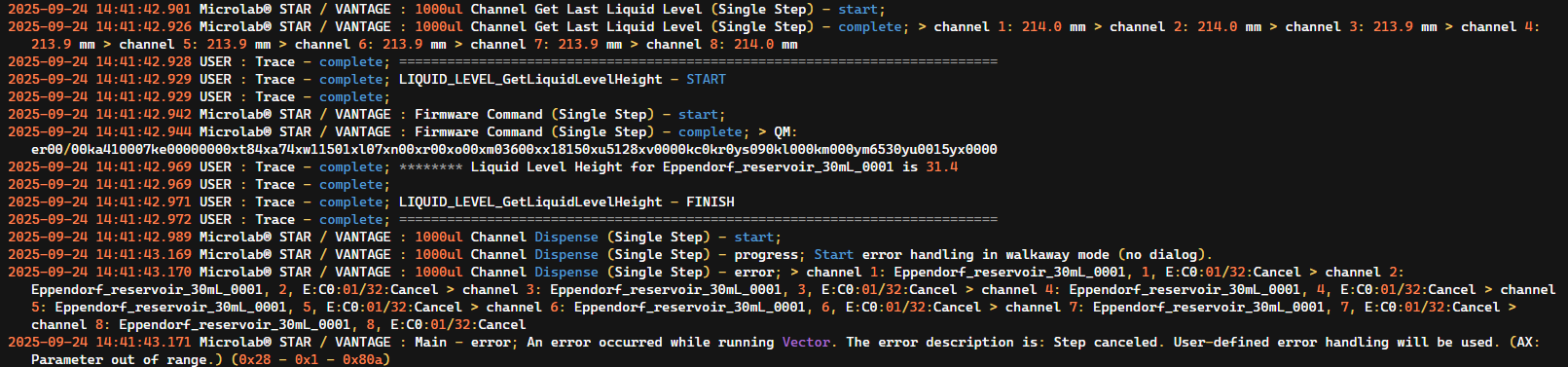
This returned an error that the parameter was out of range.

Microlab® STAR / VANTAGE : Main - error; An error occurred while running Vector. The error description is: Step canceled. User-defined error handling will be used. (AX: Parameter out of range.) (0x28 - 0x1 - 0x80a)

I noticed in the trace file that the Last Liquid level returned a height of ~214.0mm while the GetLiquidLevelHeight returned a height of 31.4 (no unit given) I’ve attached a screen shot of the relevent part of the trace file and the settings from GetLiquidLevelHeight.

1 Like

Hi @j_bishop

The height returned by the GetLastLiquidLevel is the detected liquid level height (in mm) relative to deck coordinates of the instrument. Meaning that if you obtain your teaching values and substract these from that height, you receive (I presume) this 31.4mm results. I also presume your LIQUID_LEVEL_GetLiquidLevelHeight SMT does this by obtaining the XYZ coordinates and substracts them from these.

That doesn’t necessarily mean that this is the correct height. Check for your labware definition if that height is allowed.

1 Like

Hi @j_bishop ,

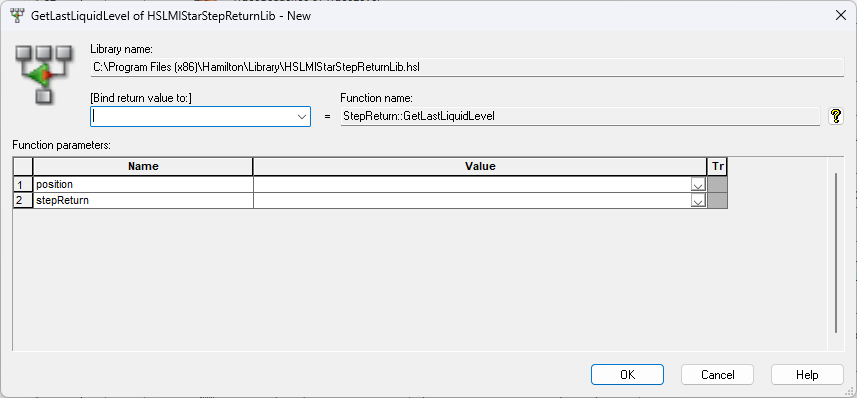
Your first issue you mentioned is because the return value from the 1000uL Channel Get Last Liquid Level (Single Step) is a formatted string value. The string has to be parsed to get the individual height per channel from this return. Using the HSLMlStarStepReturnLib::GetLastLiquidLevel function, you can feed the return value in and specify the position (channel) that the height was measured. This value is the measured height from the deck’s perspective.

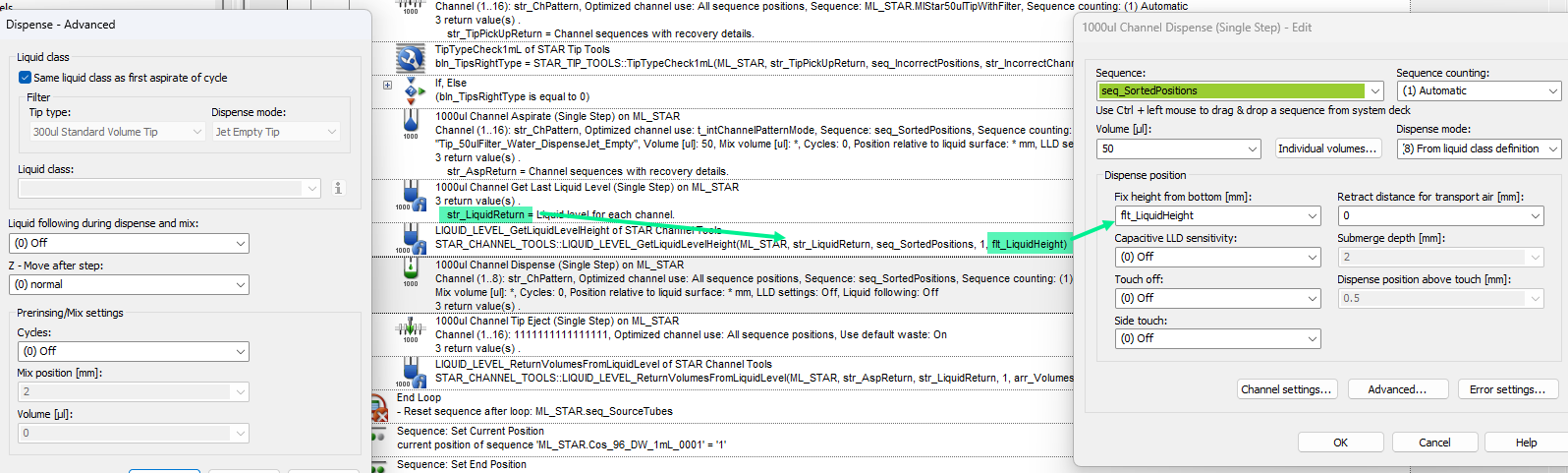
The STAR Channel Tools::LIQUID_LEVEL_GetLiquidLevelHeight function automates this parsing and also removes the Z Bottom from the parsed height to give you height from the bottom of the well. For the context of your trace, the liquid level from the bottom of the trough was found to be 31.4. This value could be used in your Fix height from bottom parameter for your dispense. I would recommend setting the Retract distance for transport air and Liquid following during dispense and mix parameters to 0 and Off respectively.

For your second issue, the error is happening on the dispense. I suspect a parameter was set that either pushed another parameter out of range or was out of range to begin with. I would need to see your dispense step and each of the parameters that were used to determine this issue.

Below is an example of getting the liquid level height and dispensing back at that height:

2 Likes

Hi @BrandonBare_Hamilton,

Thanks for the reply.

I changed the retract distance to zero as expected, the Liquid following was already off. I reran with these setting and failed again.

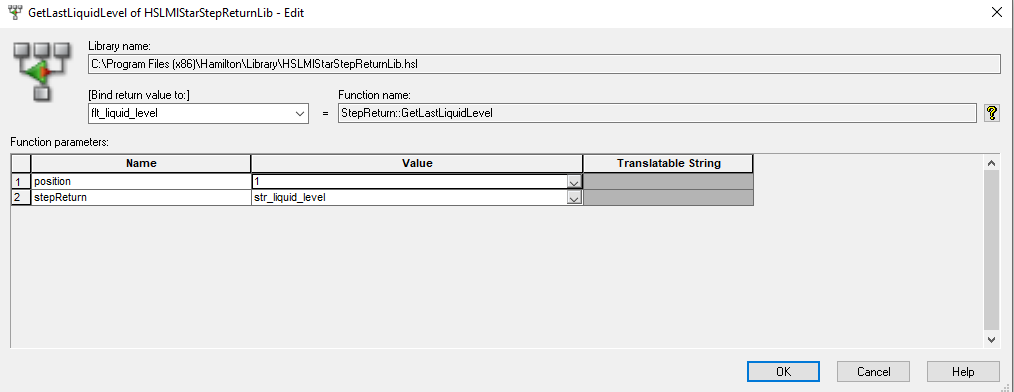
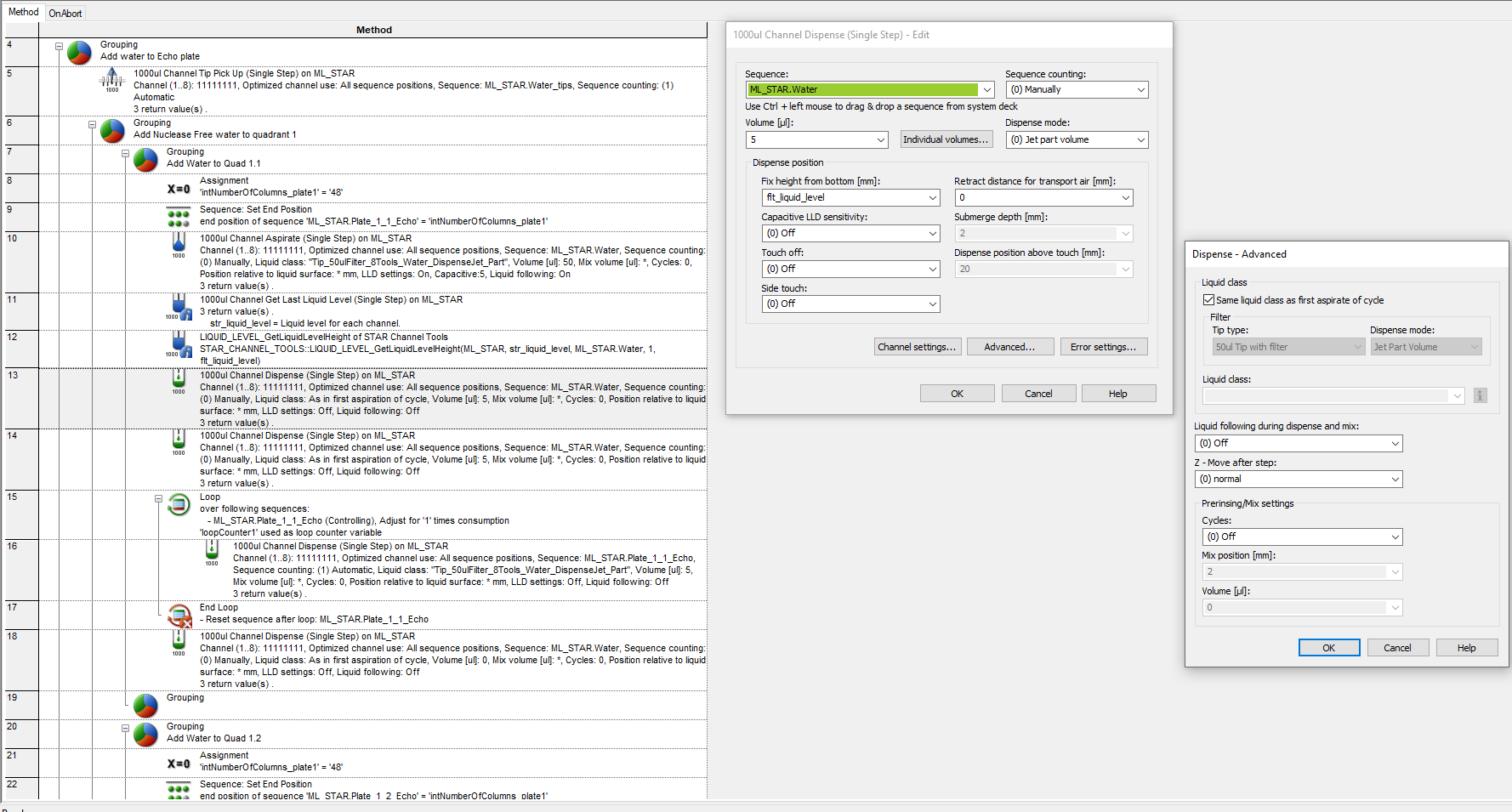
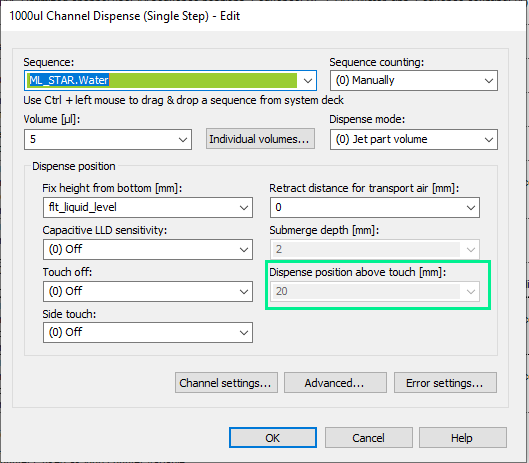
I then swapped out the STAR Channel Tools::LIQUID_LEVEL_GetLiquidLevelHeight for HSLMlStarStepReturnLib::GetLastLiquidLevel and reran it to the same error. I’ve included screeen shots of how I set up HSLMlStarStepReturnLib::GetLastLiquidLevel and the dispense settings.

Hi @j_bishop ,

I found your issue. The issue is the 20 value in the Dispense position above touch.

The limit for this parameter is 10 which is why it is throwing a parameter out of range error. Change Touch off from off to on, adjust the parameter to 5, then switch touch off back to off and close the window using OK to save this change for the command.

Even though this setting is not used, the value is still sent to the firmware for the dispense step which is why you were getting the error with all dispense height values that you calculated.

3 Likes

Thanks @BrandonBare_Hamilton,

I just made the changes and that worked.

2 Likes