Hi! I have been encountering this “error” where are Fluent freezes mid-run, same point of a sub-routine in a script. The line of script is taking a 500 ul MCA tip box out of the third slot of a hotel and placing it to the worktable. Weirdly enough if it’s a 150 ul MCA tip box, the script will work fine.
Once it freezes, the stop button will be hit but the run doesn’t actually stop and the only way to stop the run is turning the machine off. We have been in contact with Tecan Helpdesk but it has gone nowhere other than requesting multiple snapshots and dump files. I think it’s a software/script issue (written by Tecan) but as mentioned above have received no actual technical help for this problem. Has anyone encountered this before? Any actual help out there?
1 Like
What version of Fluent Control are you on?
Is it written in their “modular framework,” that turns everything into a variable? Are they still doing that? I had to decipher a few scripts written with it a few years ago and I wouldn’t be surprised if the sheer depth of modules and sub-modules is confusing something inside FluentControl - especially if it’s just a straight freeze with no error message. Is this a new issue after running successfully for some number of runs, or has it never worked in this configuration?
I’d ask their applications team if they’ve had success with this particular method at other sites, and if so have them compare FluentControl versions and module versions (if applicable).
3.6.11
@Crabhammer Yes, there are sub-routines and modules within this script that was written. I’ve had to parse through it quite a bit since they left when we have had minor number updates, but I have never touched anything with this movement since it’s just a transfer labware command. The script was working well until about a month ago. Our hardware technician replaced the RGA and motor thinking there was something wrong with it, but the problem persists. Currently, it has been escalated way up the chain with no clear answer.
1 Like
Did they update the version of Fluent Control at the time as well?
One thing that I’ve seen recommended is to “disable” the display of subroutine execution.
Not sure if that helps you here but it can be slowing down FC.
No upgrade yet but I think we will try to get that accomplished. The latest update was “may be related to multiple threads waiting for the pathfinding process to complete.” Still under investigation
I’d try to add a RGA ‘Move arm’ command after the Transfer Labware to move the RGA fingers high enough so it clears the height of the tip box already and check if that makes a difference. At least it should then be easier (=faster) for the Pathfinder to find a good movement when there is more free space around the arm at the start of the movement.
does the Fluent worktable use “default” nests ? i have seen situations where the default nest RGA coordinate table does not move the arm high enough after the move, causing problems with subsequent arm movements due to pathfinder collision/perception of collision as the RGA tries to evade,
i always start a worktable WITHOUT default locations to allow the customization of RGA parameters such as speeds, vectors & grip parameters
the logfile should also show the backend logic at play
@Snowball It freezes in the Transfer labware command. The empty tip box will be placed back into the hotel 2nd slot, RGA moves down to the 3rd hotel slot, grabs the 500 ul top box, moves out of the hotel slot, and stops. Doesn’t even make it to the worktable
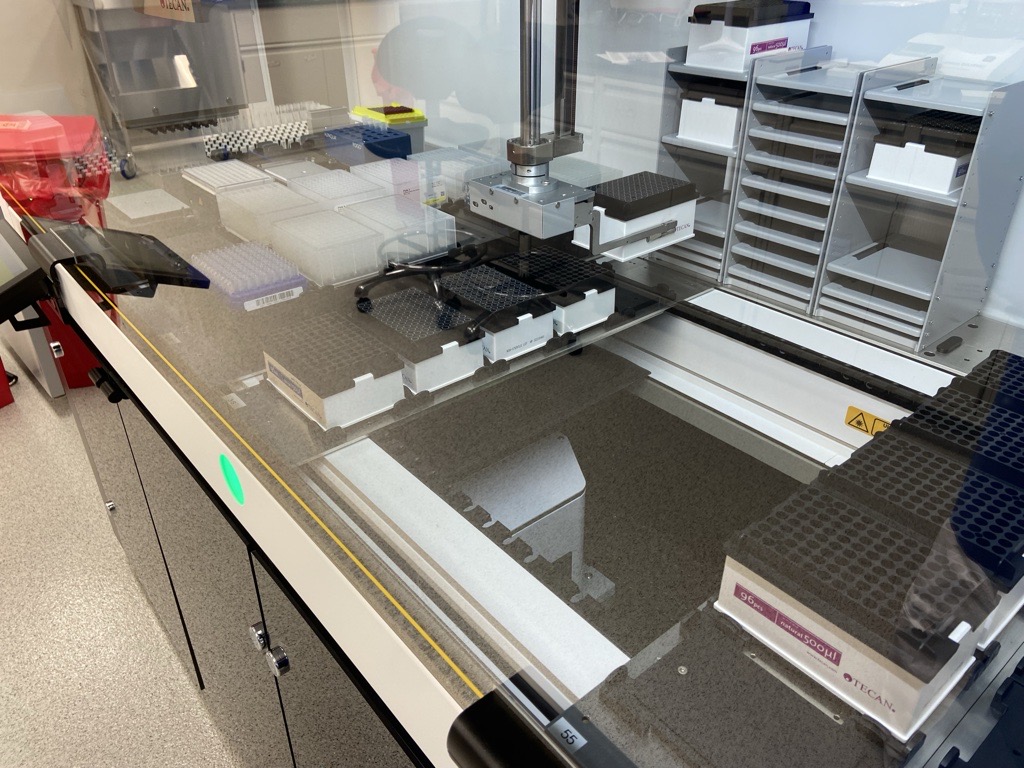
here’s our worktable, this what happens when it freezes/stops
Hi, maybe some element of the database is corrupt. Might be the script, worktable, Carrier, Labware (especially the LGE is prone to weird errors). If any of that is the case, the solution is simple: Create a fresh, uncorrupted database element (script) and copy all the commands there. Or replace the possibly corrupted database element with one that is known to work (eg replace 500uL with 150uL tip boxes). Hope this helps. Good luck!
do you have a simpler script that only runs a loop to transfer the MCA500 tip boxes between the hotel & deck positions ?
running this will determine if the error is coordinate/vector based (moving tip box from site 3 in hotel to deck position); pathfinder based as the RGA attempts to move to nest position vector OR hardware based if gripper head returns an error
Pathfinder may have a difficult time for a move calculation as in the picture the RGA with the gripped tips is kind of boxed in between hotel and the other tips. A higher Safe position of the hotel vector could help, I would do this as following:
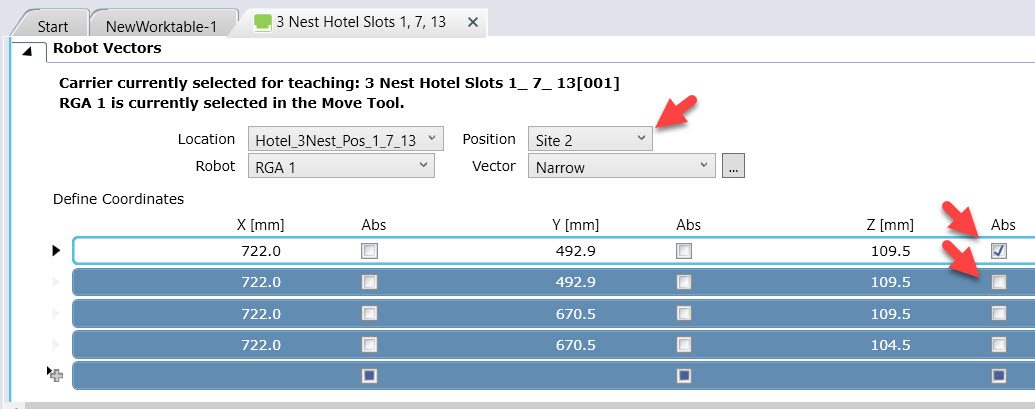
Select Hotel Site 2 in the middle [or Site 1 at the top] and for the RGA vector copy all the coordinates down by one line, so you end up having an additional line of coordinates available at the top for the safe position.
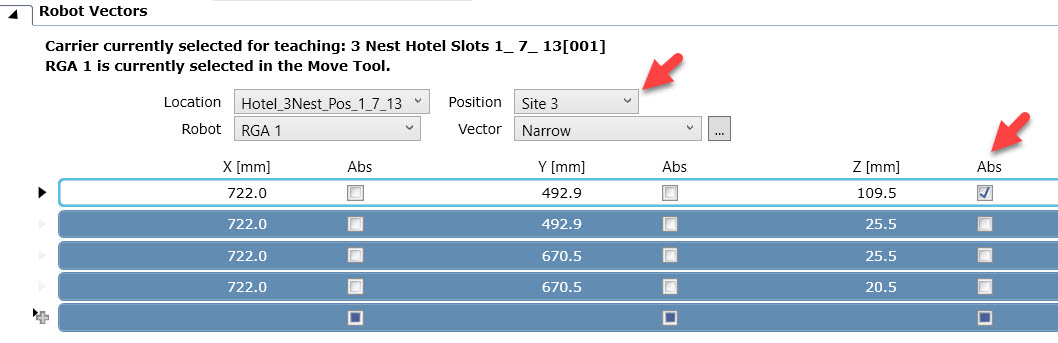
For this new safe position at the top, use the same coordinates as the previous safe position had, but set the Abs(olute) checkbox for the z-coordinate
When you now select Site 1 or Site 3 for the vector, the RGA will always drive to the same safe position, which is going to be the start point from where Pathfinder calculates the next move. If the Transfer Labware was previously working for a tip box in site 2, it should now also work for a box in site 3 as the start position for the upcoming Pathfinder move is the same.
2 Likes