I’m in the market to move on from hand scanning tubes for my Fluents. Any advice or recommendations that I should know before going with FluentID? I see that Scirobotics offers a similar product, Rack2D.
Thanks!
I’m in the market to move on from hand scanning tubes for my Fluents. Any advice or recommendations that I should know before going with FluentID? I see that Scirobotics offers a similar product, Rack2D.
Thanks!
Both modules require user to manipulate the tubes in front of the scanner head,
I’ve integrated both to instruments - experience is pretty m’eh,
sadly Fluent doesn’t offer any tube scanning that is more mechanical like the A/L,
both scanners do work - Rack2D needs a little more configuration to define the protocols etc
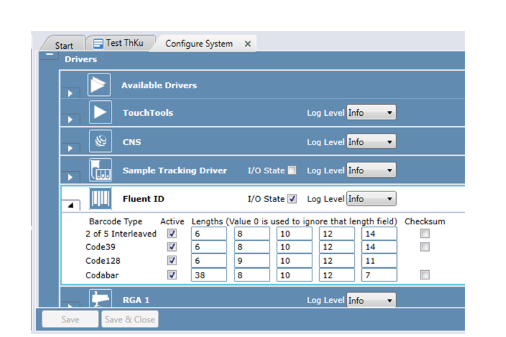
If you intend to use barcodes with a variety of character lengths, be aware that the FLuent ID allows only barcodes of 5 lengths. In my case, we receive tubes with different BC lengths and more often than desired, we need to go into the Fluent settings and change the length of the barcodes allowed, which is far from ideal.
We have also found that depending on which runner is used, the barcodes are read with variable accuracy, often requiring users to enter them manually on the screen.
Are you able to read the codes through the “window” of the runner, or does the label have to sit above the top level?
Clarifying, are you saying there are 5 barcode types that can be active at one time in the device config, and if you have a 6th then you need to sub one out?
this is from the configure option,
to setup a 6th option, would need a restart of software
also note, Fluent ID is ONLY 1D barcodes
Tecan’s solution for 2D (& 1D) is SciRobotics Rack2D module
Yes, it reads through the window in the runner.
And, yes, 5 barcode lengths at the same time, so you would need to leave the 6th length out, as per the screenshot from Optimize. Barcodes with the 6th length will be raised as error and you can enter them manually.
We had to do a lot of troubleshooting for the Fluent ID. Things we have learned/figured out
I was testing out some 2mL tubes with a hand scanner and a 32x FluentID runner and that was my observation with the minimum height, so that’s good to know that is actually the case.
In regard to the manually scanning, if you take the rack out and it tries to rescan everything, does it remember your manual scan or is it overwritten/throw off sample tracking at all? That would be annoying to hunt for the 3-4 tubes with bad labels, especially for any short-armed operators.
From our experience it does not report to sample tracking until the rack is fully read/turns green on the Touch Tools. Any time you remove the runner it will “clear” and re-read the sample runner.