What I’ve checked so far:
The IDLoader powers up normally.
LEDs on the IDLoader board are on.
The IDLoader can complete its homing movement.
I reseated the flat-flex cable and connectors.
After reconnecting the cable, the loader movement returned, but the error remained unchanged.
The IDLoader firmware is successfully read by VENUS, so communication with the main controller appears to be working.
My questions are:
Does C0: Carrier sensor communication error refer to the carrier detection sensor at the loading slot, or is it a different sensor inside the IDLoader?
Has anyone seen this error caused by the sensor strip at the carrier insertion point?
Are there any service diagnostics available to identify which sensor or module is not responding?
Any experience or service information would be greatly appreciated.
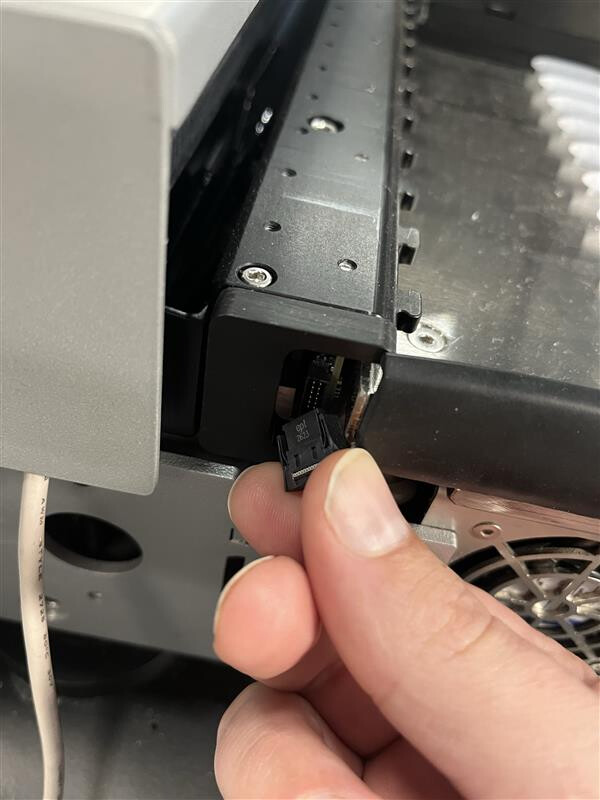
This actually has nothing to do with the IDL. It refers to the carrier sensors at the back of the deck - the chain of black blocks with magnets and sensors in them that are all connected serially. Take a look at the image below:
I have unplugged the far left side of the carrier sensors, attempted to initialize the system, and receive the same error you are seeing. With the system powered off see if you can plug this back in if it is disconnected or loose. Then power the system on and try to initialize again. Otherwise this cable of one of the carrier sensors has become faulty.
Unfortunately it doesn’t sound like you can. While I do not know the ins and outs of the electronics of the carrier sensors, your information provided thus far shows that you have power to the entire chain but one is dropping connection, probably from a downstream component on its actual board under the black cover. On a STAR you have a little more freedom with this as those carrier detection pieces are significantly smaller and only span a small number of tracks.
My best suggestion would be to contact your local Hamilton Service Support and request assistance further diagnosing the issue.