I am using Hamilton VENUS 6.2.1 Prompt Designer. In a single custom prompt I have a pull‑down bound to a numeric variable StartColumn with values 1..12 which controls a “Sequence: Set Position Current” function.
I want to display an image based on the users choice in the above mentioned pulldown.
In the Picture control’s properties I only see a “Visible” checkbox. It allows you to bind to a variable but ideally the choice of the user in the pulldown would be updating while the prompt is open.
-
Is there a way to bind the Picture control’s Visible property to StartColumn or an expression like StartColumn = 3?Processing: Hamilton_GSD_12.png…
-
If not, can Visible be bound to a Boolean variable per image, and will it update without closing the prompt?
-
Alternatively, can the Picture control’s image path be bound to a String variable so I can swap a single image at runtime?
Any pointers on the exact property names or settings in VENUS 6.2.1 would be appreciated.
1 Like
Hi @caradonna1,
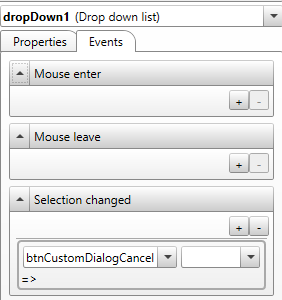
Unfortunately, it is not possible to have another object’s properties change based on a specific selection from a drop-down menu without first closing the dialog and binding the selection to a variable to appear in a new dialog. For any object in the custom dialog, there is a tab for Events that lists the available actions for an object which can affect another object’s properties. For drop-down, the only options are Mouse Enter, Mouse Leave, and Selection Changed, so while an object property can change when a user changes the selection, it can’t be based on the value selected (StartColumn doesn’t store the value until the dialog is closed).
To answer your questions directly:
-
Yes, but only by closing the dialog, which will store the selected index in the variable StartColumn, then using logic to toggle a set of booleans each bound to an individual image, then re-opening the same dialog or opening a new one.
-
No, the way to achieve something like this without closing the dialog would be to use radio buttons instead of a drop-down, in which each radio button has an event that sets the target image visible when checked then sets the target image invisibile when unchecked.
-
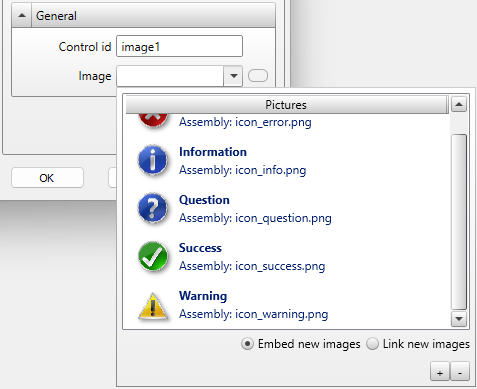
Yes, the image path can be bound to a variable so a single image changes at runtime. The “Image” property under “General” has a drop-down which allows embedding or linking new images. This will attach the image to the custom dialog, which can later be referenced by a variable that contains the file name of the image of interest (the following text is from the Help file):

Thank you,
Dan
5 Likes