How to configure Liconic plate transfer nests

Does anyone know what firmware commands or .exe I can use to upgrade my static plate transfer nest to a linear nest with motor?

My specific Liconic is an STR240 from 2016, which I acquired used. Liconic does not respond to any emails from customers with used equipment, so I am hoping this information can be useful to other users with second-hand Liconic instruments.

Liconic firmware is nicely documented and there are several .exe’s available for public download, but none of the documentation includes configuration commands to stop my STR240 from erroring on successful transfer to this station:

I pulled this linear transfer station from an STX44, where it was working without error.

Any ideas on how to get my STR240 configured for this X-fer nest?

The plan is to use this linear plate nest to shuttle the 80mm between these two green zones accessible to the STR240 plate handler and STAR iSWAP:

1 Like

If you can’t get support from Liconic themselves, I would recommend reaching out to Scipods as they service and refurbish Liconic incubators (amongst other things).

It is possible for users to configure this directly on Cytomats using .exe service software provided by freely Thermo, so i’m hoping Liconics are also user serviceable.

Instruments that aren’t user-serviceable hurt startup timelines because a 2-minute software fix can take weeks to discover

Depending on the age of the Cytomat you have, you will struggle to service them yourselves. You can certainly use their service software to do some things, but if you actually have a hardware issue, ThermoFisher will not sell you parts for you to fix on your own for at least Cytomats purchased after ~2021, and all 3rd party service companies I talked to (such as Scipods) could not service them because of this.This means you are locked into having ThermoFisher come out for repairs, and they were often not timely.

You can see the Topic I posted about this a few years ago.

Not to suggest that Liconics are perfect, but wanted to provide context for people considering using newer Cytomats.

We need a new automated incubator competitor fr

2 Likes

It’s a shame because these parts are so simple. If I am enabled to configure my instrument, I can also just build the plate nest from scratch.

1 Like

Any chance you could figure out what the “plate on” signal is and emulate it? I am going off my knowledge of the cytomat transfer station which works similarly I think but I’d imagine theres just a single high/low bit that it pulls from a data cable. Would probably be pretty hard though

1 Like

I recently wrote an python interface for two liconic STX incubators, but I didn’t get to the level of sending RS232 commands.

Both of my incubators have a linear transfer station, as in your picture. I noticed that there are some associated lines in the “device” config file:

...
<ParameterGroup>
  <Name>Sensors</Name>
  <Parameter>
    <Name>ShovelPlateSensor</Name>
    <Value>true</Value>
  </Parameter>

  <Parameter>
    <Name>PlatePresenceSensor</Name>
    <Value>true</Value>
  </Parameter>

  <Parameter>
    <Name>1TransferStationPlateSensor</Name>
    <Value>true</Value>
  </Parameter>

  <Parameter>
    <Name>2TransferStationPlateSensor</Name>
    <Value>true</Value>
  </Parameter>

</ParameterGroup>
...

Maybe this is what you’re missing?

2 Likes

From what I have discovered in the documentation, upgrading from a passive transfer station to an active motorized slide station requires editing the firmware.

I am able to successfully upload the .cod firmware from the keyence PLC to my PC, but using Liconic software, I cannot download to PLC or edit the firmware without bricking my PLC.

Does anyone know how to edit Liconic STR240 .cod firmware and re-upload without bricking the PLC? Or have access to their own STR240 or STR-series firmware updates?

From reading the Liconic FAQs, it should be possible to convert my active transfer station from slave mode to the PLC to being actively controlled by the user. I just haven’t been able to download edited .cod to the PLC without bricking it.

Very upset at Liconic for ghosting system integrators who don’t purchase new equipment. Their salespeople need to grow up and offer FAQ level support to all users

Activating the proximal plate position sensor 2 (DM101) with a metal object enables the control flow of the plate handler to proceed with a plate pickup on the transferstation.

RD DM101 returns 1 when this sensor is activated. pin 101 is the plate position sensor 2 proximal to the STR240 gate.
RD 3210 returns 1 after 30 initialization, indicating the PLC detects an ‘active’ transfer station

The motor remains continuously pushing the plate holder in the distal direction. Plate position sensor 1 (DM100) is detecting the transferstation as the motor pushes to this endstop

A properly configured slide station would reverse direction and trigger the proximal handler sensor (DM101) itself. This is the only change required for proper operation in slave mode, where the slide handler is controlled by the PLC itself.

FAQ#281 indicates there exist alternative .cod firmware files or a way to reconfigure your existing uploaded .cod firmware for all active transfer station changes. Presumably this is where you could disable slave mode on the active transfer station and controlling it directly.

There does exist ProdUtil.exe “Production Utility” in Liconic downloads that enable me to set these configs given my instrument’s uploaded .cod firmware file. However the only configuration options are for the older STX40 and STX200, and none exactly matching my STR240. When I use ProdUtil.exe to edit my .cod, STX200 reveals “slide station” option. Downloading the edited firmware to my instrument, the PLC bricks 100% of the time, and I need to factory reset before downloading the unedited .cod backup back to the STR240

This makes me want to reverse engineer the Keyence KV-40DT .cod compiled binary back to the ladder logic and edit it there, so I can ensure I keep all the relevant STR240 bits.

There does exist some KV plc ladder logic editor .exes that can only run on a windows XP virtual machine, and I think this is the next place I will look to properly configure my STR240 170mm slide station with plate sensors. There is also a liconic firmware util that also only runs on windows xp vm, presumably based on this KV plc util, which may unlock what I need

1 Like

Reviving this thread — it’s the only place online describing exactly the fault we’re chasing, so thank you for the detailed write-up.

Our unit: a LiCONiC STX220-ICBT (StoreX), transfer station driven via PyLabRobot over RS-232. Ours is a linear belt slide, and the rail was manually cut down to ~38 cm to mate it with a Tecan EVO; the sensors were repositioned during that rework.

Same symptom as yours: on homing, the slide carriage drives to the distal (far) end and the motor keeps grinding — it never reverses back toward the gate, and no error flag is raised.

What we’ve found so far (RS-232 only):

  • The DM100/DM101 registers you identified don’t behave as 0/1 sensors on our STX220 — they read as static data words (28294 / 02958), unchanged regardless of carriage position. So that register map seems STR240-specific.
  • We can read a transfer-station plate sensor (RD 1813) that toggles with position, but we confirmed it’s an optical (SUNX EX-14A) flag that fires a few cm before the end — not the distal endstop.
  • The actual far-end endstop on our unit is an Omron inductive proximity sensor. Its LED lights correctly when the carriage arrives, but it appears to map to no host-readable register, so we can’t tell over serial whether its signal reaches the PLC.

Questions, if you got to the bottom of yours:

  1. Did you ever resolve the overrun, and was the root cause firmware/config or wiring/sensor?
  2. If firmware: did you (or LiCONiC / a third party like SciPods) reconfigure the active-transfer-station profile, and which .cod / profile finally worked? Did the PLC that you bricked recover after a factory re-flash?
  3. If it turned out to be sensor/wiring: which sensor, and how did you confirm the PLC wasn’t seeing it?

Trying to decide whether to chase a wiring repair (the rail cut-down is a suspect) or escalate to LiCONiC for a firmware reconfig before we open anything up. Any detail appreciated.

2 Likes

I’m using my Liconics with a Java driver supplied by Liconic. Turns out Java can be decompiled and you can see the code as it was written.. Now, I don’t have a transfer station, but the driver is somewhat universal for all STX hardware. This is what it has to say about the transfer station. I don’t know if it helps at all, but if you can get your hands on the Java driver (you might already have it?) you can decompile it and dissect how Liconic does these commands. Apologies for the formatting, my decompiler puts the line number in the output.

public int STXSlideXfer() {
/* 1316 */     byte b = 0;
/* 1317 */     if (this.IsOperationRunning)
/* 1318 */       return -1; 
/* 1319 */     if (!this.IsInitialized)
/* 1320 */       return -2; 
/* 1321 */     if (STXReadErrorFlag())
/* 1322 */       return -3; 
/*      */     try {
/* 1324 */       this.IsOperationRunning = true;
/* 1325 */       if (OKReadBackStr("ST 1110")) {
/* 1326 */         if (!STXWaitForOperation()) {
/* 1327 */           b = -5;
/*      */         } else {
/* 1329 */           b = 1;
/*      */         } 
/*      */       } else {
/* 1332 */         b = -6;
/*      */       } 
/* 1334 */     } catch (STXException sTXException) {
/* 1335 */       this.IsOperationRunning = false;
/* 1336 */       this.logger.error("STXSlideXfer " + sTXException.getMessage() + " " + sTXException.getErrorCode());
/* 1337 */       b = -7;
/*      */     } 
/* 1339 */     this.IsOperationRunning = false;
/* 1340 */     return b;
/*      */   }
/*      */   
/*      */   public int STXSlideXferBack() {
/* 1344 */     byte b = 0;
/* 1345 */     if (this.IsOperationRunning)
/* 1346 */       return -1; 
/* 1347 */     if (!this.IsInitialized)
/* 1348 */       return -2; 
/* 1349 */     if (STXReadErrorFlag())
/* 1350 */       return -3; 
/*      */     try {
/* 1352 */       this.IsOperationRunning = true;
/* 1353 */       if (OKReadBackStr("ST 1111")) {
/* 1354 */         if (!STXWaitForOperation()) {
/* 1355 */           b = -5;
/*      */         } else {
/* 1357 */           b = 1;
/*      */         } 
/*      */       } else {
/* 1360 */         b = -6;
/*      */       } 
/* 1362 */     } catch (STXException sTXException) {
/* 1363 */       this.IsOperationRunning = false;
/* 1364 */       this.logger.error("STXSlideXferBack " + sTXException.getMessage() + " " + sTXException.getErrorCode());
/* 1365 */       b = -7;
/*      */     } 
/* 1367 */     this.IsOperationRunning = false;
/* 1368 */     return b;
/*      */   }
/*      */   
/*      */   public boolean STXReadTransferStationDetector() {
/* 1372 */     if (!this.is1XferSensor)
/* 1373 */       return false; 
/* 1374 */     return BinReadBackStr("RD 1813");
/*      */   }
/*      */   
/*      */   public boolean STXReadTransferStation2Detector() {
/* 1378 */     if (!this.is2XferSensor)
/* 1379 */       return false; 
/* 1380 */     return BinReadBackStr("RD 1807");
/*      */   }

2 Likes

What is your response to RD 3210? If it reads back “0”, send RS 3210 to reset the bit and restore proper behavior.

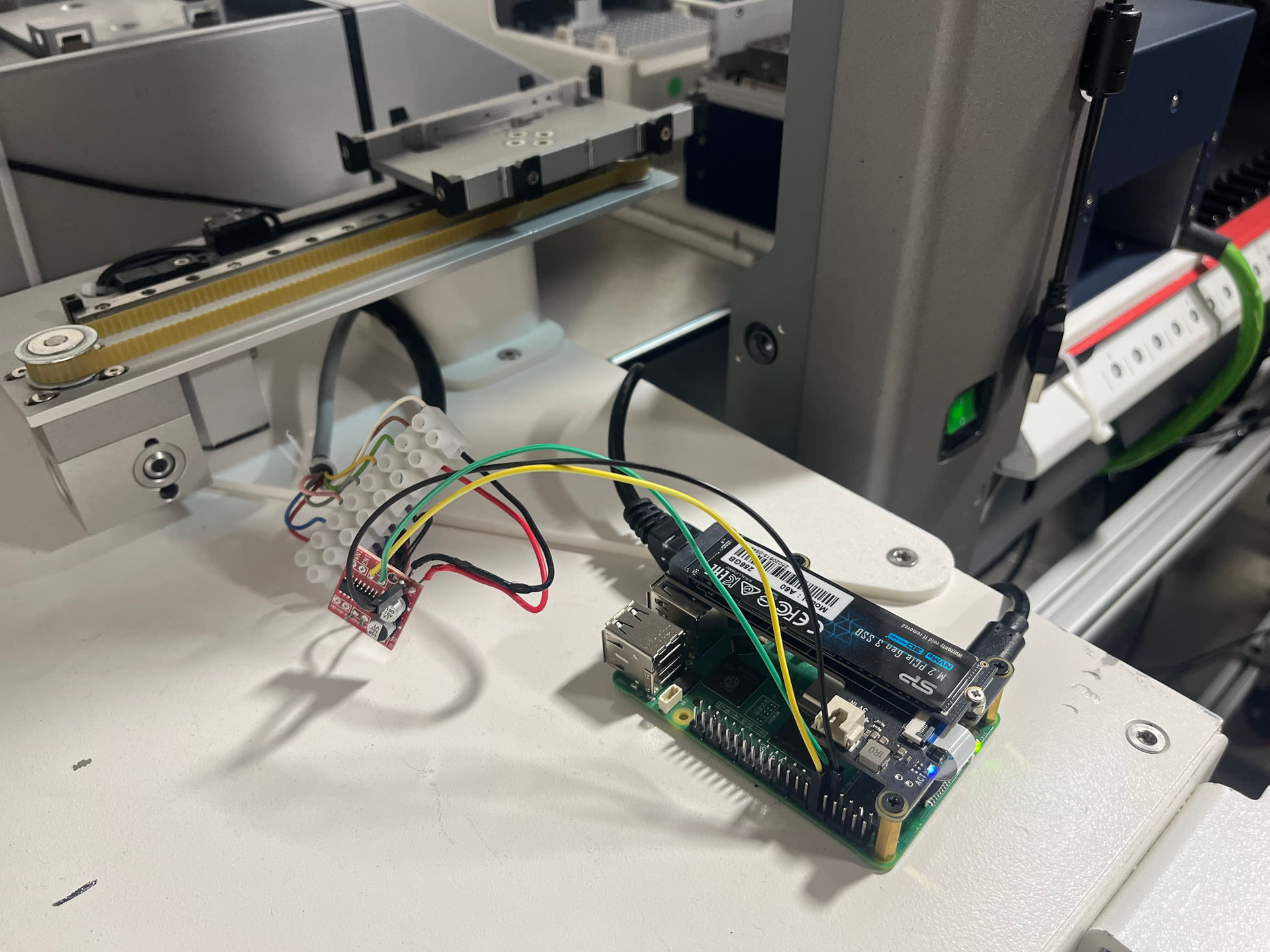
I bought by unit used, so Liconic stonewalled for 1 month before refusing to send a firmware update to me to configure my slide station. To fix my issue quickly, I liberated the transfer station control by driving the motor with signals from a raspberry pi I program directly:

If you provide more information, I will try my best and help. You will have the most luck going directly to Liconic for troubleshooting if you bought your unit new.

2 Likes

Thanks for posting the decompiled driver; that was exactly what we needed to test directly.

We drove ST 1110 / ST 1111 straight over RS-232 to our STX220-ICBT (Keyence PLC), mirroring STXSlideXfer() /STXSlideXferBack(). Result: the PLC returns OK (it accepts the bit-set), but the operation never starts — RD 1915 (ready) never drops to 0, and the carriage doesn’t move. In your driver’s terms, STXWaitForOperation() would never see it go busy.

We ruled out the IsInitialized precondition by retrying ST 1111 under three handler states:

  1. idle / ready, no activation → no motion
  2. after ST 1801 (activate) alone → no motion
  3. after a full ST 1900 → ST 1801 re-home, with the handler genuinely re-initialised (RD 1915 went 1 → 0 → 1, ready after ~45 s) → still no motion

One question: does your decompiled driver expose the higher-level transfer-in / transfer-out methods (the ones that send ST 1904 / ST 1905 with the DM0/DM23/DM25/DM5 position writes)? On our unit those composites are the only routines that actually drive the slide, but they’re parameterised by carousel/cassette geometry, not slide stroke, so they run the same fixed (over-running) distance. Curious whether the driver writes any DM that sets the slide travel itself.

Thanks ben, really appreciate the offer to help, and the RD 3210 pointer especially.

Direct answer on RD 3210: it reads 1 on our unit. So RS 3210 doesn’t apply to us, the active-station bit is already set, and the overrun reproduces with it at 1. Read-only survey, carriage sitting at the distal end:

RD 3210 active-station flag = 1
RD 101 Omron distal prox = 1 (carriage at far end — position endstop)
RD 100 door-side home switch = 0 (never asserts on our slide)
RD 1813 EX-14A optical detect = 0 (no plate/target present at rest)
RD 1807 second detector = 0 (no sensor feeds this input on our build)
RD 1814 error flag = 0
RD 1915 ready bit = 1
RD DM200 handler error code = 00000

One heads-up for anyone following your STR240 register list: on our STX220 the home/end switches are read at the input number directly (RD 100 / RD 101), not in data memory. RD DM100 / RD DM101 on our unit are unrelated static data words (28294 / 02958), not the 0/1 endstops, so the DM100/DM101 addressing doesn’t transfer between models, but the active-station flag RD 3210 does.

The behaviour, captured. A full re-home (ST 1900 → ST 1801):

ST 1900 → OK
ST 1801 → OK
t= 0.0s RD 1915 ready=0 RD 1814 error=0

t=45.2s RD 1915 ready=0 RD 1814 error=0
t=48.2s RD 1915 ready=1 RD 1814 error=0 ← reports DONE, no error

The carriage creeps to the door-side reference (correct), then shoots out to the distal end, and the motor keeps driving into the hard stop. However, RD 1814 never sets, and the handler reports ready. It then just sits at the far end; it never reverses to return the plate to the door.

What we think the issue is:
The slide travel distance is hardcoded in the firmware and runs open-loop. The key point, and we verified this directly: the PLC does see the distal endstop, RD 101 (the Omron) reads 1 the instant the carriage reaches the far end, and the motor drives straight past it anyway. So the stop isn’t gated on that sensor at all; it just runs its programmed (pre-cut-rail) distance. Plate presence is a separate input (RD 1813, the EX-14A optics) and is likewise not consulted to stop or reverse the motor. We cut our rail to ~38 cm to mate with a Tecan EVO and relocated the endstop to the new far end, but because the firmware ignores it and runs the old, longer distance, the carriage over-drives past the shortened rail into the hard stop and never reverses.

What we’ve ruled out: The bare slide-jog relays ST 1110 / ST 1111 from the Java driver are unmapped on our firmware build, as indicated by an OK returned but zero motion, even after a full re-home (details in our reply to jnecr above). And the composite import/export (ST 1904 / ST 1905) only takes carousel/cassette geometry params, not a slide-stroke distance. So we’ve confirmed there’s no serial command that moves the slide a tunable distance, the travel really does live in the .cod.

This puts us right where you were: it’s a firmware travel reconfig. We bought ours used as well, so we’ll push Liconic on it as you suggested, but they will do the same to us. Your Raspberry Pi bypass is a great option at the moment. Thanks again, this thread has been hugely useful.

DM0 = Set stacker hotel to access
DM5 = Set stacker shelf to access
DM23 = Set shelf pitch
DM25 = Set number of shelves

I’m sure DM25 gets set somewhere, but probably only once in an instantiation method to set a bunch of parameters. I haven’t found it yet but will keep looking, but I’m sure it just retrieves it from a JSON file sets it in to firmware.

private void WriteZPitch(int paramInt) {
/*  188 */     if (!this.isUseCassConfTable)
/*      */       return; 
/*  190 */     for (CassetteConfTable cassetteConfTable : this.CassettesConfTable) {
/*  191 */       if (cassetteConfTable.getId() == paramInt && 
/*  192 */         cassetteConfTable.getZPitch() != 0) {
/*  193 */         ReadBackStr("WR DM23 " + String.valueOf(cassetteConfTable.getZPitch()));
/*      */         break;
/*      */       } 
/*      */     } 
/*      */   }

/*      */   public int STXLoadPlate(int paramInt1, int paramInt2) {
/* 1535 */     byte b = 0;
/* 1536 */     if (this.IsOperationRunning)
/* 1537 */       return -1; 
/* 1538 */     if (!this.IsInitialized)
/* 1539 */       return -2; 
/* 1540 */     if (STXReadErrorFlag())
/* 1541 */       return -3; 
/* 1542 */     if (paramInt1 == 0 || paramInt2 == 0)
/* 1543 */       return -4; 
/* 1544 */     if (!CheckPosition(paramInt1, paramInt2))
/* 1545 */       return -4; 
/* 1546 */     this.IsOperationRunning = true;
/* 1547 */     setCarsOffSet(b);
/* 1548 */     WriteZPitch(paramInt1);
/* 1549 */     delay(100L);
/*      */     try {
/* 1551 */       OKReadBackStr("WR DM5 " + String.valueOf(paramInt2));
/* 1552 */     } catch (Exception exception) {
/* 1553 */       this.logger.error("STXLoadPlate " + exception.getMessage());
/*      */     } 
/* 1555 */     delay(200L);
/*      */     try {
/* 1557 */       OKReadBackStr("WR DM0 " + String.valueOf(paramInt1));
/* 1558 */     } catch (Exception exception) {
/* 1559 */       this.logger.error("STXLoadPlate " + exception.getMessage());
/*      */     } 
/* 1561 */     delay(this.STXDelay);
/*      */     try {
/* 1563 */       OKReadBackStr("ST 1904");
/* 1564 */     } catch (Exception exception) {
/* 1565 */       this.logger.error("STXLoadPlate " + exception.getMessage());
/*      */     } 
/* 1567 */     if (!STXWaitForOperation()) {
/* 1568 */       b = -5;
/*      */     } else {
/* 1570 */       b = 1;
/*      */     } 
/*      */     try {
/* 1573 */       if (!this.is1601)
/* 1574 */         OKReadBackStr("ST 1903"); 
/* 1575 */     } catch (Exception exception) {
/* 1576 */       this.logger.error("STXLoadPlate " + exception.getMessage());
/*      */     } 
/* 1578 */     this.IsOperationRunning = false;
/* 1579 */     return b;
/*      */   }
/*      */   
/*      */   public int STXUnlodPlate(int paramInt1, int paramInt2) {
/* 1583 */     byte b = 0;
/* 1584 */     if (this.IsOperationRunning)
/* 1585 */       return -1; 
/* 1586 */     if (!this.IsInitialized)
/* 1587 */       return -2; 
/* 1588 */     if (STXReadErrorFlag())
/* 1589 */       return -3; 
/* 1590 */     if (paramInt1 == 0 || paramInt2 == 0)
/* 1591 */       return -4; 
/* 1592 */     if (!CheckPosition(paramInt1, paramInt2))
/* 1593 */       return -4; 
/* 1594 */     this.IsOperationRunning = true;
/* 1595 */     setCarsOffSet(b);
/* 1596 */     WriteZPitch(paramInt1);
/* 1597 */     delay(100L);
/*      */     try {
/* 1599 */       OKReadBackStr("WR DM5 " + String.valueOf(paramInt2));
/* 1600 */     } catch (Exception exception) {
/* 1601 */       this.logger.error("STXUnloadPlate " + exception.getMessage());
/*      */     } 
/* 1603 */     delay(200L);
/*      */     try {
/* 1605 */       OKReadBackStr("WR DM0 " + String.valueOf(paramInt1));
/* 1606 */     } catch (Exception exception) {
/* 1607 */       this.logger.error("STXUloadPlate " + exception.getMessage());
/*      */     } 
/* 1609 */     delay(this.STXDelay);
/*      */     try {
/* 1611 */       OKReadBackStr("ST 1905");
/* 1612 */     } catch (Exception exception) {
/* 1613 */       this.logger.error("STXUnloadPlate " + exception.getMessage());
/*      */     } 
/* 1615 */     if (!STXWaitForOperation()) {
/* 1616 */       b = -5;
/*      */     } else {
/* 1618 */       b = 1;
/*      */     } 
/*      */     try {
/* 1621 */       if (!this.is1601)
/* 1622 */         OKReadBackStr("ST 1903"); 
/* 1623 */     } catch (Exception exception) {
/* 1624 */       this.logger.error("STXUnloadPlate " + exception.getMessage());
/*      */     } 
/* 1626 */     this.IsOperationRunning = false;
/* 1627 */     return b;
/*      */   }

This is really helpful, thanks for digging it out. It actually lines up with what we’re seeing.

The load/unload path you posted shows the pattern clearly: the carousel gets its geometry written to DM words first (WR DM23 z-pitch, WR DM5 shelf, WR DM0 hotel) and then ST 1904/ST 1905 fires. But the transfer-slide commands from your earlier post — STXSlideXfer → ST 1110 and STXSlideXferBack → ST 1111 — are bare triggers with no DM write and no parameter. So as far as the serial interface goes, the slide stroke isn’t something you pass in; it looks hardcoded in the .cod. That matches our symptom: we shortened the rail to ~38 cm for a Tecan mate, and the slide still drives the full original distance into the hard stop. (ST 1110/1111 are also unmapped no-ops on our firmware build.

Two things from your snippet I’d love to see more of, if your decompiler will show them up:

  1. setCarsOffSet() — it’s called at the top of both STXLoadPlate and STXUnloadPlate (with 0). “Offset” is exactly the kind of value that might move the travel reference. Does it WR a DM word, and if so which one? Is there a transfer/carriage variant of it?

  2. The CassetteConfTable source — you’ve got WriteZPitch pulling getZPitch() from that table and writing it to DM23, and you mentioned it likely loads from a JSON config. If that table (or whatever populates DM25 = shelf count) has a transfer-station or slide-stroke entry, that’s probably the firmware value we’d need Liconic to reconfigure for a cut-down rail (if they allow).

Basically we’re trying to find where the slide distance is stored, since there doesn’t seem to be a serial command to set it directly. Anything you find on those two would be gold.

The drivers are available for download on Liconics site: LiCONiC – Support – Drivers

Will be quicker and more useful for you to decompile and search through yourself (I do like combing through the driver, but need to get some “actual work” done :laughing: ).

Download the driver, the jar file is in the root directory. Change .jar to .zip, extract all the files from the .zip. Then find a decompiler of your choice to decompile all the .class files. I’ve been using the appropriately name Java-Decompiler on github.

The file that I’ve found most useful in the driver is STXobj.class in \com\liconic\hardware.