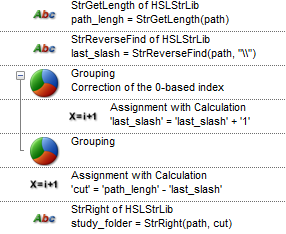
I would like to learn how to handle this more professionally.
Using a prompt, I ask the user to browse and select a folder (e.g., MyPC/Documents/Folder1/My_study ). I need to extract only the folder name (My_study ), not the full path.
At the moment, I’m using the Strlib library with overly complex logic.
I’m wondering if there is a simpler tool or method to achieve this.
Not sure what you are exactly doing but it’s rather simple;
Use the HSL Extension String Library to convert your file path to an array and index the second last element; it’ll only be 5 lines of code
This can be done with the HSLExtensions File library. Both the commands GetFileName and GetFileNameWithoutExtension will function the same in your case. While they are technically in the “file” library they just return the last part of the specified string. So in the example below you would see “HSLExtensions” traced out.