For those of you working with the Microlab Prep, I wanted to share that Hamilton has released a REST API that gives you direct programmatic access to the system. This opens up some interesting possibilities for integration and custom automation workflows.
What’s Available
The API provides broader control over the Microlab Prep with:
RESTful endpoints with Swagger documentation and developers portal
Multi-language support (Python, C#, Java, etc.)
Dynamic protocol creation - build and modify protocols programmatically
Error handling capabilities - monitoring and responding
Real-time monitoring and status reporting
Essentially, you can now treat the Microlab Prep as a programmable component in larger automation workflows rather than being limited to what is possible only while standing in front of the device and through the UI.
Technical Discussion
I’m curious about use cases the community might have for this. Some obvious applications:
Integration with existing automation frameworks that support consuming REST APIs
Custom protocol generation based on sample metadata
Building decision trees that adapt protocols based on real-time results
Connecting to upstream sample tracking or downstream analysis systems
I know many of you have been requesting API access for the Prep for years, so I’m curious how this implementation aligns with what you’ve been looking for. This initial release focuses on programmatic protocol management and system integration through the existing execution engine - we’re continuing to explore ways to deepen the API’s capabilities based on community feedback.
Where to Learn More
We’ll be demonstrating the API this week at ADLM 2025 in Chicago if anyone wants to see it in action or discuss technical implementation details. Stop by, I’d love to meet you and show you the demo.
The developers portal will be going live officially later this week.
Questions?
Happy to answer technical questions about the API capabilities, integration patterns, or specific use cases. Also curious to hear if this fills gaps or simplifies workarounds you’ve been using.
Excited to finally get this in your hands after all the requests over the years. Let me know how it works for your use cases!
This is fantastic new @mrthorne - is there a place we can see the swagger documentation? Would really help to understand and evaluate the API and start to give you some feedback.
Yes absolutely @mathewkeegan! The developer portal has the entire API reference documentation (openAPI specification/swagger/etc) along with some short guides on consuming the APIs for common activities and then larger example projects. These exist for both the Prep API as well as the VENUS API.
We’re making a few more adjustments to the site and then I’ll link it in this thread.
The developer’s portal with information about the Prep and VENUS API can now be accessed by following the link found on the Hamilton Software API page. The short form to get the link is temporary and intended to better gauge interest, the user base, and potential support need.
I’m sure the direct, developer portal link will get floated out there once a few have beared the burden of the form.
When accessing the Prep API:
For the best experience, you’ll want to upgrade to v3.3.1 (released 8/6/25 and available on the Prep software download page).
If you are on version v3.2.2 or earlier, you can remain there and have full access, but remember the latest version always has the latest bug fixes and performance enhancements.
Lastly, don’t forget to sign up for the Hamilton APIs webinar on August 13th! In it I’ll be demonstrating an implementation of variable handling, remote execution and management of runs/errors, and show off a sample 3rd party software integration, all using the Prep API.
Hey,
Thank you for the updated link! I did sign up and still haven’t gotten a link to the developers portal.
Is it something that’s done manually on your end or something went wrong with my form?
Good question @Tsargu. There aren’t any specific code examples up on the portal, but here are a couple of ideas:
After using a protocol to move a reagent into a number of wells, a quick frame could be captured by the camera and analyzed for visual reactions by trained ML tool that could list out those specific wells. This would become the input to dynamically creating or modifying a new protocol that act only on these specific wells via a modified transfer sameple / add reagent / hit picking step to perform the next part of some process.
Upstream data from a LIMS system could be used to construct a specific set of pipettable locations (with barcodes if necessary?) that could be exported later as data (csv, or json) for the LIMS system to be updated.
Let’s say a 6 step protocol errors at some point during it’s run or otherwise must abort (let’s say after step 3), based on the report data of when the error occured, that same protocol could be modified to disable the first three steps and run again to complete it’s pipetting.
Just a couple of thoughts off the top of my head. Maybe you have some other ideas that could be explored?
Ah, got it — so this isn’t something handled inside the protocol itself, but rather before or after it runs. In that case, examples aren’t really needed, since this is just standard programming logic and not specific to the Prep API.
For now, that is correct, the protocol is self-contained. Any programmatic modifications you’ll want to do before the run has been scheduled or after it has completed.
In the meantime, one option is to split a larger protocol that needs those types of decisions into multiple protocols on those logical breaks and then have your orchestrating software handle both making whatever modifcations might be necessary, along with scheduling and executing the pieces after the modifications are made. The camera handles detecting tips, so you can leave partial racks on deck and the 2nd or 3rd protocol in a chain can pick up from where the previous left off.
I just wanted to say awesome addition to make the ML Prep fully functional, this is seriously now something we would consider using. Thank you for all the hard work on the Hamilton side!
I’m having two questions, and wonder if I can get some help here.
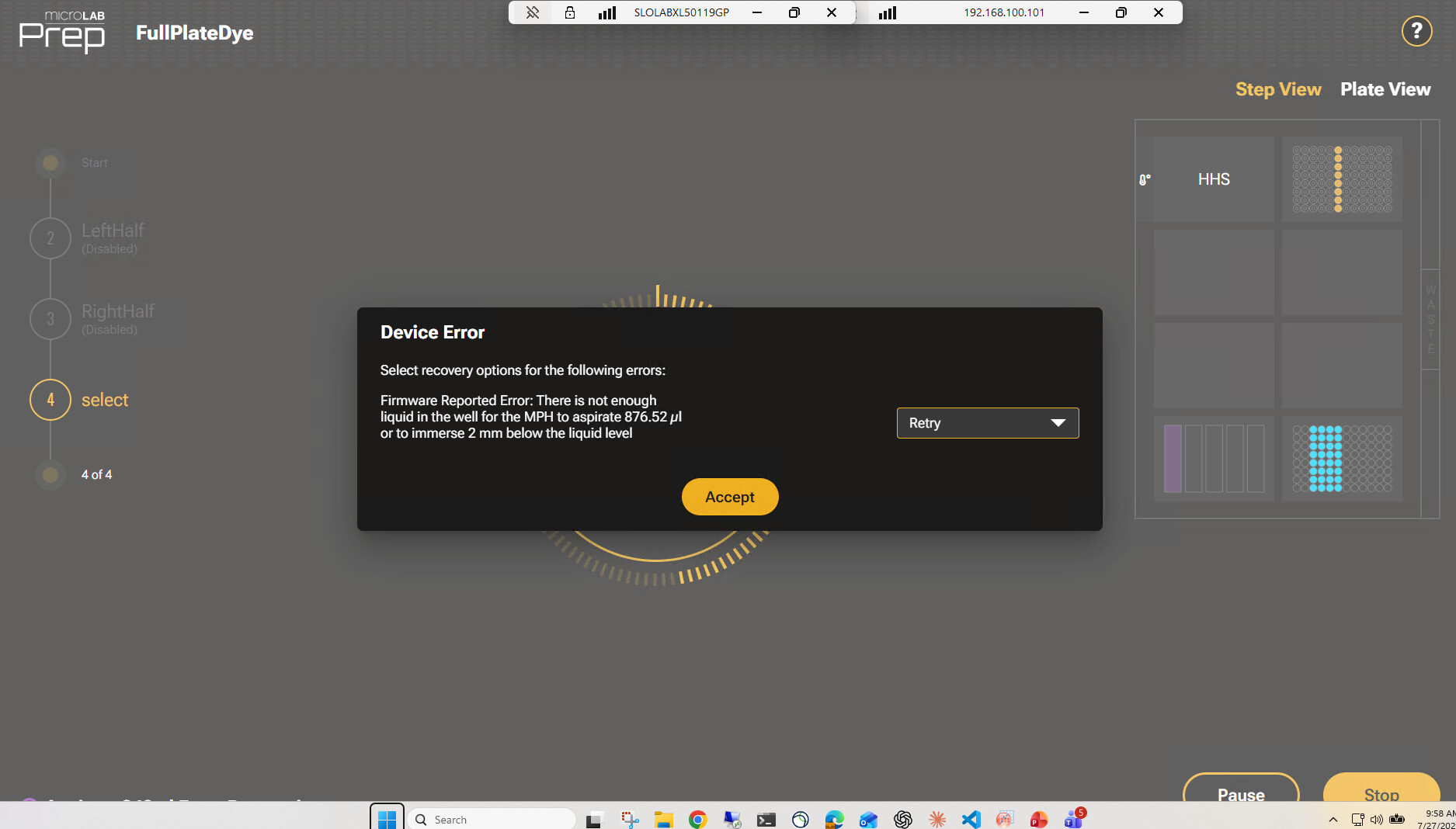
Error handling. I was trying to alert on protocol errors mid-run. It looks like the API can’t see a pending firmware Device Error (the Retry/Cancel dialog, shown below):
/errors only seems to surface Instinct-level errors (assay canceled, load failure, module not connected), not firmware Device Errors. Is there any way to detect these — a pending-view endpoint or a real-time (SignalR/WebSocket) channel? Or is it not exposed via REST?
Can the API run Daily/Weekly maintenance (and Data Maintenance) fully unattended, without any touchscreen interaction?
Hi @PBI-HamiltonPrep-YZ, for checking for errors, you’ll want to subscribe to the websocket. Take a quick look at the Error Handling recipie on the developer portal for guidance on this.
Data maintenance can be run headless without much fuss using the maintenance endpoints, just pull the Id for the data maintenance routine and then use the appropriate POST to start it.
Daily and weekly are a little trickier as they have dialogs to acknowledge as you walk through the process. (They aren’t necessarily meant to be headless since they require user interaction at the device for removing labware, wiping the deck, etc… unless you have a robot doing this for you, which maybe is a conversation for a different thread ). For daily and weekly to run headless, you’d want to subscribe to the websocket to get the id’s of the dialogs you will need to acknowledge along the execution of the procedure.
Thank you so much @mrthorne, this was super helpful! Subscribing to the websocket did the trick — I’m now catching Device Errors in real time and firing off alerts without any issues. Really appreciate your insights and help.
I’m now poking at running Daily/Weekly maintenance via the API. I get the mechanism you described — subscribe to the websocket, grab the dialog IDs, acknowledge them via close-view as the routine walks through. The piece I’m stuck on is finding the right websocket URL for those maintenance dialogs. The error socket (ws://[ip]/NimbusLite/instincterrors) works great for errors, but nothing streams over it during a maintenance run — so I’m guessing the maintenance/view dialogs come over a different socket (the spec mentions a “RunStatus” websocket, but I can’t find its exact URL).
Do you know the correct websocket endpoint for the maintenance dialog events? That’s the last piece I need. Thanks again!
So on the dialog responses, good catch. That’s a documentation gap on our end, it’s probably only shown in a couple of the example projects right now. There’s a second websocket for maintenance dialogs and protocol run status:
ws://[ip]/NimbusLite/instinctevents
A few things worth knowing before you wire it up since the portal doesn’t spell this out (yet):
Not everything coming over the socket is a dialog you need to ack. You’ll see a mix of event codes multiplexed together. The ones you care about for maintenance are maintenancedata and messagebox. Those carry an id you POST back via /maintenance/close-view.
You’ll also see “finished” (routine is done), “timeremaining” (countdown, can ignore for your purposes), and “generic”. Heads up that “generic” is chatty, and its payload is sometimes a bare string (“aborted”, “paused”) and sometimes JSON. Wrap that parse. It’s worth handling explicitly because it can tell you a messagebox you’re currently showing got handled elsewhere, in which case don’t try to /close-view it. You’ll get a 400 back for a stale/already-closed view.
Some Daily prompts never hit the socket because we answer them server-side (channel count, final pass/fail). Don’t be alarmed if the touchscreen flow looks like it has more steps than the socket does.
On /close-view itself, viewResult is a strict enum, so a typo will 400 on you. Practically you’ll use Ok, Yes, No, Cancel, Abort. And some daily/weekly screens need more than a plain Ok. inputType: “yesno” wants viewResult: “Yes”/“No” on its own, while a selectionCaptions array is a pick-one and wants “Ok” with the zero-based choice index as a string in viewInput. (Did I mention these procedures weren’t necessarily meant for headless operation? )
Last gotcha: the dialog id isn’t at the top level of the message, data comes through as a JSON string itself so you’ll need to parse the inner payload to pull the id out before you can use it in /close-view.
Should be smooth sailing once you’re pointed at the right socket though.


 ). For daily and weekly to run headless, you’d want to subscribe to the websocket to get the id’s of the dialogs you will need to acknowledge along the execution of the procedure.
 )
)
