Hi all,
I’ve encountered an issue in our lab workflow and was hoping someone might have experience with this.
Our system automatically generates CSV files (example attached). We have thousands of these files that need to be processed. The problem seems to be related to the file name length and special characters.
When trying to use “Import Worklist” , I get the following error:
Invalid name
plate_1138-1[NO-2D-11148,NO-2D-11149,NO-2D-11151,NO-2D-11153,NO-2D-11154,NO-2D-11155,NO-2D-11156,NO-2D-11157,NO-2D-11163,NO-2D-11164,NO-2D-11166].csv
Make sure it does not contain invalid characters or punctuation and that it is not too long.
When trying to Open File , I receive this error:
The Microsoft Jet database engine could not find the object
plate_1138-[NO-2D-11148,NO-2D-11149,NO-2D-11151,NO-2D-11153,NO-2D-11154,NO-2D-11155,NO-2D-11156,NO-2D-11157,NO-2D-11163,NO-2D-11164,NO-2D-11166].txt
Make sure the object exists and that its name and path are specified correctly.
If I manually rename the file and make the name shorter, it works without any problems. However, since we have thousands of these files, renaming them every time is not really practical.
I was wondering if anyone has encountered a similar issue or knows a workaround for handling such file names. Any advice or suggestions would be greatly appreciated.
Thanks in advance!
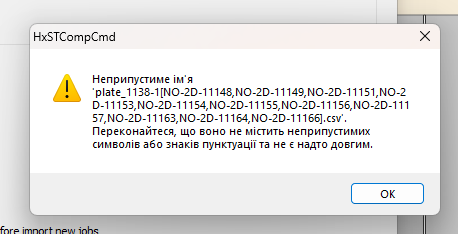
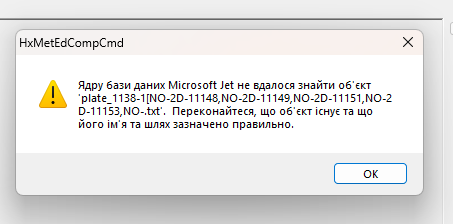
plate_1138-1(NO-2D-11148,NO-2D-11149,NO-2D-11151,NO-2D-11153,NO-2D-11154,NO-2D-11155,NO-2D-11156,NO-2D-11157,NO-2D-11163,NO-2D-11164,NO-2D-11166).csv