Hi,
So i understand the importance of liquid classes in terms of dispensed volume. We have a LVK for classing liquids and I have a method to build that uses a new liquid class, but the method only involves removal of a volume of liquid from the wells, and that is then just discarded.
My question is for the new liquid class, do i need to make a new correction curve? Or since the correction curve takes into account volume left in the tip etc in the dispense step, (which doesn’t matter in my method) should my new liquid class just be concered with speed etc, but the correction curve would just be the volume eg 50uL = 50uL, 100uL=100uL etc.
Thanks for any input and opinions,
Ewan
Hi Ewan,
It depends on how accurate the volume you remove from the well has to be. If you’re removing all the liquid from the well, then likely you don’t have to worry about adjusting the correction curve. If you’re looking to remove a more exact amount, then depending on the liquid type, you may have to optimize the correction curve. The correction applies to both the aspirate and dispense steps.
Thanks,
Eric
1 Like
Hi @ewanfyffe ,
If your transfer is only concerned about the removal of the liquid, then you can certainly zero out the correction curve (50=50, 100=100, etc). If you have a particular volume you are removing that never changes (IE you are always removing 100uL) then you only really need that point and the other points won’t be referenced.
1 Like
Hi guys,
Thanks so much for the quick reply on this. There will just be 2 volumes being removed and i believe it’s 3% PEG in Tris. I will probably zero out the two correction curve points and set the z-height to make sure enough is left in the well (~40uL out of 300uL) I believe it’s more about leaving a consistant volume left across all wells, over the accuracy of the volume removed from each well.
Obviously open to any suggested tweks to this.
Thanks again.
Ewan
1 Like
Thanks for this Eric,
This made me wonder, is there a setting or section of the LVK software that allows you to see the volume aspirated instead of the dispense graph?
Ewan
There isn’t a setting in the LVK software itself, but we do have customized versions of the VENUS method that the LVK launches that measures after the aspirate instead of after the dispense. Please let me know what version of VENUS are you using and I can look into what we have.
@EricSindelar_Hamilton, Thank you, that sounds amazing. We are currently in the process of upgrading so we have Venus 5 and 6. Currently teh Venus 5 machine is the one we are classing liquids on though.
Thanks.
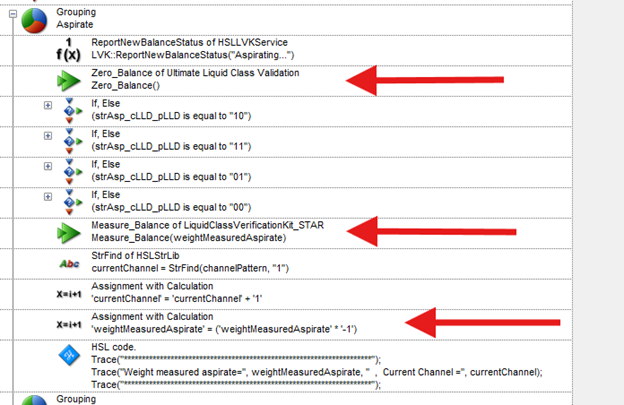
Actually, making the modifications is pretty straightforward and likely an easier path than worrying about method version compatibility and overwrites. See below!
The LVK method can be found in: C:\Program Files (x86)\Hamilton\Methods\LVK
Within the Pipette_1mLChannels submethod, add a Zero_Balance before the aspirate and a Measure_Balance after aspirate. Assign a new variable (weightMeasuredAspirate). Make sure to multiply by -1 to make it a positive value.
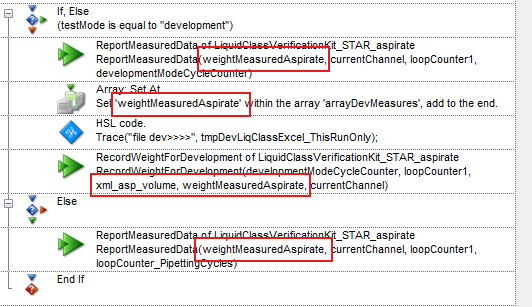
Then swap in this value in the reporting steps after the dispense command.
Do not add a second set of ReportMeasuredData commands, as this will disrupt the GUI reporting.
I hope this helps!
Thanks,
Eric
3 Likes