I have a question regarding the management of fluid classes when working with various matrices. Is it possible to sort volumes by tips and then apply different fluid classes based on the viscosity specified in an Excel file? Do I need to create different arrays containing the viscosities? If so, how can I ensure that this does not conflict with the volume sorting?
You absolutely can choose a tip type based on volume and choose liquid classes based on viscosity provided by an Excel sheet. However, there is no automated way to do this. You need to pair your viscosities with liquid classes, which are tip type specific.
The order would be: read in values and volumes → pair with liquid class
Since liquid classes are handed over as strings, you can automate the selection via string concat through consistent naming of the liquid classes. Eg. read in viscosity x with volume 43, you can concat “Viscosity” + x + “Volume” + 43 to use the specific liquid class “ViscosityxVolume43”. If you want to use volume ranges you have to use an if statement to select the liquid class for your volume range, such as if <= 50, concat “Volume” + 50.
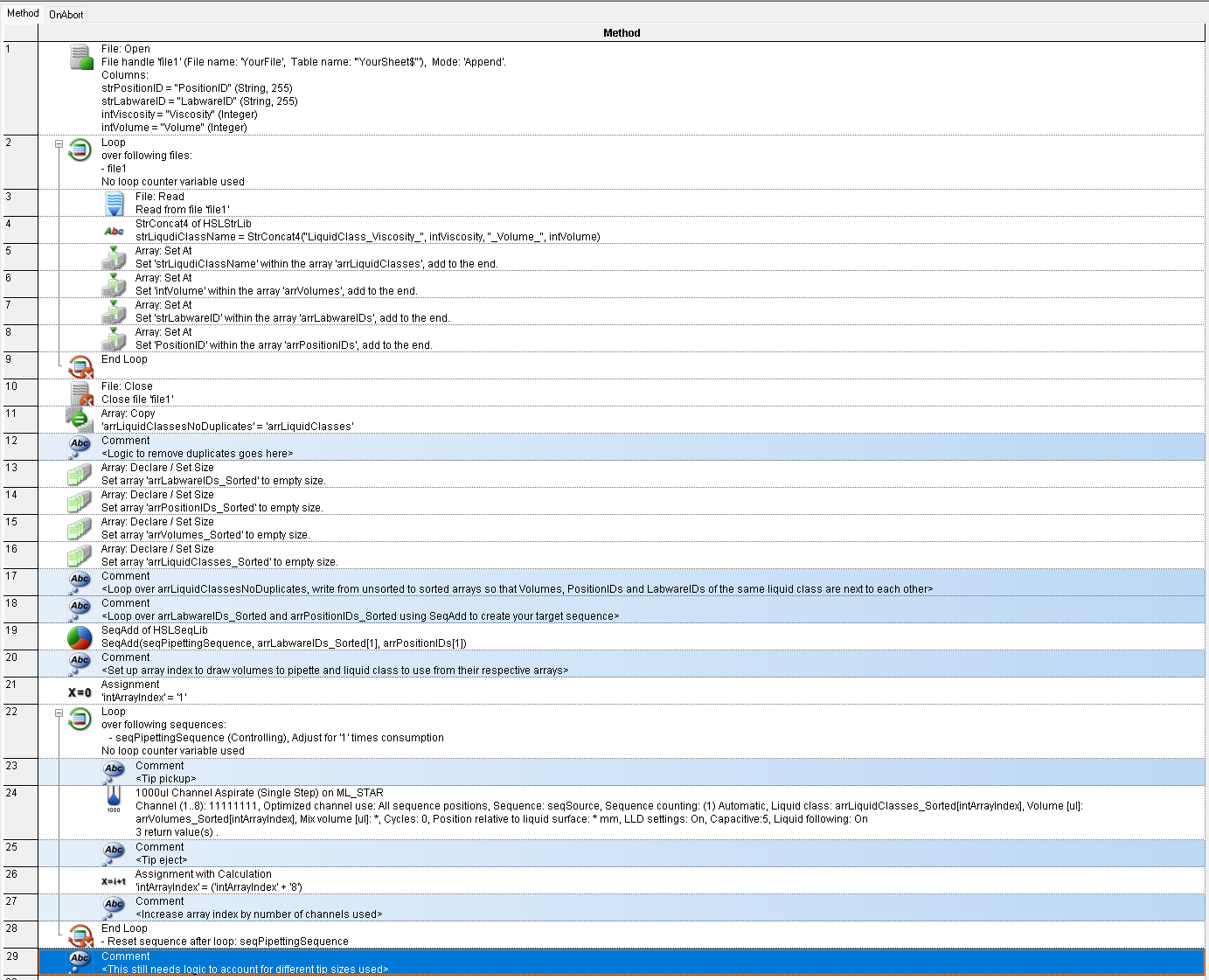
Hello @PatrickM, thanks à lot. I understand your point. Just to make sure I’ve got it right, could you please provide a visual example of the code? Thanks in advance.
I haven’t really got the time to set it all up, and I don’t know all of your specifics, of course. But here would be a general code example with comments: