VENUS Scheduler, like TADM, is a component of VENUS. My understanding is that the installers actually just unlock those functions within VENUS. So, they aren’t separate applications. With VENUS five, these installers are included along with the base software.
Hi @weiyolan, launching HxRun in simulation or not in simulation based on an external call is not very easy to do prior to Venus 6. I do not know of any simulation flags like those you mentioned, but I do know we did with the method manager 2 that was released a few years ago. I would have to dig through it to figure out how exactly it controlled the simulation toggle.
As far as the command line options go, this is all that I am aware of:
[[drive:]path]filename: Specifies the method file to open. Go to Method File Types for valid file extensions. If no path or a relative path is specified, the base path is the default methods path.
-r: Run method immediately.
-t: Run method immediately and terminate when method is complete.
-c: Execute HxRun from an editor.
-minimized: The window is minimized to the taskbar.
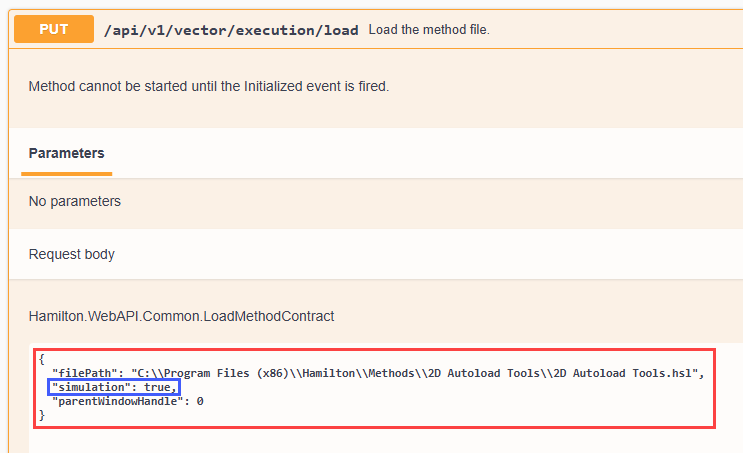
That being said, if you are using Venus 6 and have access to the Swagger ui then this can be done very easily. If you call your method to be started through Swagger then simulation is one of the input parameters for the load command:
Eric shared a link here Library Downloads (Links) that has a shared folder for various libraries and tools. In there you will find the Method Manager 2 which was released in 2021. That is a standalone gui with a .dll called MethodManagerHelper.dll that has a function called “SetSimulation”. The gui utilized this function in conjunction with a toggle switch for setting the global simulation of the device it finds in your system configuration editor. I am sure this function can be used for inputs other than a toggle switch.