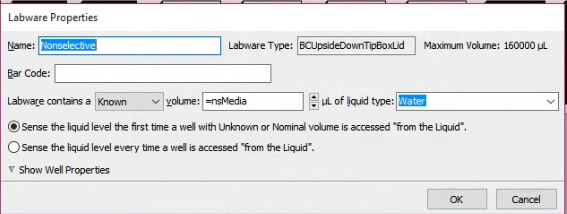
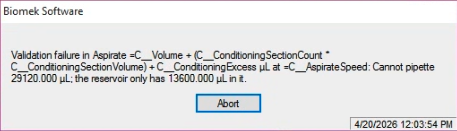
*EDIT: I realized using my (IF =nsMedia<50000) is flawed! I set nsMedia to 160000 in the start tab so the software will never see nsMedia as anything other than 160000, it will never trip the Then/Else loop and I will always see the same error. So the new question is how to reference the volume remaining in the reservoir as its own variable that can define my IF argument?
Hi all, I need some advice on building a method on my second-hand Biomek i7 that features a pause step to trigger during a loop if the media reservoir gets too low. My method is a simple plate-filling method but will need to be agnostic with regards to how many plates are run per batch and which wells require a given volume.
I want to use the 96-multichannel head for all liquid transfer steps. My media reservoir has a max volume of 160 mL. I am using the “Select Tips” function for the user to choose which wells need to be filled at a given volume. The volume, in turn, is defined by a variable. Attached are some screenshots for additional details.
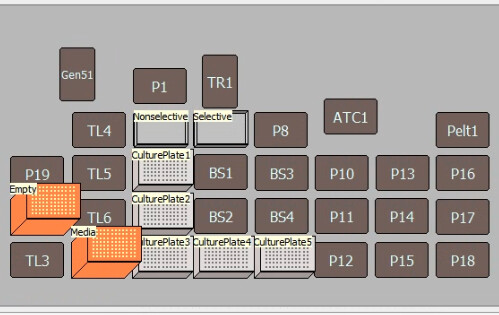
Crude deck layout. Ultimately, I want to pipette from both selective media and nonselective media, but for now, I’m only focusing on nonselective pipetting.
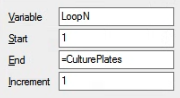
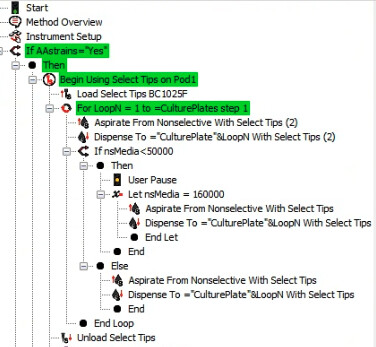
My aspiration loop is simple and stops at =CulturePlates which, for now, is set to 5 in the Start tab.
The loop is triggered based on a button prompt asking if the user has any strains requiring a given volume. The screenshot shows successful aspiration through two plates but gets stuck without prompting a pause, even when I set a tolerance of 50 mL left in the reservoir and this error pops up regardless of that tolerance threshold.
While the loop logic makes sense to me, I understand it might not make sense to the robot. Do I simply have things a little out of order in my method or am I asking for something more complex?
For context, I am brand new to any and all automation as of a month ago and we don’t have any in-house expertise. Just winging things over here! Thanks for your time.
Unfortunately, the robot is most likely right. However, it probably has some parameters being factored in that you are not privy to.
I haven’t taken a deep look at the script quite yet, but the first thing I’d confirm is if there’s an overage or any other volume loss occurring during the pipetting. You could also check labware state at the beginning and end of each loop to find reservoir volume and step through the loop one by one to make sure the mental math matches what is being calculated within the simulation.
*EDIT: Saw in the error message in the original post that the instrument automated tracking is indeed working as expected
Not familiar with the Beckman series programming or automatic volume tracking but if you want to handle the volume tracking yourself, you’d want to structure your loop like this:
Set the volume in the reservoir at the start of the method (nsMedia=160000)
Set a variable to track the approximate volume pipetted at each loop (AspiratedVolume = 96*individual volume)
Pickup tips
Start loop
If nsMedia < 50000
Pause program to refill
Set nsMedia back to 160000
Aspirate media
Dispense media
Set current reservoir volume with nsMedia = nsMedia - AspiratedVolume
End Loop
Eject tips
Hope this makes sense and best of luck on the automation journey!
I can think of two ways to do this. Either way, you’re going to need a way to set the volume of liquid in your reservoir - otherwise, the instrument will think there’s nothing left and throw an error.
The cleanest way is to figure out the code to directly access and reset the volume of liquid in the reservoir. Beckman doesn’t make this especially intuitive to do. Do you have any methods that were supplied by Beckman that have a “set labware volumes” step in them? These usually appear as script steps that aren’t normally accessible as steps to add from the software menu. That’s because there’s hidden code in them that directly accesses the labware volume dataset to read or write it. If you can find one of those, click on it and press Ctrl+Shift+U to open up the secret menu and click on the “code” section. That will at least show you the syntax that it’s looking for to access the instrument’s idea of the remaining volume. You can make it elegant this way, but it will probably be kind of a pain. I don’t have one handy, but you can probably get somebody to send you an export containing one of these steps to play with if there are no Beckman-made methods on your instrument.
Then there’s a quick-and-dirty way you could try it that just bypasses the instrument’s volume tracker entirely. You just keep track of nsMedia by yourself. After taking some media out of the reservoir, add a step that subtracts the volume you used from the nsMedia variable. That way, your (IF =nsMedia<50000) step will trigger appropriately. Then, after the User Pause telling the user to refill the media, add an Instrument Setup step. Mark everything but your reservoir “As Is,” preserving almost all of your labware setup. For the reservoir, just reset the Known volume to whatever you told the user to put in. That way, you can avoid insufficient volume errors.
You people are wonderful, thank you for your replies! I posted my question then went on PTO to find a good number of workable solutions on my return.
@Crabhammer your quick-and-dirty method is good enough to work for my needs and gets me going while I search for a more elegant method. As far as I know, we don’t have any “set labware volumes” methods but that doesn’t mean the info isn’t out there somewhere. I’ll keep looking!
@evwolfson and @YahyaB , with Crabhammer’s advice as my safety net, I’ll make sure the reservoir volume is dropping as expected then incorporate Yahya’s tracking steps. I think this combo will be sufficient for larger batches than what I’m working with at the moment.
If I build something that I find truly elegant, I’ll post the updated method below for anyone else who has a similar inquiry.
You could try an IF statement positioned at a suitable stopping point in the loop with a statement something like ‘IF labware(“Your Reservoir Name”).properties.Volume < WhateverAsAnInteger’ then add a pause step with a prompt telling the user to fill up again in the ‘Then’ branch, and leave the ‘Else’ empty. You would also need a silent instrument setup step after the pause in the ‘Then’ branch where all the positions other than the reservoir are ‘As’-is’ but the reservoir is new and re-filled to 160000ul or whatever.
I might not have referenced the volume property correctly here, but that’s the general gist.