Hi All! I’m wondering if there is an easy way to have the STAR pause after each 384 well plate is used up so we don’t have plates sitting on the deck during the whole run (it can load up to 10 384 well plates at a time). I have all the positions in the 384 plates pre-loaded into a giant sequence worklist so that I can have them sorted in a specific way, so I haven’t found a good way to pause after each plate is used. If anyone has any ideas I would appreciate it. Thanks!
There’s usually a counter when you loop through a sequence. You can use that to add a pause.
Is it a loop that runs through the worksheet processing all the plates?. You can throw an if/else statement in the loop saying something like… if x = “P24” (or position 384, or 384 positions have been consumed) then a dialog box pops up, effectively pausing the script. In the dialog box the user would have to click “OK” to make the script move on.
1 Like
The sequence I’m using as a loop in this step is from the 96 well sample plates, the 384 well list is used as the dispense sequence. Is there still a counter for a non-controlling sequence?
So I tried doing that earlier and the robot completely ignored it haha
There are probably a number of workarounds you could use to pause in the middle of the loop, but if I’m understanding your setup correctly it may be more straightforward to split each 384 plate into its own sequence instead of one giant concatenated sequence. Then you’d have a loop in a loop where the inner is a Loop Over Sequence for a single 384 plate and the outer repeats as many times as you have plates, pausing after each inner loop is complete.
Use the Seq library and GetCurrentSequence.
2 Likes
Since you keep the 384 well plates separate, just put them in an array of sequences and loop over the array. You can use up each 384 sequence per index and just continue to use up the 96 well sequences , keeping in mind never to reset the 96 well sequences after the loop.
In order to put them in an array, would I need to have a different worklist file for each of the 10 384 well plates? They are sorted in a specific way, which is why I have the 10 plate master worklist I upload at the beginning of the run that acts as my 384 well sequence.
No, you can build the sequences and the array however you want from one worklist. There are many approaches, depending on whether you always process the same number of plates or not, whether sample numbers vary, or how exactly the sorting looks. I would recommend getting acquainted with the SeqLib and the DevLib (default libraries) and then getting creative.
Ok I’ll try it out, thanks! Yeah I’ve been working with the SeqLib quite a bit, but I was hesitant to mess with the master worklist because its used in other parts of my script. But I’m just going to try it out and see how it goes as this seems to be the easiest way to add the pauses.
Hi @InnerKK ,
There is a function within the HSLSeqLib called SeqGetPositionCountForCurrLabware. Assuming your 384 well plate target sequence is at least grouped by labware (all positions for that target are together) this function will return the number of positions left for the labware in the current position of the sequence. You can use this to monitor the number of positions left and show a dialog when the count increases (moved to the next target labware). See example below:
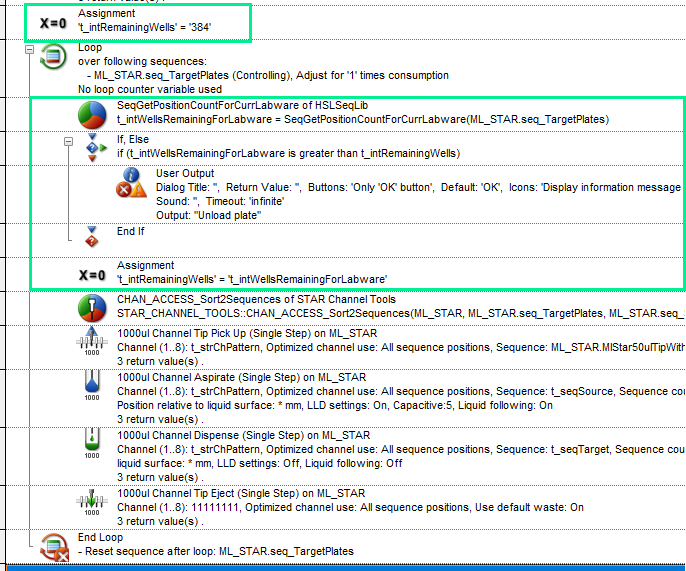
I start with the remaining wells set to 384 (max for the target plate). Every loop it gets the position count for the labware. As long as this number keeps going down, the if statement lets the pipetting happen. As soon as the number goes back up, it triggers user output to pause the run.
2 Likes
This is awesome thanks Brandon! I’m going to try it out today and see how it goes!
2 Likes
This worked perfectly, thank you!
1 Like