Hi everyone! Can you help me with progrmming a colomn\row serial delution using the CO-RE 96?
We tried to follow the manual with example CO-RE HEAD 384, but using this example we can’t create the method.
Thank you 
Hi everyone! Can you help me with progrmming a colomn\row serial delution using the CO-RE 96?
We tried to follow the manual with example CO-RE HEAD 384, but using this example we can’t create the method.
Thank you
What sort of issues are you running into?
In general I don’t undedstand how to do it. Can you help with it?
I guess in general I break it down into loops and your standard mix before mix after and be careful not to transport too much air.
→ If you’re talking about scripting in general, try to break down the process into repeatable steps; so for instance Mix@Source>Aspirate>Dispense>Mix@Dest, rinse repeat. As long as you can loop and iterate along that loop to assign source and destinations in a modular way, you can create something worthy of copy/paste into future methods.
A really low level example would be something like
loop i where i = 1 to 11
Mix at column i
aspirate at column i
dispense at column i+1
mix at column i+1
Next i
With that you’ve broken down a 12-step serial dilution into 6 lines and all you need to do is change volumes to your need. It’s better practice to get new tips every time if you’re not using super low volumes, so adapt the script as needed.
→ If it’s technique issues, I’d recommend referring to section 6.3 of Hamilton’s Liquid Handling Reference Guide that’s linked around this forum frequently (https://forums.pylabrobot.org/t/liquid-handling-guide/725). Besides that, try to mimic your manual pipetting steps and avoid bubbles/volume loss. Every experiment has unique goals and constraints so be sure to define goals and understand practically what your finish line is - equivalent or better - which can apply to many things from yield to CV to time savings.
Okay then, how to pick up one row or column if I don’t have tip support for CO-RE 96? I mean this one ADAPTER FOR TIP_CAR_480
Is it possible to create sequence with one row or column? Will it work in this way?
So there are different ways to pick up a single column or row with the 96MPH, which I’ll refer to offset pickup.
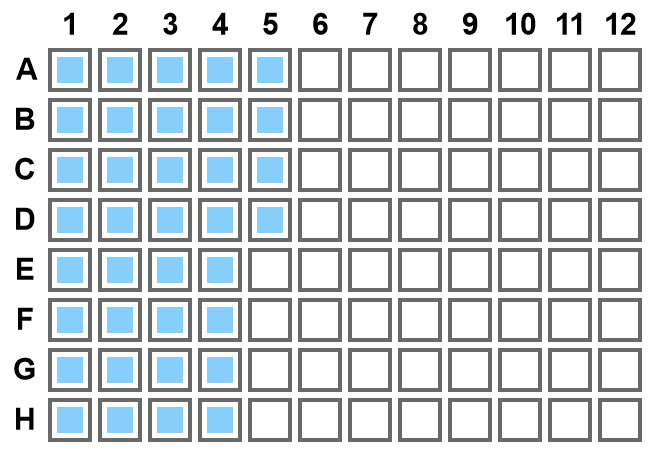
Tip adapter - as you found, this is a tool that elevates the tip rack above the typical position. In my experience, this item is better used for “build-a-box” functionality where the nest starts empty and you program in steps to fill it with tips in a pattern or sequence you need. For instance, if you have A1-H4 and A5-D5 filled, you can transfer those tips over then tell the 96MPH to pick up tips covering the whole position - boom you have a custom tip mask on your 96mph.
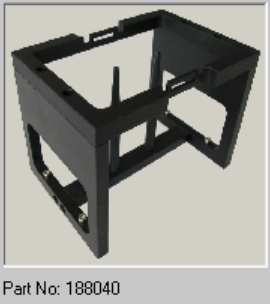
The other way is to use a full rack of tips and to mount tips to the 96mph subtractively, or rather the alignment of the 96MPH and the tip rack is not concentric so only a determined number of tips is picked up. For this, you need a tip rack module that has supports for the tip wafer (see the middle posts in the picture below).
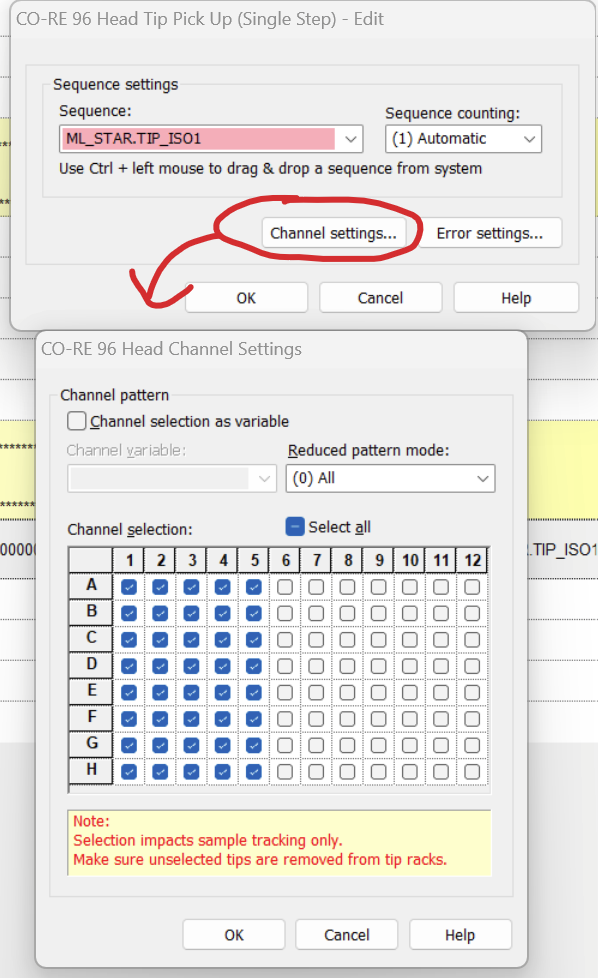
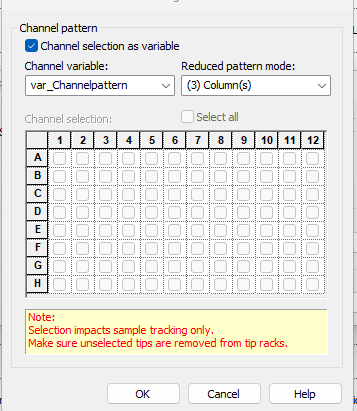
Assuming you have the correct hardware to enable tip pickup, you’d then either build a box and pick up the entire position, or create a submethod to pickup reduced pattern mode pickup in which the 96-head tip pickup state is reduced to a Long string of 96x “0” or “1” for “pickup tip” or “don’t” pickup tips. If this pickup amount is constant - always one column - then your string is just 8x “1”'s followed by 88x “0”'s. You can also designate this via the Channel settings GUI during the single step tip pickup.
Play with these tools, and you should have a good idea of how to start scripting to the point where you can get a method working, resolve movement issues, then start work on liquid classes and accuracy. Try to just use the pickup command before working on the entire serial dilution. First step is always to try new things and make mistakes - and most importantly learn from the mistakes. You’ll also likely find that how you sort the tip sequences plays into this movement as your string designates pickup based on your tip sequence, so picking up from the left side of the 96MPH (right side of tip wafer), you’d have to start your tip ordering on your pickup position in reverse: tip 1 would be A12, tip 9 would be A11…
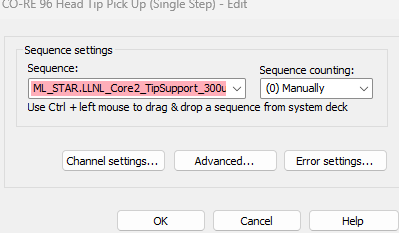
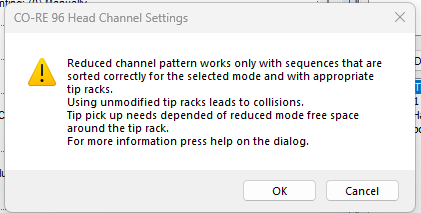
@evwolfson When using the latter method described here (I know it’s not your preferred), there is an error that is presenting (I can try and take a screenshot later) but it’s mentioning that the sequence can’t “sort correctly”. Again, this motif is:
The intention is to use variable for channel pattern but I’ve also tried hard coding on the GUI. I have that pick up command set to option (3) column btw and I tried (0) all and essentially all the options to no avail.
Could you share a picture of your offset pickup setup, the error, and the sequence properties? Something to do with the sequence not sorting correctly makes me think that the sequence might be row-major instead of col-major, but there’s no way to know for sure without additional information.
copy that standby…
If you change your var_Channelpattern to the following:
111111111111111111111111111111111111111111111111111111111111111111111111111111110000000000000000
Does that fix it? Can’t check on an instrument today, but it might just work by transposing the array. With that error I’d be willing to bet its some disagreement in sequence sorting, but hard to tell without messing around on a system.
oh sorry no I forgot to mention this …I started with the above mentioned pattern and still same thing
Hi, this looks like you are trying to pick up ROWS (based on how you have your var_Channelpattern written out) but you actually have the “Reduced pattern mode” set to COLUMNS.
The var_Channelpattern that @evwolfson wrote out is in blocks of 8 x 12columns (10 x (11111111) and 2 x (00000000) while yours looks like it is in blocks of 12 x 8 rows.
The 96 head defaults to using it’s column 12 first, moving down in column number. If you are using the tip support I’m pretty sure you have to write the variable as 000000000000000011111111111111111111111111111111111111111111111111111111111111111111111111111111. There is a thread that you can search for where Brandon was telling me how to make the head pick up using column 1 first.
Open to feedback though.
Thanks @Christina I tried that as well to no avail. Can you point me to the thread you mentioned please?
Hi, here it is, there’s also lots of good info in this whole thread Partial tip dispense/aspirate with 96MPH - #15 by BrandonBare_Hamilton
Have you checked to see if your tip support sequence is sorted correctly? Does the sequence make sense (1-96 in the direction you want it to go), are there more than 96 positions (something with Venus 6 keeps adding positions to my sequences and makes me crazy)? Are all the positions actually on the tip support and not part of a plate or other labware (only asking because again, sometimes odd positions get added by the Venus 6 ghost).
I think this is the jackpot! I’m super hopeful for this. I’ll check asap and get back to you @Christina thanks so much!
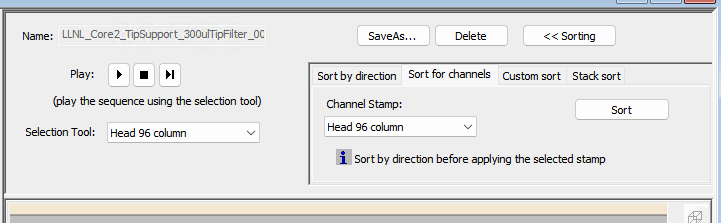
I wanted to follow and say thanks! I had to sort the sequence first “by direction” and then “for channels” both had to be set to column as well as my tip pick channel selection as mentioned earlier.
@caradonna1 I’m so glad you figured it out!