Hi all! I’m trying to find the best way to reload a carrier part way through my method. I assume there is a way to do this, but I’m still learning so I could use some help. I was hoping the robot would know that it needed to have the carrier reloaded, but that was definitely wishful thinking on my part haha. I have 8 PCR plates that are going to be used in my method, but I only have 4 positions in my carrier available. I want to have the first 4 plates loaded, and then when they are done being used, I want the robot to pause so I can swap out the current plates for the next set and have it continue where it left off. In my deck layout I have all 8 plates loaded on the one carrier (so 1 & 5 in one spot, 2 & 6 in the next spot, and so on) but I only load plates 1-4 on my initial Load command. Is there a simple way to do this that I’m missing, or is it going to take a bit more work on my end? Thanks!
The easiest (ad most dirtiest way) is to create a sequence of your plates to process and follow that sequence.
In the loop, place a GetCurrentPosition step and when the current position hits 384, execute a reload.
Hi @InnerKK,
You only need 4 plates on your deck layout for this (unless they are actually different labware types) so no plates superimposed over top of each other.
When a carrier is unloaded, any labware currently on it during the run is effectively removed from the sample tracking database. So if at the start of the run you scan a carrier and barcodes are assigned to the plates on that carrier, then you call an unload command on that carrier, querying those barcodes will return errors. This is because they were effectively removed from the deck layout with the unload step.
So if you’d like to process 8 or more plates and you only have 4 positions, you would basically do the following:
- load the carrier at the start of the run
- process with liquid handling up to 4 plates that were loaded
- do any file handling that needs to be done for those plates
- unload the carrier
- custom dialog to pause the method and ask for a reload
- load the carrier and scan new plates
- go to step 2 and repeat for however many plates you need
I hope this helps!
Matt
Thank you, this is really helpful!
Yeah that is what I was going to do originally, but I wasn’t sure if there was a better, cleaner way
Hi Matt, just a follow up question. Would I need to have 2 separate mapping files, one for plates 1-4 and one for plates 5-8?
Also, for tips, does the robot automatically pause if you need to reload the tip carriers or would I need to do the same thing for that?
Hi @InnerKK,
It sounds like you would definitely need multiple mapping report steps in your method at the least. But how many depends on how your sequences are managed as well as the naming convention of your mapping report files. If you are processing 8 plates then perhaps you would write your method to have 8 mapping reports generated and the naming convention would utilize the unique barcode of the plate. Or perhaps it’s just one mapping report and you keep appending to it with the next plate’s data. Regardless, what if your method has an unfortunate abort halfway through and you have already processed some plates but you didn’t make any mapping reports yet? In this case, having a generate mapping report command immediately upon completion of each plate might be a good idea. And like I previously said unloading a carrier with labware currently on it removes those labware from the sample tracking database - if you pipette to a plate, unload that plate/carrier, reload that plate/carrier so it is effectively the same sequence and labware ID (but physically is a new plate you swapped out), a mapping report that is then generated for that sequence will not have the previous pipetting data.
Now tips are a different situation altogether. If your tip sequence goes unchecked and you keep using tips you eventually just get a “no more sequence positions available” error. Tip sequences must be checked and custom reloads prompted to the user prior to tip pickups - if enough tips are available then do the tip pickup, if they aren’t then prompt a reload and show a tip edit dialog. Hamilton has created many helpful libraries that take care of common things in methods like this. I’d suggest downloading and taking a look at the STAR Tools demos from the library downloads section of this forum to see how this is done.
Matt
Thank you for the reply! I actually ended up solving the issue by buying another plate carrier for the PCR plates, shifting the tip carriers over, and then using the 8chan to reload the tips.
Hi Matt, I figured I would ask this here instead of making a new topic - is there a way to add sample barcode names to the mapping files? We have individual tubes with barcodes that scan into Excel as A01234 (all the barcodes are unique for each tube) and then the contents of these tubes are transferred to a 96 well plate. Thats when they are loaded onto the STAR, but the STAR never scans the individual barcodes since the tubes are never loaded onto the robot, just the 96 well plates. I know there is a source position barcode option on the mapping file customization, but I’m not sure how to use it. This is how the worklist looks, but we only use the PlateID and PosID to make the pipetting sequence, so I’m not sure were the BarcodeID would fit in. Thanks in advance!
PlateID PosID BarcodeID
Cos_96_PCR_0002 A1 A01234
Cos_96_PCR_0002 B1 A01235
Cos_96_PCR_0002 C1 A01236
Cos_96_PCR_0002 D1 A01237
If you want to work around the limitations of the Hamilton sample tracking database, you can always simply build and manage your own arrays with sample barcodes/data throughout the run, then build a custom export through the file handling operations.
I typically prefer this approach as it provides maximum flexibility, but of course use cases vary.
Hi @InnerKK,
This is quite easy to accomplish. You have a .csv of data including barcodes of samples for individual wells of a plate. Obviously when and if the autoload loads the target plate it only has the capability of reading the physical barcode that could be on the side of the rack - reading possible barcodes on the container level isn’t going to happen. So the process would be to read the csv with the general steps file handling commands, parse the contents of the file, and assign the barcodes manually to each position:
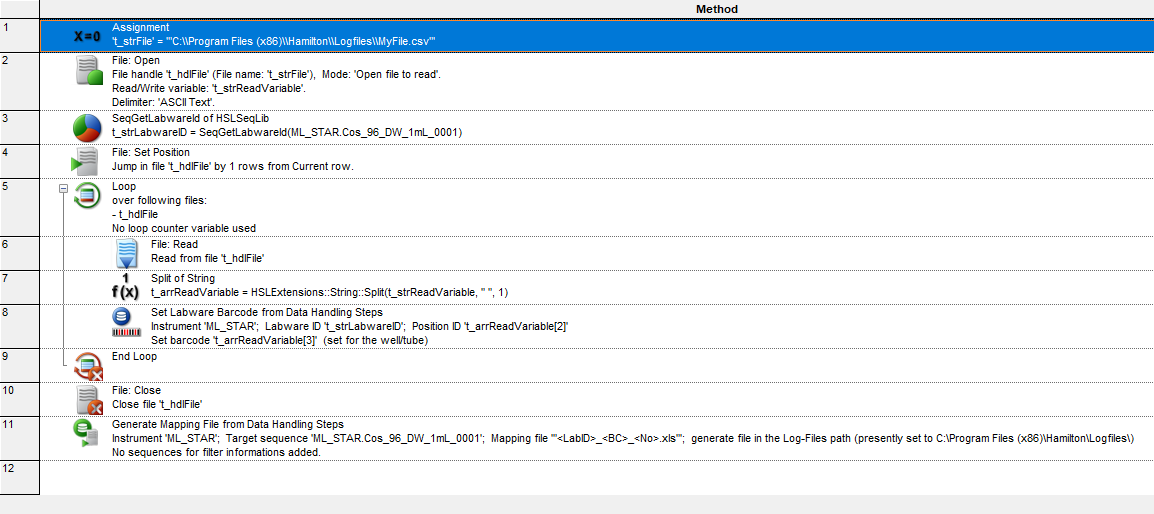
In the example above the file can be in a variable or it can be selected via a custom dialog. Then the file in question is opened in your choice of format - my personal preference for any text based file is ASCII. Jump past the header row and loop over the file reading each row as a single long string if you use ASCII - the read command returns the entire row as a single variable (in the example above its l_strReadVariable). That variable will be equal to “Cos_96_PCR_0002 A1 A01234” per your file example above. You can then use the Split command of the HSLExtensions string library to split the string into its own array where values are separated by a space (“ “). Thus your string becomes an array of 3 values where the first value is “Cos_96_PCR_0002”, the second value is “A1” and the third value is “A01234”. Finally assign the barcode to the labware ID in question at position array value 2 with barcode array value 3. And since you are looping over the file each row with data winds up becoming a barcode assignment. In no time at all all positions within the file are accounted for and a subsequent generate mapping file command will show the barcodes:
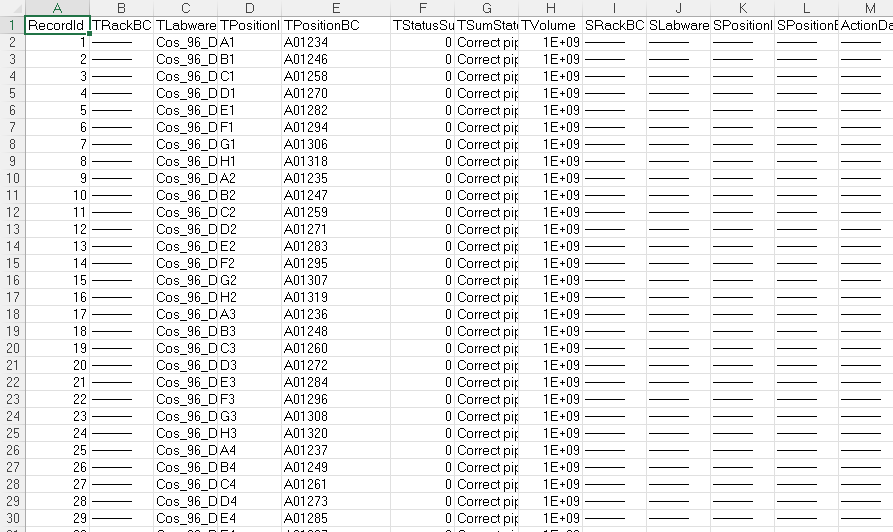
Please keep in mind that this is a very simple approach to transferring barcodes from a file to containers on a rack. It assumes that the file contents are exactly as specified where each row has 3 values separated by spaces and no more than 2 spaces on each row. It also assumes the contents of the second value on each row is always going to be the correct alphanumeric value that corresponds to the labware definition on the deck layout. Deviating from this without error handling or more data handling could result in errors.
I hope this helps!
Matt
Hi Matt,
This is perfect, thank you so much! I’m trying to get it to work with an .xls file because that’s what I’m using in other places in my protocol, but I’m having a difficult time getting it to work. I feel like I’m very close, but its stuck in a constant loop and not progressing forward in the arrays (so its only assigning A01234 to plate 1 A1 over and over again).
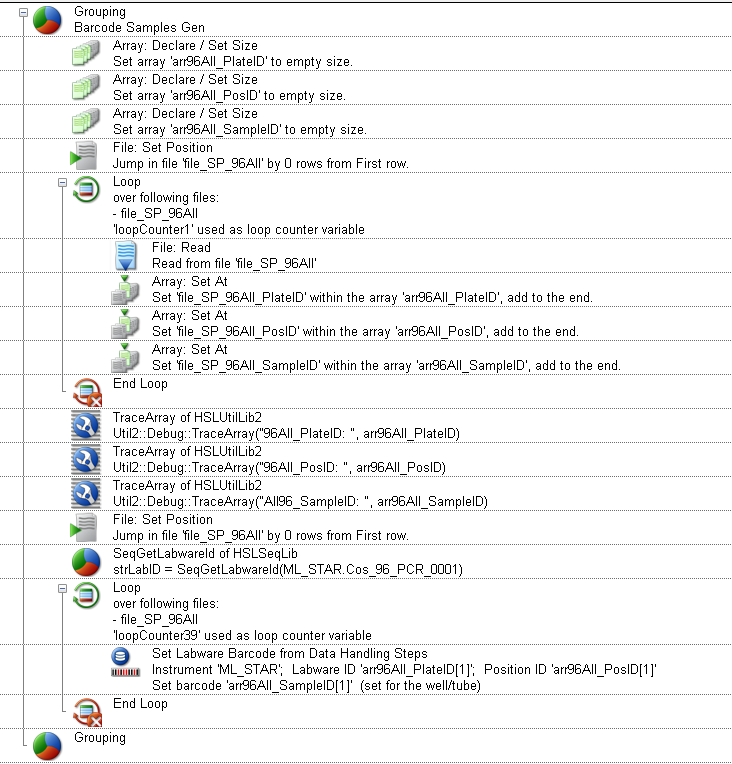
Never mind! I fixed it by adding a variable for the array index and then increasing it by one in the loop. Thanks again for all your help!!