Does anyone have good resources available for troubleshooting RGA issues?
I’m having a multifaceted issue that I am having trouble diagnosing.
The stock labware (96 deep well U bottom plate) is close to my actual measurements (A Nunc 96 well plate, PN 278752), but just slightly off. When the RGA goes to pick up the plate, it will grab the plate, raise up about an inch, then throw an error that it didn’t pick up anything. If I say “ignore and continue” it will place the plate where it should, then return home. I have tried to change a few of the settings (dimensions, bounding boxes, and robot grip width) and I either get the same error or I get a “crash detection” error. Is there some other setting I should work with?
I’m hoping that if I solve problem 1, it will solve problem 2 and 3.
When grabbing and moving a plate, I cannot get it to sit properly on bioshake. I have the correct adapter (2016 1151) for the Nunc plate. The arm will bring the plate to the bioshake, go to set it down, then it bounces off the top of the adapter. Granted, this adapter does have chimneys that go up into the deep well plate, so the alignment has to be perfect. It’s off by 2-4 mm (on the x-axis), not sure how to correct that issue.
If I start from placing the plate on the adapter on the bioshake and then have a command to pick up the plate and place it on a nest; the RGA will pick it up, move it to the nest, but it will be off by 1/2 - 1 cm to the left.
I think all of these problems are related, and I’m hopeful that if I fix the gripping issues the rest will fall into place. But I am out of ideas on what to try next. Any ideas or resources I can check out?
What’s your Force set to for the plate labware under custom attributes? I have it set to 30%.
For setting the plate down you go to the robot vectors for the Bioshake and work the coordinates backwards. If you get any errors after setting the coordinates, it’s because the placement and the coordinates are mismatched. Make sure the site carrier for the Bioshake is defined correctly. Then verify the plate site position is defined correctly. Pick up a plate for teaching, open the Bioshake settings, move the plate into position and set the placement. Then go to the vectors and set the import the same the coordinates for the last coordinate and work your way backwards from there.
Once the coordinates are set for placement it’ll fix the issue for return it as well. This is happening because it’s picking it up from a different spot on the plate than it is dropping it off.
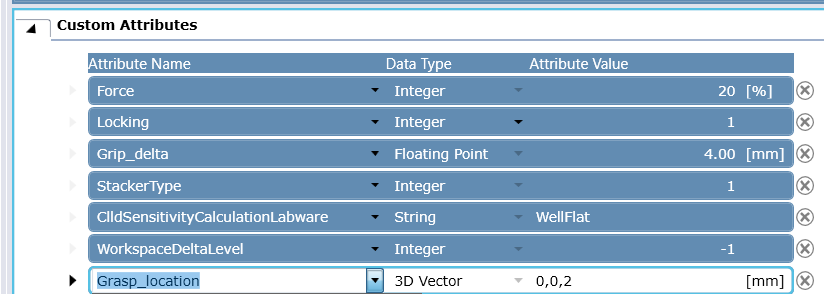
Make sure the gripper fingers are physically aligned and tight; Then at the labware definition - Robot Specific - Check values for Grip Narrow (and Grip Wide) it should match the expected physical dimension / expected grip distance of the plate and at Custom Attributes the attribute Force shall use typical values (see default labware definitons) that are about 10% for lids or other light objects, 20% for microplates , 30% for deepwell plates or other heavier objects. Bounding Box shouldn’t directly play a role regarding whether the grip itself is detected or not.
If the gripper fingers bounce onto a carrier you may want to grip a plate with an offset, by adding the Custom Attribute Grasp_location from the dropdown items, so you grip the plate a bit higher and don’t bounce onto the carrier or grip against the carrier instead of the plate.
Also while testing use a marker and mark where the RGA fingers grip on the plate, it is important that the RGA grips the plate at the exact same physical position on the plate when gripping from different carriers and sites.
Thanks for the help and advice. @avargas doing the teaching steps helped a lot.
For other people coming to this thread later, after doing all these tests and trying new things - I kept getting the same error. I ended up talking to someone who used to do things on this TECAN and they suggested turning off the grip detection. I know, not ideal. But it is what it is. For what were doing in this particular instance, I am comfortable with turning the grip detection off.