Hi, I’m working on Venus 5 with my Starlet using a 96 deep‑well plate, 1 mL of a very volatile solvent, and the 96 head.
I am using the head to go to the bottom of the plate and mix the wells. After mixing, I want the head to move back above the liquid, while still inside the well, perform a couple of aspirate–dispense cycles to eject any remaining liquid, and then do a side well touch.
I managed to achieve all of that using the probe by calculating deltas and using the Virtual Labware movement library.
My issue is that after each step, the head moves back up in Z to its default position. This results in the following sequence:
Go to bottom → mix → go back up
Go above liquid → dry tip → go back up
Go above liquid → side touch → go back up
Eject tips
Is there any way to disable this upward movement between each step, so that the tips remain within the wells and cross-contamination is minimized?
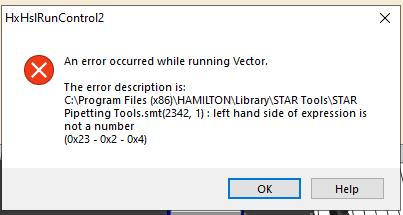
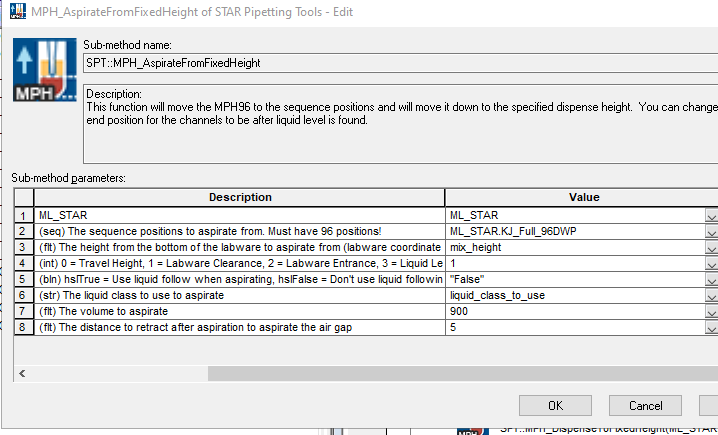
Your input string “False” does not compile in VENUS as a boolean, which is resulting in an improperly typed variable that cannot be properly resolved at runtime. “left hand side of expression is not a number” is a catch-all error description for any variable type mismatch, any time a variable value for an assignment, result of an expression, or return value of a function.
VENUS does accept integer values of 0 and 1 for hslFalse and hslTrue, respectively. Otherwise you can add the ASWGlobal library to your method, which defines globally used constants (ASWGLOBAL::BOOL::TRUE and ASWGLOBAL::BOOL::FALSE) that will be available to any method or library which references ASWGlobal. These constants map the the compiler recognized booleans of hslTrue and hslFalse.
I did some testing and was able to get where I wanted to go, but I was a bit too hasty. During a movement of the head, I thought it was going to collide with something, so I switched off the instrument while the head was moving down.
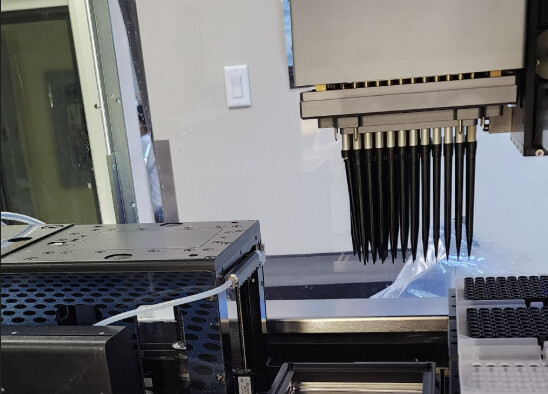
After restarting it and beginning the initialization process, the head loaded with tips moved to the top-left corner, where I have an MPE module installed. The tips then started colliding with the MPE.
I quickly stopped the system and restarted it. However, no matter what I do, the head keeps moving to that position, even though my waste is located on the opposite side.
Is there a manual function to force tip ejection? I looked through the control panel but couldn’t find anything. When I have issue with my track gripper, I can take the control of it and guide it where I want. Here, I am stuck.
Even if I try to initilize the system, it is asking me if there is a risk of horizontal collision. If I click yes, it aborts and errors. If I click no, the head goes moves towards the MPE and will collide…
Not sure if this is allowed in the US, but there is this bit of software called “Service Software” and here you can perform a drop of all your tips from the head.
Since I am not 100% sure if this can be done by you, I would contact your FSE and guide you through it. But it works also for channels etc.
Hi Pascal, unfortunatly, I do have the software but I don’t have access to it (restricted access). Only Hamilton can.
So, I called them and then came on site.
They used that software to force eject the tips.
The other option would have been to unscrew the whole MPE and remove it…