Stuck with Simple Method: Transfert from CSV on Venus 4.5

Merry Christmas!

I broke one of my old methods created in version 6.2 and wasn’t able to fix it, so I went back to the fundamentals.

What I want to do is very simple:
The user browses for and uploads its CSV. The CSV dictates liquid transfers: from which plate to which plate, from which well to which well, volumes. (very convenient when we have many wells with different volumes to transfer).

HOW I DID IT:
STEP 1: DL VENUS 4.5
I am at home and I don’t have access to my Vantage so I downloaded 4.5 (Eric shared a link somewhere).

STEP 2: DECK SETUP
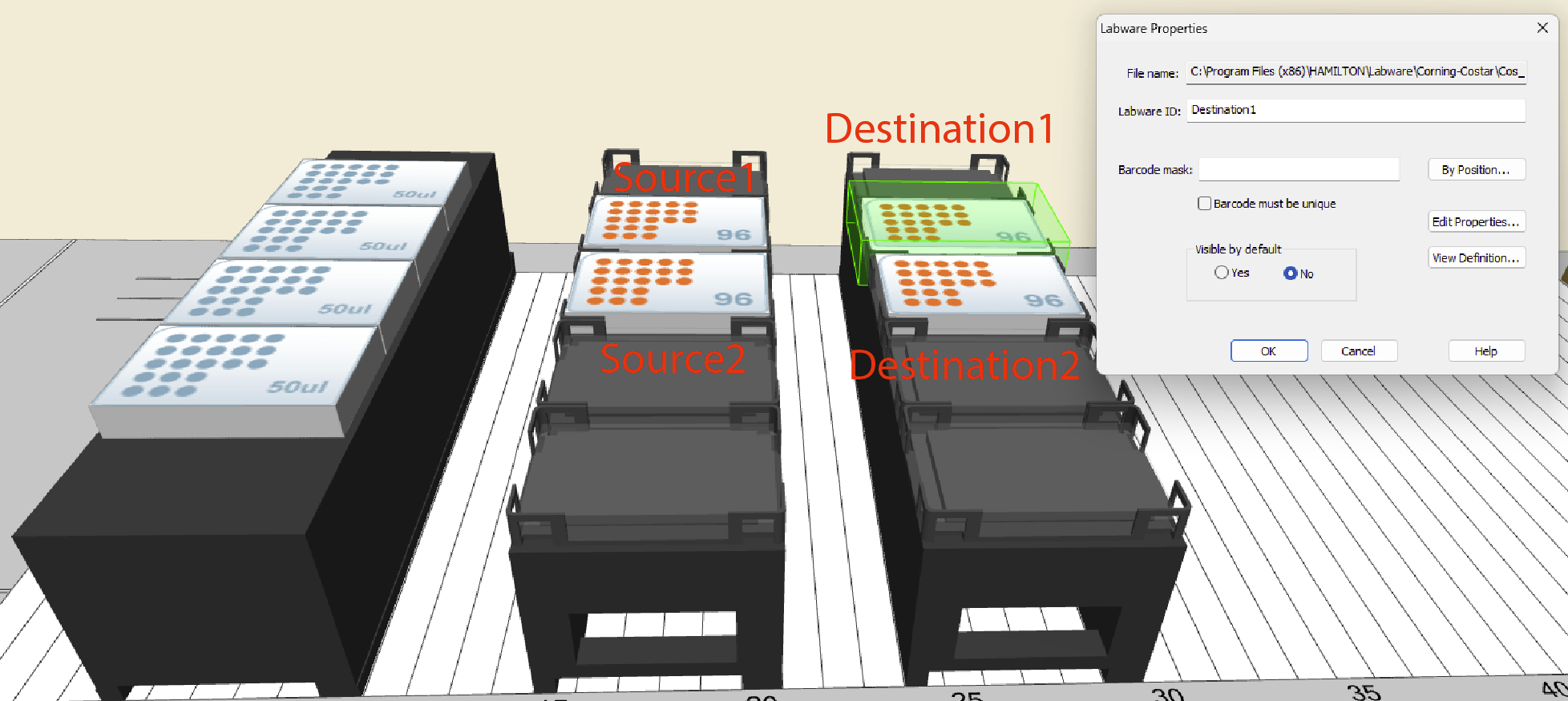
Put some tips, 2 source plates called Source1 and Source2 and 2 destinations called Destination1 and Destination2 (Done using right click, properties, LabwareID).
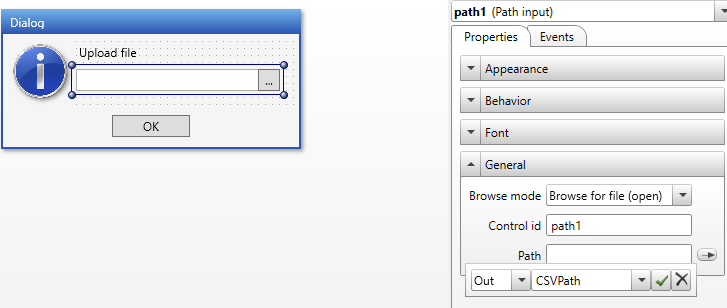
STEP 3: CUSTOM DIALOG
Create custom dialog box with browse section and path linked to a variable “CSVPath”
STEP 4: CREATE CSV FILE
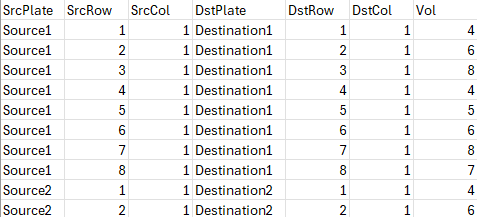
Put the header with Source plate, Source Row, Source Column, Destination Plate, Destination Row, Destination Column and Volume. I made a simple CSV where I transfert the first column of each plate to its destination.
STEP 5: File: Open
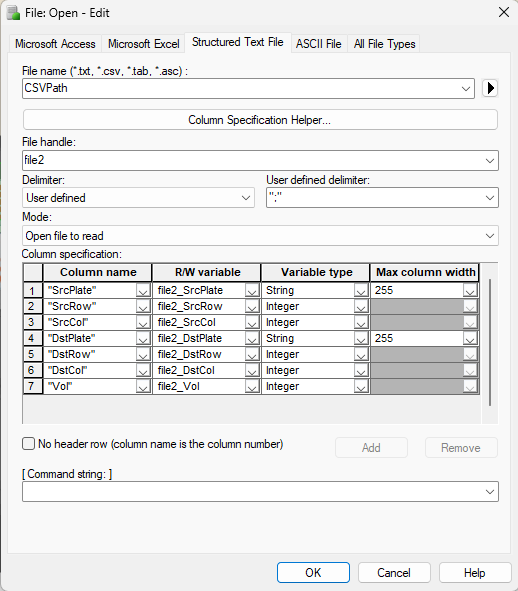
Add the file open step, structured text file. File name is my variable from user Dialog box. File Handle 2 and the file is well mapped: we have 7 columns. Mode: Open file to read
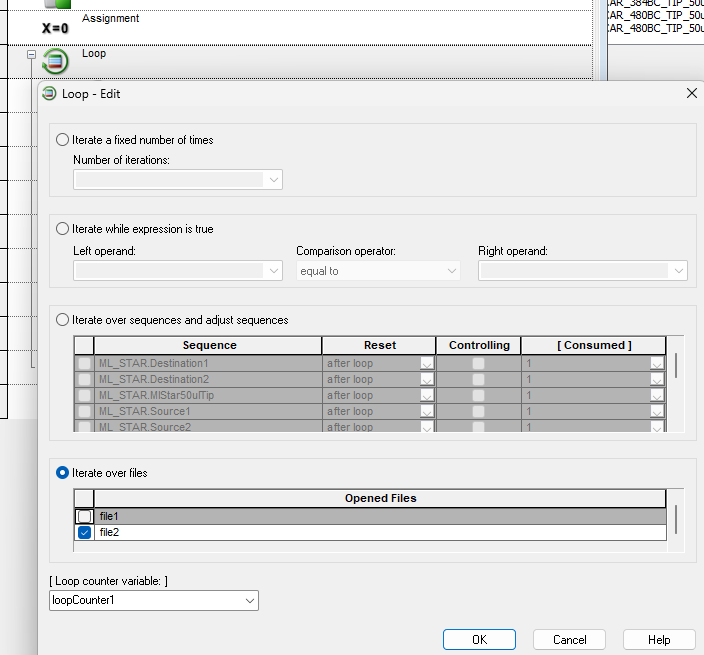
STEP 6: LOOP, ITERATE OVER FILE
I selected the right file handle.
STEP 7: FILE READ
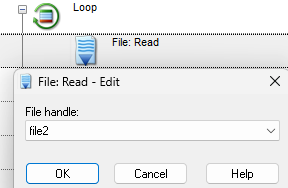
STEP 8: TRACING AND ADDING PIPETING STEP:
I added some trace steps to keep track of every transfert and a gold step to aspirate and dispense. But Venus won’t let me input my file and volumes here.
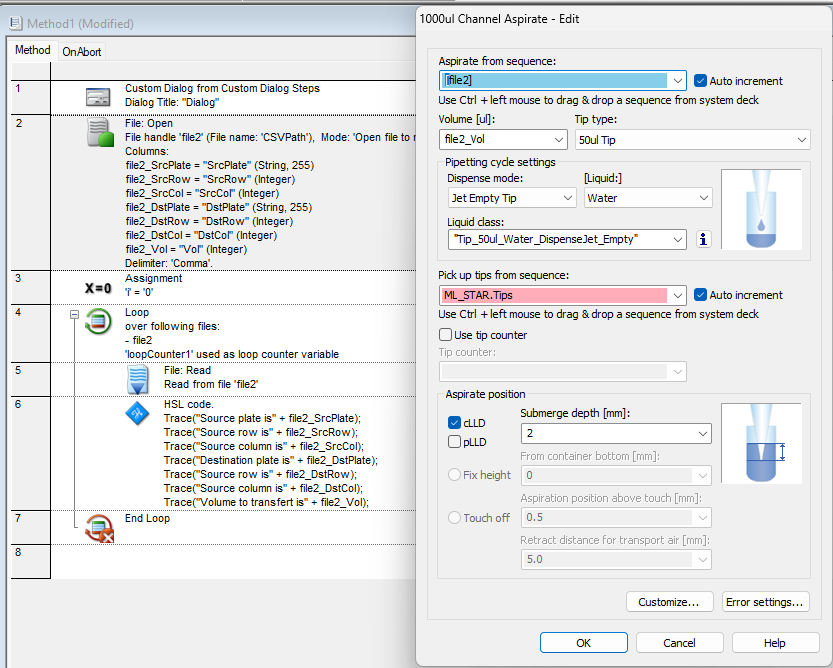
Now that I think about it, I recall using arrays and more complex steps for this kind of thing, with the plates specified separately on the side. That said, I’m not entirely sure…I’ve been working a lot on a Biomek recently, and the logic there is very different, which may have influenced the way I’m thinking about this.

As I mentionned, this should be very straighforward: browse, upload CSV, parse plate to plate, well to well, volume. Liquid transfert.

Anyway, if any of you have ideas, or even better, a working method I could look at, that would be amazing.

Thanks a lot!
1 Like

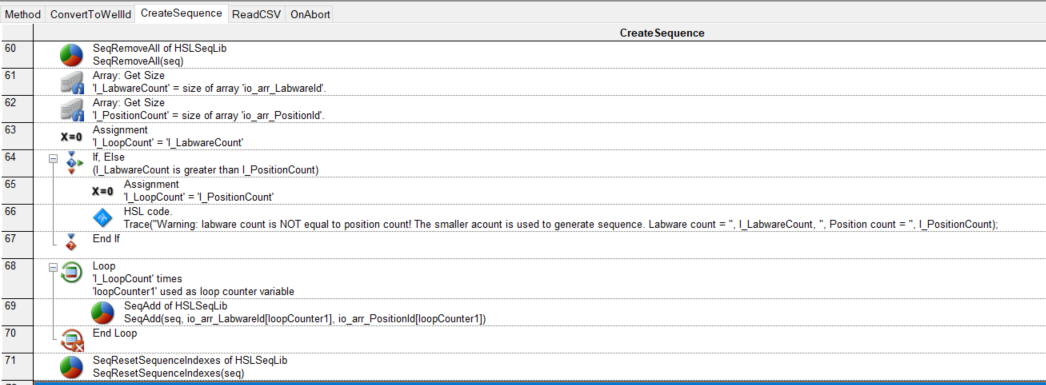
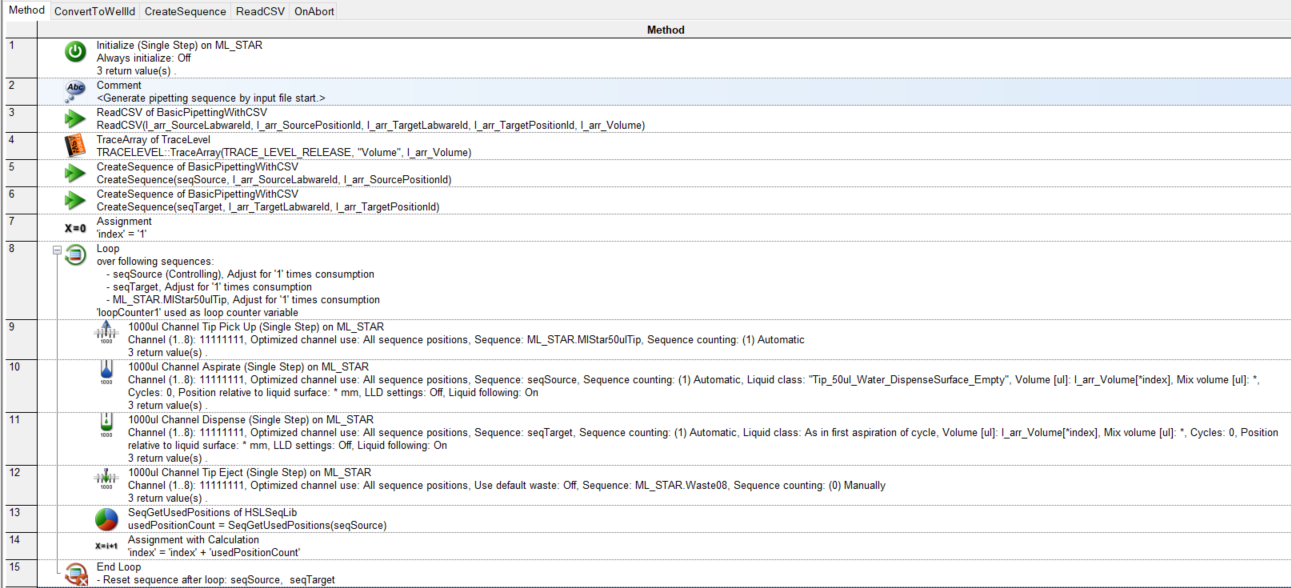
As far as I know, it is not allowed to input a file object into the ‘Aspirate from sequence’ input box in STEP 8. Instead, you have to create a sequence.

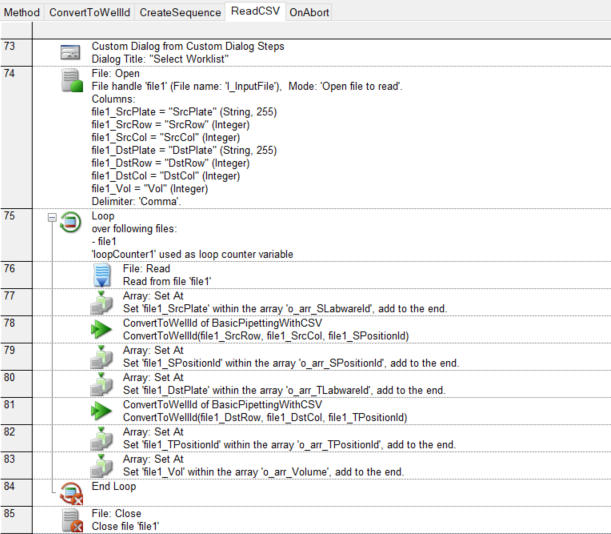
I have created a demo method based on your CSV file to illustrate this.


To make it easier, you can also download it from the GitHub: demo-method/ReadCSV at main · VerisFlow/demo-method · GitHub

Please note that this is a demo method intended to demonstrate CSV reading logic.
It should not be executed on the physical instrument.

3 Likes

This is amazing!
Thank you very much!
Gonna have to dissect it cause indeed, it uses arrays.

And yep, I am runing that on simulation so no worries.

Thanks again!

1 Like

Hi Xianghua,
Thanks again for your help, this is wonderful.
I am dissecting your method and everything makes sense.

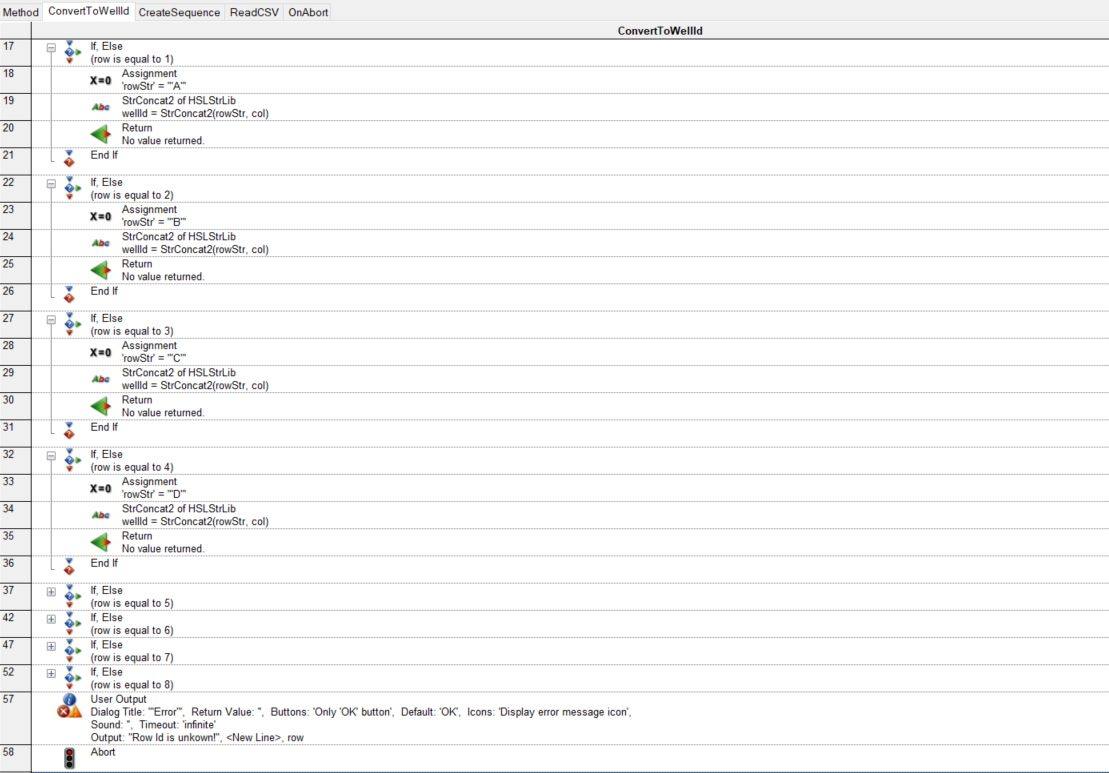
One of the thing I notice is that you converted row and column IDs into wells using the ConvertToWellID sub (Concatenate rows and Columns). That makes sense.

You then store that postion (e.g. A1) into the variable file1_SPositionId that belongs to the array o_arr_SPositionID.

Question: Does it mean that Venus works better with well IDs in CSV (e.g. A1, B3, C4 etc.) rather than rows and columns?

Question: You use a lot the function RETURN, with no value return. What is the point of using that function?

Thank you very much.

Hi,

I’m glad to hear the demo method was helpful! You are asking great questions. Here is the clarification on those two points:

1. Regarding the Well IDs / Position IDs (e.g., A1 vs. Rows/Cols): The reason I combine them into a single ID is specifically for the SeqAdd command in the HSLSeqLib library. This command is used to create “Sequences”.

  • Sequences: In Hamilton Venus software, a “Sequence” is essentially a list of pipetting positions to aspirate from or dispense to. This includes the Labware ID (to find the labware on the deck) and the Position ID (to find the specific well in the labware).
  • Position ID Formats: While I used the alphanumeric format (e.g., A1, B3) here, the Position ID can also be numeric (e.g., 1, 2… 96). This actually depends entirely on how the specific well ID is defined in its labware definition file. I converted them to the “A1” format simply to match the labware definition used in the demo method.

2. Regarding the Return command: Even without returning a specific value, the Return command is very useful for flow control. It forces the sub-method to exit immediately at that line, skipping any remaining code in that specific sub. I often use this to keep the code structure clean; it allows us to “bail out” of a function early if a certain condition is met, rather than nesting the code in deep If/Else statements.

I hope this clears things up! Let me know if anything else jumps out.

Best regards,

Xianghua

2 Likes