Interested in seeing if any of you have adopted modules over subroutines yet. Is there a use case for when you would prefer one over the other?
Cheers,
Interested in seeing if any of you have adopted modules over subroutines yet. Is there a use case for when you would prefer one over the other?
Cheers,
I talked to few Tecan development folks about this once. As of v3.0, the only difference was the global parameters. I think the intended future use was that modules would work more akin to Hamilton submethods whereas the subroutines are for calling scripts within another scripts.
You can use the “parameter” variable in any script so you can effectively convert subroutines into modules. Also modules I don’t believe can be run asynchronously so you end up with less functionality…
Do you know if modules can be done one-after-another? I’m trying to write a script where I take out 96 well plates and add media to them in specific arrangements. But I’m trying to write a general script where I can add liquid in different arrangements by calling the module again with different parameters. However, when I try not starting on the first plate, it runs an error for some reason.
I have never used modules. However I have used subroutines and you can run those back to back.
Hi,
I am using a lot of subroutine. One of them is to pickup tips with the MCA384 on the active carrier. Since it’s a tricky process and it sometimes fail, inside the subroutine I have a XAML to validate if the tips are ok. If not, it drops them back and retry up to three times.
Anyway, when we did the upgrade I thought that it was a good scenario to convert that subroutine into a module and I gave it a try but in the end, the inability to run that in asynch mode makes me lose a lot of time so I went back to subroutine.
In my opinion they missed the shot with these modules.
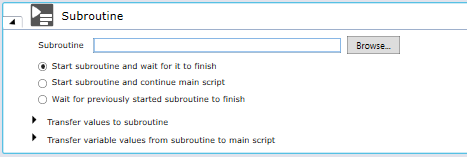
Hi, just wanted to add some info on modules that might not be as well documented: modules can be dragged and dropped into scripts instead of using the Subroutine command, but they can also be called as a subroutine. Use the subroutine command and look for the module in the list of scripts. This allows all the same functionality as a subroutine in terms of sync vs async.
I also use a lot of methods and subroutines. And totally agree with Brian! Another helpful thing about methods is that they’re easier to handle larger scripts. For example, we have an RNA library prep script that can take 6-8 hours to run. It’s better for organizations when there’s that many subroutines.
I was involved in the development of the concept of modules that was added to the FluentControl software. My intention at the time was to add a programming concept similar to a function in traditional computer programming so that you could abstract away some of the underlying details and just expose the few variables the user would need to change on each function call - and to allow greater code reuse.
In particular at the time I was thinking about the bead cleanup process in NGS workflows and how much similarity there is among them, certainly within individual kit vendors and yet how often we would re-invent the wheel programming each cleanup independently. So my thought process around modules was to expose just a few variables - those few things that change - e.g. the bead volume, perhaps the number of wash cycles, etc.
In setting it up this way, you could write the bead cleanup once instead of 3-4 times, ensure consistency in the implementation, and shorten your code and programming time.
In practice, in many of the scripts I have seen written by others using this module command, a huge number of variables get exposed, requiring a lot of data entry to manage these variables, which is a time-consuming process. For example, liquid classes, every conceivable volume, the type of plate, whether it’s a plate, trough, tube, etc. It makes it a bit unwieldy when done this way.
In the bead cleanup example, you would expect the liquid classes to remain constant and so no reason the user should be required to specify those. The bead volume may vary but likely the ethanol volume does not, so no reason to expose every single volume for the end-user to specify when calling the module.
If you have to enter 10-15 inputs into the modules, that’s really not the way I intended it! I think there is high value in utilizing modules, when implemented in a way that doesn’t expose too many variables to be input. Maybe sharing the original intent will be helpful to others using this command.
Mike Mueller
Nucleus Automation Partners LLC
I have a very basic question about subroutines. Has anyone had the issue of setting up a subroutine, putting in the parameters, and the program “runs“ but nothing actually happens. Is there an error in setting up the parameters. It’s hard to troubleshoot since there’s no error message bc nothing actually happens.
it depends what you’re asking the subroutine to do,
add comment lines with “logging” activated - this info is great for troubleshooting & verifying that the script lines are executed as needed,
If they are not being executed, are there any fixes to that? Do subroutines require some kind of specific command to run? I’ve just set up a script with the subroutine in it. Do I have to tell it to “run subroutine“?
Can you post some screenshots and we can get a better idea of what the problem might be? Usually it’s a condition not being met.