Hi all,
I just want to share what I’ve been working on the last few weeks.
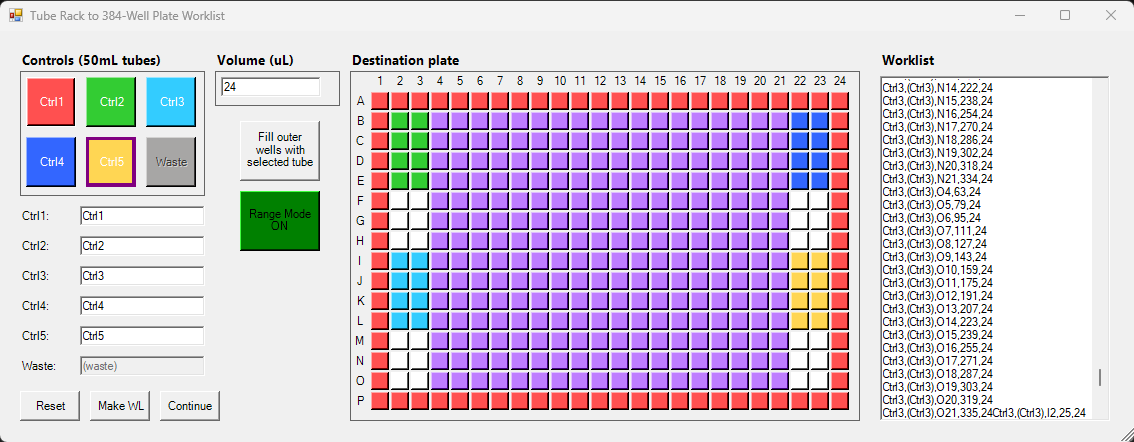
We needed a way for a TECAN-Fluent-ignorant user to generate a worklist (.gwl) to pipet liquids from a 2-by-3 rack of 50mL tubes to a 384-well plate.
What I made is a UI via a PowerShell form, which is launched by a .bat, which in itself is launched by our scheduler (our Fluent is integrated into an automated platform).
main.ps1 launches the UI. You’ll see that the user can link liquid volumes to wells. Every link is stored in a textBox (Worklist). I probably spent too much time on the colors in the UI, and it still doesn’t work 100% the way I wanted it, lol.
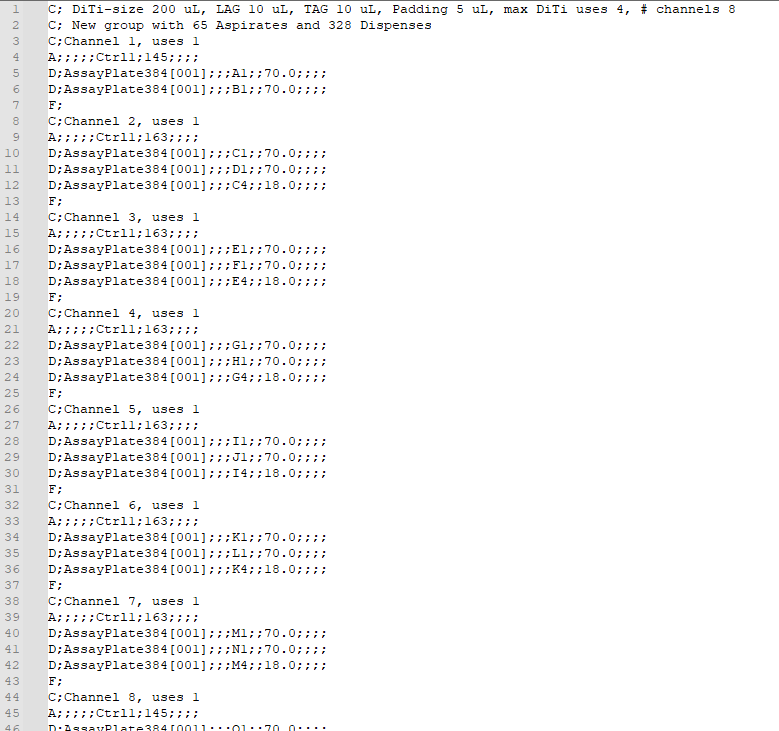
When clicking ‘Make WL’, the textBox content is pushed to another PS script called ‘createWL.ps1’, which creates the .gwl. This script can probably be optimized to gain pipetting efficiency (time reduction), but I am pretty happy with the results. Now I optimized it by going column-by-column in the plate (though for each liquid separately), and assigning each channel to 2 rows in the plate. Also, I used multi-dispense. The script tracks DiTi-reuses as well.
A further note on main.ps1:
- I am using a variable called ‘PB_Enum’ which is stored in a .txt that is continuously read by our scheduler. By setting this variable to 0, I stop the scheduler from continuing with the experiment, to allow all the time needed to create the .gwl.
Any way, I just wanted to share this. Feel free to have a look and comment on it.