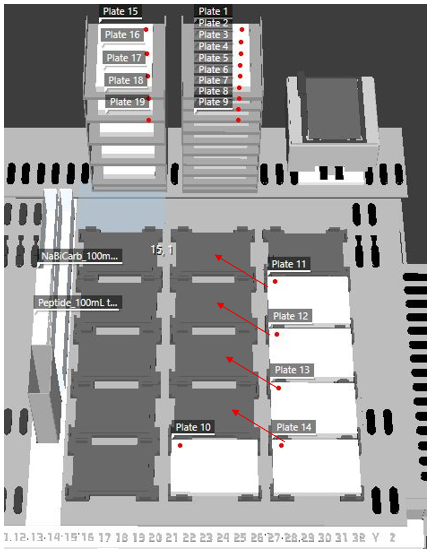
I need the RGA to move 4 plates from 3rd column of nests to the 2nd column of nests so that the air FCA can access them for pipetting (see image). I tried using the Transfer Labware command but was receiving the error “Target position of arm RGA out of range.” The RGA should be able to move plates between 7mm nests in multiple orientations, so I’m not sure why it’s not using the NR grip to do so. I checked the site definitions for the 7mm nest and base plate (6 landscape 7mm nest) and both have NR selected as a grip option.
I decided to use the execute vector command to force the RGA arm to use NR grip to move the plates to their target location. This worked, but I discovered that the plate positions don’t update on the worktable which is not allowing the FCA to pipet the reagents. Is there a way to update the worktable with the plates new positions after the Execute Vector? If not, how do I get Transfer Labware command to work correctly?
To update plate positions on the worktable (after Execute Single Vector) you can use the Set Location command.
To force certain grip orientations in a Transfer Labware command, you need to set the Allowed Orientation in the carrier definition of the Nest or Segment carrier and disable orientations it shall not use for the particular carrier
4 Likes
Incredible, thank you!
1 Like