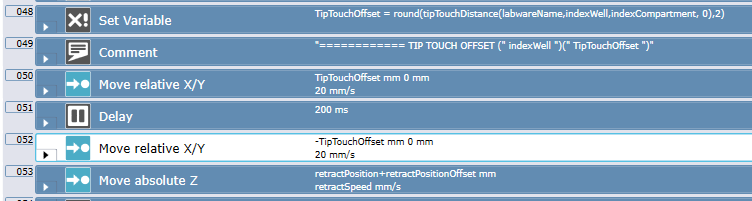
I am wanting to add in a “Touch-Off” function that would allow the pipette tips to touch off the side of the well after each dispense before moving on to the next column of wells. I want the touch off to be above liquid level. What is the easiest/best way to incorporate this into a aspiration and dispense script? The reason for wanting to be above liquid level is that I don’t want contamination carrying over from column to column. There are two sets of dispenses in this script. The first set is all of one liquid and the second set is of a seperate liquid. Certain wells will be barcoded differently, which is why I prefer not to have carry over. Thanks!
Are you using a Fluent? If so, you could incorporate this into the liquid class microscript. You could use the move commands to place the tips where you need them.
FYI it can be a bit confusing to use those functions in microscript for something like the 8-channel. It’s a unclear in the function help prompt how to refer to the channel number when there’s a single microscript that is used by 8 channels - so do you reference FCA channel 1? Channel 8? Channel X? Less important for tip-touch since this is a single value, but still can cause some head-scratching.
Thank you @Optimize ! I found the worktable lookup functions in the manual under chapter 12. Would you mind explaining how exactly you use tipTouchDistance(labwareName, well, compartment, direction[, height])) in order to get the values that you need?
Thank you! Makes sense. And I assume I can leave the variable as tipTouchDistance(labwareName, indexWell, IndexCompartment, 0),2) and that will allow it to work on any labware in the script that uses that specific liquid class?
Do I need to set it to 0)2) by default, or do I need to actually measure it in mm to see how far It needs to move? I assume the 2 stands for 2mm as the distance for it to move?
It is important to note that this function has you provide the height in the well, as it will reference the compartment definition defined in the labware. Imagine you are in a PCR plate - the tip touch distance will vary greatly depending on the location of the tip in the well.
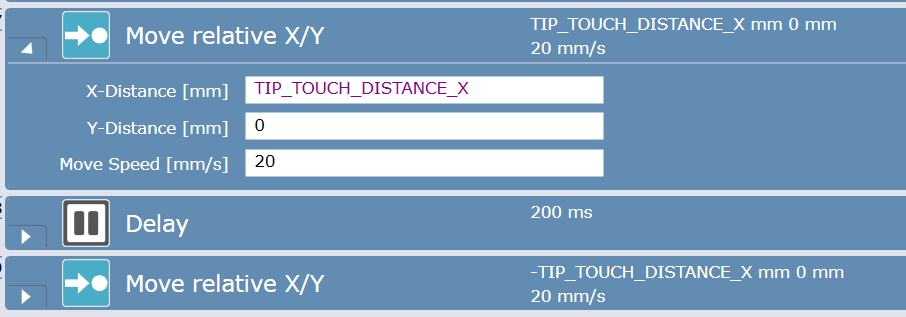
Instead of using the function, you can simply use the pre-defined variables TIP_TOUCH_DISTANCE_X and TIP_TOUCH_DISTANCE_Y. These automatically calculate the tip touch distance based on the current height of the tip in the labware.
Thank you all for the assistance with this! I was able to get it set up and ran the simulator and everything looked good. Going to do a water run today to verify everything looks good.