I have a couple of methods developed in Venus 5, but we are moving to windows 11 and Venus 6. I have exported the methods over and they run fine in the legacy run control, but when i try to run them normally i either:
Get a step where AswStandarDialogs hasn’t been initialized and the method doesn’t progress,
Or i put in a AswStandarDialogs initialization step towards the start of the method and then the method pauses at the line:
‘AswStandardDialogs : Initialize - start; >> Start >> load comvisible library’
I have been told that there shouldn’t be an issue with the AswStandardDialogs library in Venus 6 and this is likely a windows permissions issue interfearing with the Venus 6 UI.
I just wondered if anyone else has had this issue?
If something can run in the legacy run control, should it be able to run in the regular venus 6 run control?
Thanks,
Ewan
Hi @ewanfyffe,
AswStandardDialogs is actually not compatible with Venus 6. You should adapt your methods to Vector Custom Dialogs instead (found in this link Lab Automation Forums » Hamilton Libraries :: Hamilton) which is a newer library that includes all the same functionality as AswStandardDialogs and more.
Matt
2 Likes
Ok, That’s great, thanks for letting me know. I have started to adapt the method to vector customs dialogs so will keep going with that.
Hi Matt,
I was having a look today at the Vector Custom Dialogs and got on pretty well with the new set of loading instructions.
I was wondering, the loading instrution that i am replacing gave a volume of reagent and the appropriate trough or plate on the deck dsiply would flash. Is this possible to re-create in Vector Custom Dialogs?
Thanks,
Ewan
Hi @ewanfyffe,
Absolutely! This is actually a staple of our NGS Assay Ready Workstation platform. Vector Custom Dialogs is used to handle all displays of loading dialogs where each dialog is broken down to individual carriers. Each carrier’s dialog shows any of the following: carrier tracks, site or container positions, contents of each of those sites or containers, volumes if applicable, a large and/or a small image (although the image is any png or jpg created entirely outside of VENUS), and any other details that may be important.
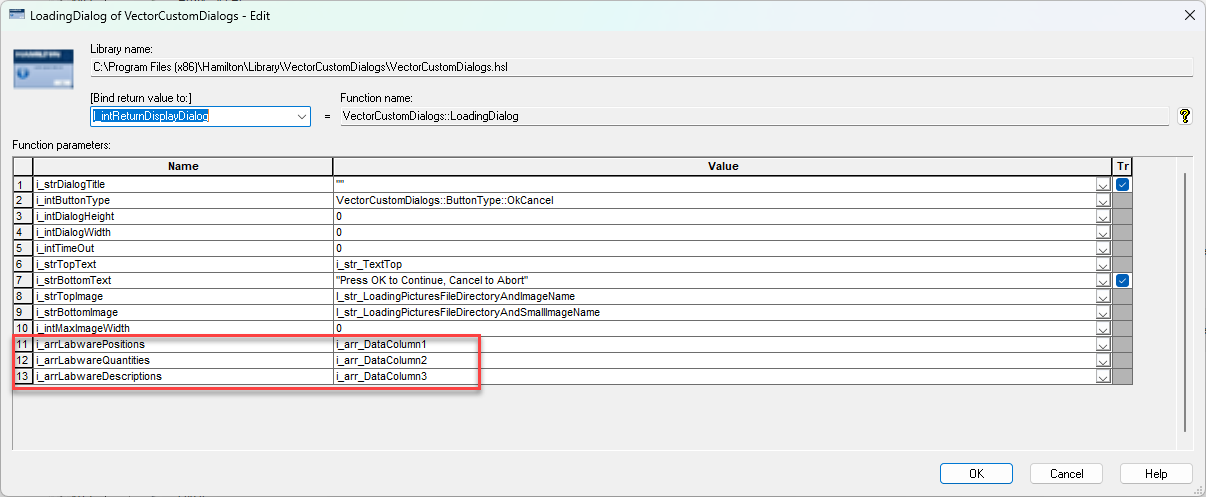
While each of the loading dialog step’s parameters can be variables, the most important ones to point out are the final 3, the arrays. Any 3 ordered lists of values can be added to these parameters, so for say a 32 position sample carrier you could list all 32 positions, their volumes, and descriptions of each position. Although that might make a rather large list for users to look at, so if perhaps each next 8 positions are all the same then you could trim the arrays down to 4 total values where the position array becomes 4 string values of “1-8”, “9-16”, and so on.
There is also a step called loading dialog set resources where you can set the headers of the chart you will be displaying.
Matt
4 Likes
That’s great, thank you Matt
1 Like