Hi,
I’m new to using the liquid level sensing tips. Our lab is trying to use the Biomek i7 to move high volume of samples from tubes to plates for better storage. I want the use the Liquid level sensing tips to sense the volume levels and move the samples.
I’d like the method to continue running without any pauses even if no volume is detected in a well and, instead, generate a report or list of wells where the transfer failed due to insufficient volume.
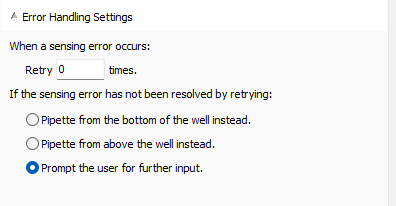
Currently, the only error handling options I see in the method are those shown in the attached image.
Is there a way I can script my way around this issue?