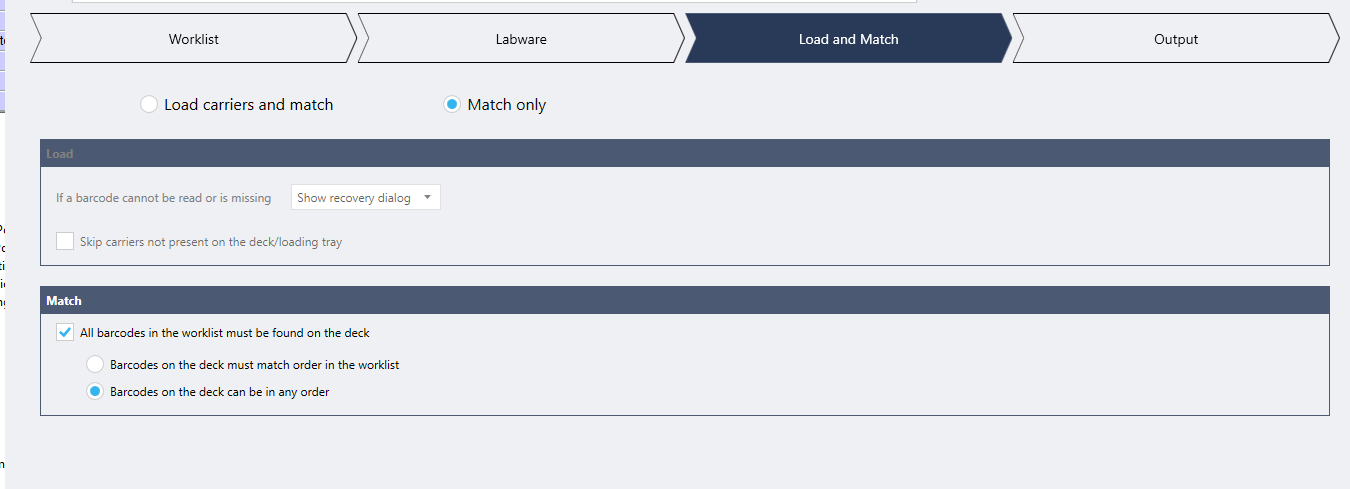
Venus 6.2 Hit-Picking Power Steps

I used the hit-picking power step to cherry pick aspirate from scanned sample barcode tubes & assign where to dispense them (assigned wells into plate) on the fly.

However, when I swapped 1D tubes in random positions to demonstrate the cherry picking (show the method can find the tube & still dispense into its designated well), I got an “Out of Reach Positions” error.

I’m familiar with the Out of Reach Positions error, but need to figure out a way to incorporate error handling for this since this error happened only for a 1 plate demo & it’s intended to be able to aspirate from wherever the tubes maybe in the carrier into it’s designated wells for multiple plates.

Is there any way to preemptively have it rearrange the channel pattern depending on where the tubes/wells are located (since it already maps where they are from scanning before pipetting)? Or any error handling at all for this?

Any help would be greatly appreciated, thank you to any robotic geniuses who can help!

@EricSindelar_Hamilton @BrandonBare_Hamilton … Do you guys happen to know of a library that could possibly help with this or any advice?

I figured if anyone knows anything, it’d be you guys. Let me know when you get a chance, thanks again either way.

1 Like

Hi @day ,

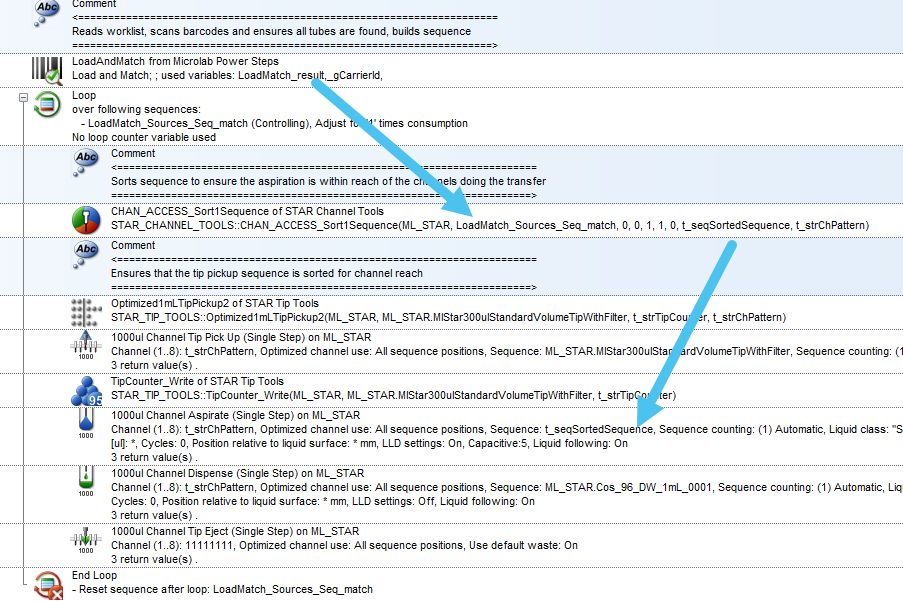
Power Steps will not compensate for reach for the channels as you are noticing. You would have to use STAR Channel Tools to sort the transfer to compensate. With VENUS 6, there is a LoadAndMatch funcion that uses the same worklist GUI as the Cherry Pick function but will perform the load step and will match your barcodes and build the sequence for you. You can feed this into the CHAN_ACCESS_Sort function of your choice to make sure the channels stay within their reach. See below a quick example:

Can you confirm your configuration? Are you STAR or Vantage and do you have > 8 channels or a combination of different channels on your gantry?

1 Like

I knew I could count on your brilliance, thank you for your quick help @BrandonBare_Hamilton

We have it for the STAR, 14 channels. You are the greatest, thank you!

2 Likes

@BrandonBare_Hamilton .. Do you guys happen to have a demo method or anything with the LoadandMatch function?

It runs as if everything is good for this step but then nothing happens & I believe it’s because my LoadMatch_result returns false. We cannot for the life of us figure out why (we’re applying the same things from the import worklist of the hit picking power step to the loadandmatch/import worklist function step).

Hopefully you can rescue us yet again, already more than grateful for your help! Hopefully last desperate call.

I also realized, the sequence returns have no positions either. Below is a trace file from a demo version of the method, in hopes this helps solve where we’re going wrong.

2025-11-06 17:14:19.249 Data Handling Steps : Import Worklist - start;

2025-11-06 17:14:19.751 Data Handling Steps : Import Worklist - complete;

2025-11-06 17:14:19.861 USER : Trace - complete; GetLabwareAndPosition(ML_STAR\Carrier1\Thermo_48_Tube_Honeycomb_Rack_0001\B1)

2025-11-06 17:14:19.861 USER : Trace - complete; >> Thermo_48_Tube_Honeycomb_Rack_0001, B1

2025-11-06 17:14:19.877 USER : Trace - complete; GetLabwareAndPosition(ML_STAR\Carrier1\Thermo_48_Tube_Honeycomb_Rack_0001\D2)

2025-11-06 17:14:19.877 USER : Trace - complete; >> Thermo_48_Tube_Honeycomb_Rack_0001, D2

2025-11-06 17:14:19.908 USER : Trace - complete; GetLabwareAndPosition(ML_STAR\Carrier1\Thermo_48_Tube_Honeycomb_Rack_0001\H3)

2025-11-06 17:14:19.908 USER : Trace - complete; >> Thermo_48_Tube_Honeycomb_Rack_0001, H3

2025-11-06 17:14:19.940 USER : Trace - complete; GetLabwareAndPosition(ML_STAR\PlateCarrier1\Plate2)

2025-11-06 17:14:19.940 USER : Trace - complete; >> PlateCarrier1, Plate2

2025-11-06 17:14:19.940 USER : Trace - complete; Power Step Load and Match - complete

2025-11-06 17:14:19.940 USER : Trace - complete; MATCH? 0

2025-11-06 17:14:19.940 USER : Trace - complete; Trace sequence LoadMatch_Sources_Seq_match - total positions: 0, current position: 0, end position: 0

2025-11-06 17:14:19.940 USER : Trace - complete; Trace sequence LoadMatch_Destinations_Seq_match - total positions: 0, current position: 0, end position: 0

We have a worklist that has the tube barcodes (2D 2 mL tubes in 48 format), we want to find on deck via barcodes & the worklist also has the well positions, we match the plate barcodes & select the target/source sequences (tubes to plates).

I do realize (unlike what we had for the hitpicking), there’s nowhere to tell it what wells to go into. Maybe that’s where the issue is or is definitely an issue in itself.

Hi @day ,

For the load and match to work without scanning (not using the Autoload) I believe you need to set the barcode of either the plate or the containers before calling the function. If you can upload an example worklist, I can confirm this.

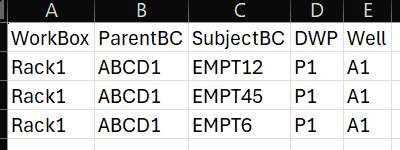
Thanks for your quick reply, we are beyond desperate as mentioned so cannot thank you enough already. I uploaded a snip of a dummy worklist (this is just an example of 2 vials pooled into 1 well, P1 is the labware name for plate 1 and Rack1 is the labware name for the tube rack).

We have it so the carriers & barcodes are loaded/set prior to the load and match, so we just use the match part for load & match.

I’m not sure how to use this to tell the method what wells to dispense into like the hitpicking method & either way cannot get it to match.

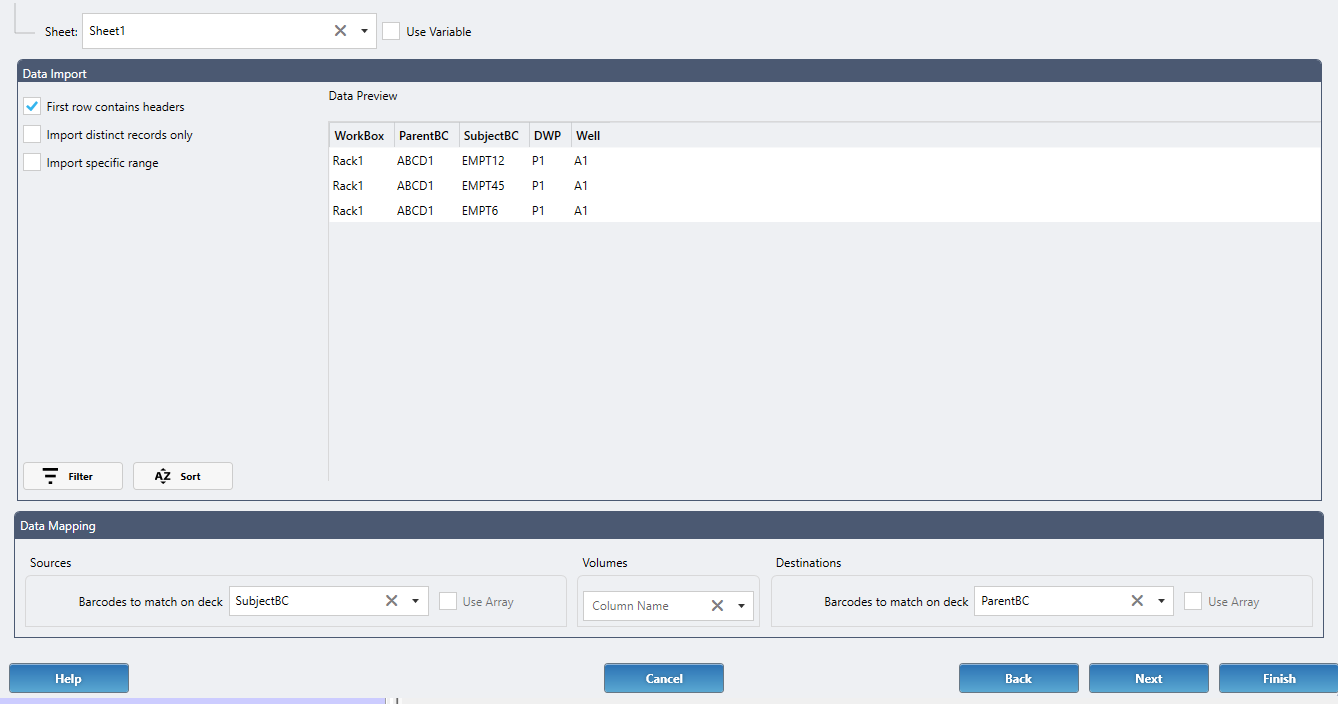
I attacked the load and match step where I choose the column name for the source that has the tube barcodes that are scanned in beforehand. The plate barcodes are scanned & added into an array that’s used for the destination. Then I selected the tube apiration sequence and dispense plate sequence, it seems to find the tube rack and well positions according to the tube barcodes but then returns 0 positions for the sequences & false for match result.

the hit picking is ideal, but then I assume (& don’t see how) we can then use the STAR tools to ensure there is not channel reach error unfortunately (as there is no way it seems to loop the hit picking step with star tools like in your example to calculate the ch. pattern)

Hi @day ,

Do you have a 2D barcode scanner on the deck? Assuming Rack1 is either the LabwareID or the barcode of the plate, you can set the labware to aspirate from, but the sample barcode needs to be either associated with a well or you need to add a well column for the source. If you have a 2D barcode scanner, then you have the means to attach a barcode to a well after scanning.

Rack1 is just the labwareID (renamed labware in .lay), same with P1 P1 is labwareID of 1st plate. I have a well column in the worklist (not sure if you saw my attachments?)

Yeah we have a 2D barcode scanner (easyCode) on the deck to scan the 2mL tubes (48 format rack).

I get an array of my tube barcodes from scanning, same with the plates. Tube barcodes are also in SubjectBC column of worklist. I dont understand how to attach a barcode to a well? The tube barcodes is how it’s matched onto the deck, same with the plates, but how do I set the tubes to plate wells via barcodes without overlapping the tube positions set from the barcodes? Do you have an example? Sorry, I feel like I get what you mean, but also am not certain so I dont understand.

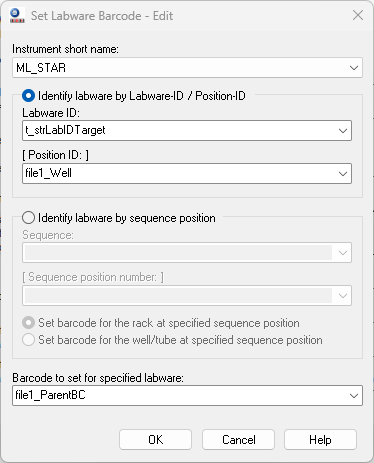
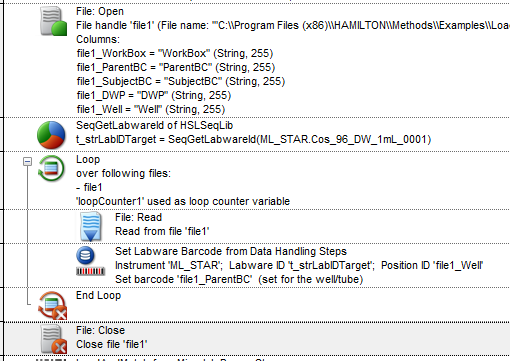
When you scan the barcodes on the easyCode, you should get an array of wells, and an array of barcodes that were scanned. After you transport the labware back to its carrier, you need to loop over the arrays and set the barcodes using the Data Handling Steps : Set Labware Barcode command. You can hard code the labware ID to match the tube rack and set the barcode and well from the 2D scan results.

In this example I was using the file to set it, but file1_Well and file1_ParentBC could be swapped with the array variables from your barcode scan.

For the Deep Well plate, you can read right from the file and get the well and barcode to set:

As long as all barcodes are set to labware ahead of the scan, the Load and Match will return the sequence positions that were found.

2025-11-07 12:14:18.022 TRACELEVEL : TraceSequence - start;    ----------------------------------------------------------
2025-11-07 12:14:18.023 TRACELEVEL : TraceSequence - progress; Name:    LoadMatch_Sources_Seq_match
2025-11-07 12:14:18.023 TRACELEVEL : TraceSequence - progress; Current: 0
2025-11-07 12:14:18.023 TRACELEVEL : TraceSequence - progress; Count:   3
2025-11-07 12:14:18.023 TRACELEVEL : TraceSequence - progress; Total:   3
2025-11-07 12:14:18.023 TRACELEVEL : TraceSequence - progress; Max:     3
2025-11-07 12:14:18.023 TRACELEVEL : TraceSequence - progress; Used:    0
2025-11-07 12:14:18.023 TRACELEVEL : TraceSequence - progress; LabwareID: AltemisLab_48TubeRack_2mL_0001, PositionID : D1
2025-11-07 12:14:18.023 TRACELEVEL : TraceSequence - progress; LabwareID: AltemisLab_48TubeRack_2mL_0001, PositionID : C3
2025-11-07 12:14:18.024 TRACELEVEL : TraceSequence - progress; LabwareID: AltemisLab_48TubeRack_2mL_0001, PositionID : F4
2025-11-07 12:14:18.024 TRACELEVEL : TraceSequence - complete; ----------------------------------------------------------
2025-11-07 12:14:18.026 TRACELEVEL : TraceSequence - start;    ----------------------------------------------
2025-11-07 12:14:18.026 TRACELEVEL : TraceSequence - progress; Name:    LoadMatch_Destinations_Seq_match
2025-11-07 12:14:18.026 TRACELEVEL : TraceSequence - progress; Current: 0
2025-11-07 12:14:18.027 TRACELEVEL : TraceSequence - progress; Count:   3
2025-11-07 12:14:18.028 TRACELEVEL : TraceSequence - progress; Total:   3
2025-11-07 12:14:18.028 TRACELEVEL : TraceSequence - progress; Max:     3
2025-11-07 12:14:18.028 TRACELEVEL : TraceSequence - progress; Used:    0
2025-11-07 12:14:18.028 TRACELEVEL : TraceSequence - progress; LabwareID: Cos_96_DW_1mL_0001, PositionID : A1
2025-11-07 12:14:18.029 TRACELEVEL : TraceSequence - complete; ----------------------------------------------
2 Likes

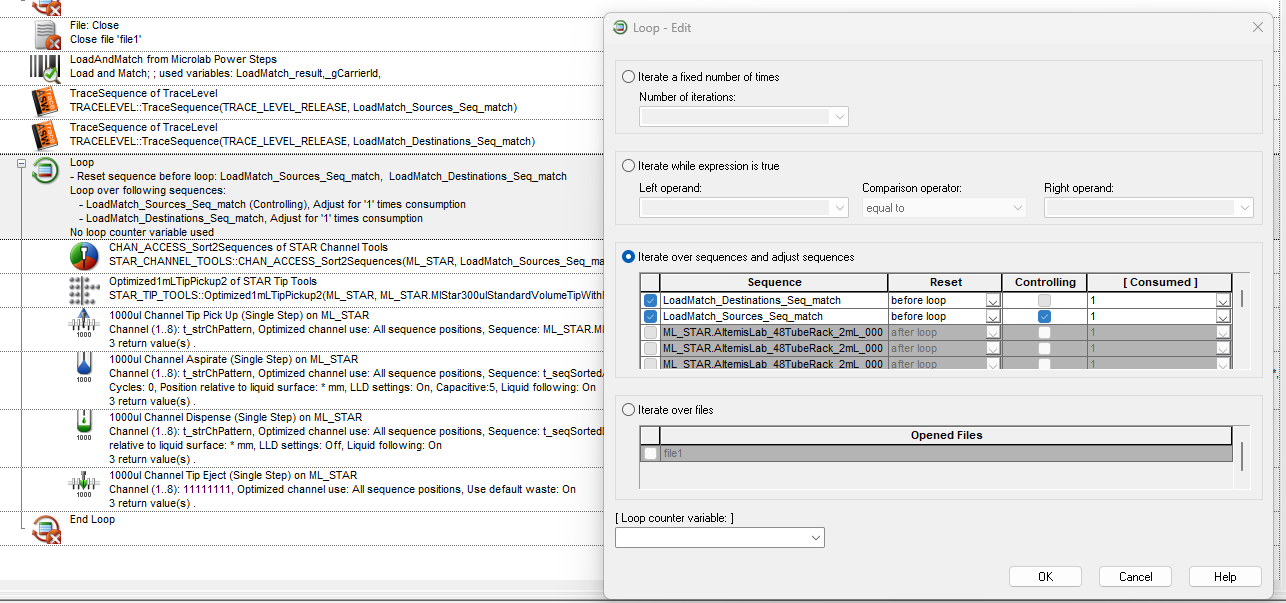
Apologies @BrandonBare_Hamilton for disappearing. I was able to follow what you amazingly provided (you are seriously a hero).. but I ran into a snag, it wasn’t entering the loop to aspirate/dispense, then I ran out of time.

I finally got back to it & got it to work. Oddly, I had to reset the sequences (Load source & destination from the LoadandMatch) before entering the loop & that’s what made it work perfectly. Hoping that sounds normal as I realize it’s different than what you had.

Despite if that should happen or not (hoping it’s good ha)…

THANK YOU SO SO SO VERY MUCH!! @BrandonBare_Hamilton … you truly save myself/us from so much hardship & are incredibly helpful/informative + teach a lot, etc. There are no words, if there is any way to post a review or write to your team (whatever can pay it forward), please feel free to let me know & I’ll be happy to do so!

3 Likes