Hello All,
I wanted to share that I released a VS Code extension for HSL for anyone who is working in HSL, interested in building their own library, or writing a method in pure HSL (for some reason).
The extension includes:
- Full IntelliSense support
- Library-aware autosuggestions (it scans your installed Hamilton libraries and suggests functions based on what is available on your machine)
- Basic error checking / diagnostics
- Fully working syntax highlighting/definitions
I spent a long time building this and would really appreciate feedback from the forum community.
It’s available now on the Microsoft Visual Studio Code Marketplace here:
This also adds HSL language context (syntax, completions, and diagnostics) that can improve prompt-based development, corrections, and library/method creation from scratch when using tools like GitHub Copilot, Claude Code, or other AI coding assistants within VS Code.
Best,
Zach
14 Likes
How does this work with the Hamilton-generated CRC checksums at the bottom of the HSL files that prevent them from being run if modified outside of the HxHslMetEd?
1 Like
Yep the control directives block markers checksum footers for Method-Editor Generated HSL is a real thing, and it’s a known limitation unfortunately 
How I’m using this (and what the extension is mainly for) is:
-
Read/review + feedback without “editing it for me.” Open the generated .hsl in VS Code to get highlighting, navigation, quick sanity checks, and (with Copilot/Claude/etc.) a really valuable second set of eyes on method flow, logic, and readability.
- If you have sub-methods, you’ll usually want to provide both the
.hsl and the .sub so an AI tool actually has full context.
-
Catch human mistakes faster. The vs code extension shines for things like variable naming consistency, wrong variable used in a workflow, subtle case-sensitivity issues, etc.
-
Library development is where you get full freedom. For HSL libraries (.hsl / .hs_) you’re not fighting the Method Editor’s CRC mechanism, so VS Code + AI can be used to build a lot of reusable logic cleanly.
Practical workflow tip:
- Keep official edits/saves for Method-Editor-generated methods inside HxHslMetEd (so it regenerates the footer).
- Use VS Code primarily as a viewer/reviewer for those files (or set them read-only to avoid accidental saves).
I am poking at what it would take to support Method Editor–generated blocks more directly, but decoding the block codes / structure is a lot of reverse-engineering work. Maybe @Stefan or @Huajiang might have some insight on how to get the method editor makes these Block Markers’ CLSID and GUID
1 Like
Ah sorry I don’t mean the control directives block markers checksums; I mean the comment at the bottom which is autogenerated containing the author name, time last updated and the cyclic-redundancy-checksum. Obviously like you say you can still use for read/review, but hsl libraries also rely on the cyclic-redundancy-checksum, so won’t work if only edited in this - although you can technically get around this with just making an actual edit in the HxHslMetEd afterwards like you said, which would regenerate the footer.
With respect to the Block Marker’s CLSID and GUID there is a list of the first (step-type) ones, but the step-specific ones are controlled/generated/queried by HxPars to my knowledge, so that would be the thing to look into 
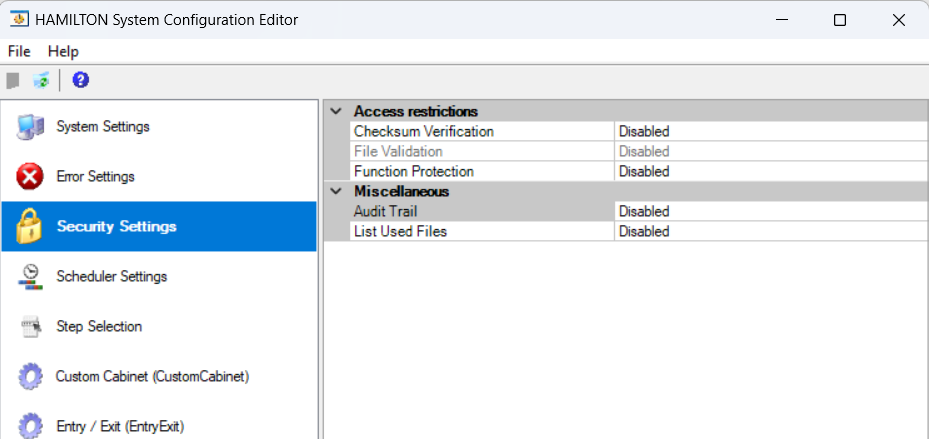
Ahh yes, you are right. As most of my work is with R&D I have the checksum verification off:
You probably will have to make a small edit in the HxHslMetEd.exe for the checksum to be auto calculated for your use if your lab requires it.
2 Likes
Ah yeah of course, I forget that in certain environments you have the permission to just turn those checksums off!
to generate the CRC checksum or handle with instrument step, we have to use the Win32 and COM object of venus. I am very interested with editing hsl file in vs code, and I hope that I can fix this problem.
But hsl does not support OOP or data structure, this makes it real hard to programme with hsl and you have to store all the data/parameter in array. This is why we try to control STAR outside venus.
1 Like
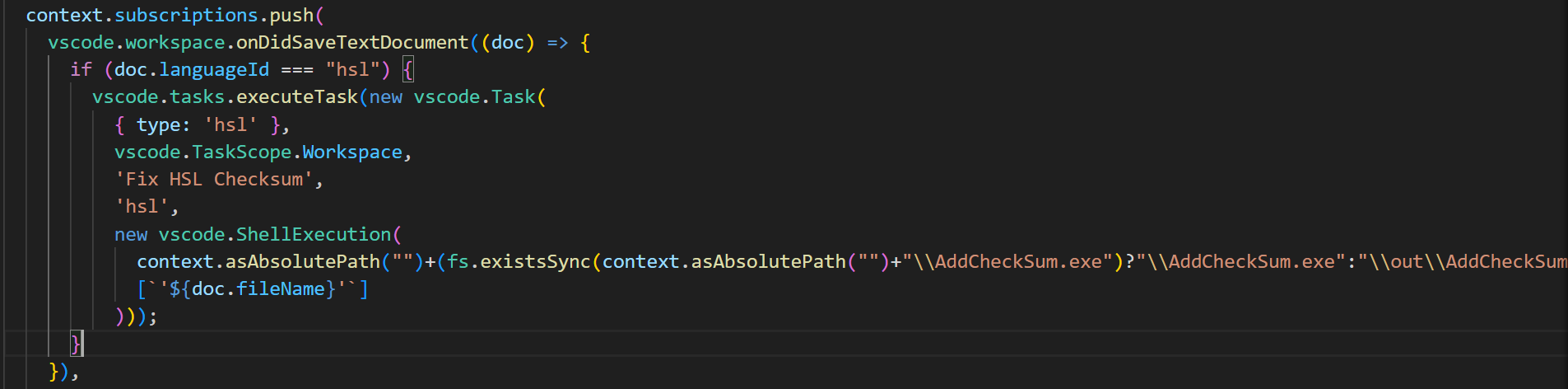
I added the function of generate checksum after saving of hsl file. This can be done in C# with about 2 lines code
            var security = new HxSecurityCom() as IHxSecurityFileCom2;
            security.SetFileValidation(args[0], 0, "//");
and execute this tool after file saving, then we can add checksum to hsl file
3 Likes
Updating the checksum at the end of the file has been added as a feature! Thank you @Huajiang for your contribution!
I’m actively working on the following features:
- In app runtime log streaming so you can “run” but more accurately manually debug HSL code right from VS Code
- Adding user settings for the extension for new features like auto comment completion and structuring for writing libraries (making titles automatically and using the // end for namespaces and functions)
- Block Marker creation (this will enable complete AI compatibility with developing Venus Liquid Handling Methods)
2 Likes
I see that you wrote many codes in C# and python to do some job like converting stp file to ascii or hsl, which I think make your project much more complex. Why do not write a language server for hsl, then all the jobs can be done in language servier. I think Languge server can simplify the development, for you can only write C# code and complete all the job.
Wow, I’ve already have my methods with HSL code blocks besides the functions I haven’t figured out how to call e.g. Asp/Disp, iSWAP. So I will most likely give this a go.
1 Like