Efficient transferring from 96 to 384 plate

I’m writing a method that transfers volumes from a 96-well plate to a 384-well microplate using 8 1000uL channels. I have my microplate split into 4 quandrants of 96-wells for generating replicates. So A1,B1,… , G1, H1 will end up in the microplate positions of the same position. When this method is run our STARlet is able to draw up all 8 volumes from the 96-well plates, but when it dispenses into the microtiter plate because of the well spacing, it will individually pipet each target well one at a time shifting the channels between transfers. It’s much more efficient to pick up every other sample from the 96-well plate (A1, C1, E1, F1, B1, D1, G1, H1) and then dispense them in the same wells of the 394-well plate, so that 4 channels can be operating at a time. My method supports up to 480 samples at a time, and I’m adjusting the end position of my target sequence to match the number of samples so I don’t think I can preserve this dynamic sample sequence if I program the target sequence skipping every other well.

My question is what ways can I adjust the sequence to stagger the channels and sequence positions in order to be able to transfer more samples at a time? Has anyone else had to deal with a similar issue?
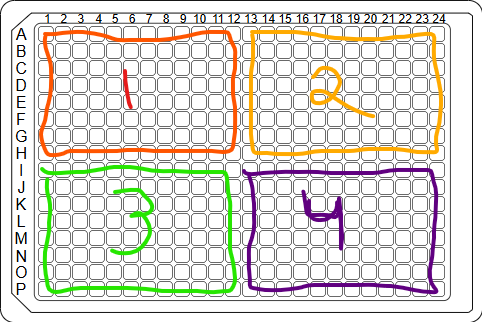
Hi! I had to deal with a very similar problem transferring from a 96 well sample plate into a 384 well plate for qPCR. My answer might be a little confusing but I’ll try to explain the best I can. So the first thing I did was create a master worklist of all the positions in 10 384 well plates (basically the max we can set up at a time) in the sequence I wanted the plates to be pipetted in, which was in quadrants. Then I used that worklist as the destination sequence, but the 96 well sample plate as the controlling plate. If you have any question please feel free to DM if that’s easier! I can also upload some images when I’m back at the robot.

I don’t think this would do what I’m looking for but I could be wrong. I believe that doing what you suggested would still place each well from the 96 plate to the next available 384 plate well sequentially, meaning that the 384 plate would be processed dispenses into starting from A1, B1, … and so forth. With 1000uL channels that would be Channel1, Channel 2, … and so it would still have the inefficiency of only pipetting a single 96 well at a time to the 384 plate. I could be misunderstanding though.

What I want is for the following:
My source sequence is [96plate.A1, 96plate.B1, 96plate.C1, 96plate.D1, 96plate.E1, 96plate.F1, 96plate.G1, 96plate.H1]
Aspirate from 96-well plate (Channel 1: A1, Channel 2: C1, Channel 3: E1, Channel 4: G1, Channel 5: B1, Channel 6: D1, Channel 7: F1, Channel 8: H1)

My target sequence is [384plate.A1, 384plate.B1, 384plate.C1, 384plate.D1, 384plate.E1, 384plate.F1, 384plate.G1, 384plate.H1]
I want to dispense into 394-well plate (Channel 1: A1, Channel 2: C1, Channel 3: E1, Channel 4: G1, Channel 5: B1, Channel 6: D1, Channel 7: F1, Channel 8: H1)

This would allow the dispense step to dispense Channels 1-4 at the same time and then follow up with Channels 5-8. Saving on multiple channel movements.

So I need to generate a new sequence using every odd index of the sequence, then append to that every even index of the sequence? This is a tough use case to explain, so hopefully I’m explaining it clearly.

Ahhh ok I think I understand. So with our samples we didn’t have them next to each other in the 384 well plate meaning 96.A1 would be 384.A1, 96.B1 would be 384.C1, and so forth.

If you have access to the HSLSeqSortingLib, it allows you to sort a sequence by raster and by rack. You can use any raster, but the 18 mm raster for 5 mL channels will do. That way it should sort your sequence column-wise and in odd-evens (as the 5 mL channels can only access every other well due to their spacing).

1 Like

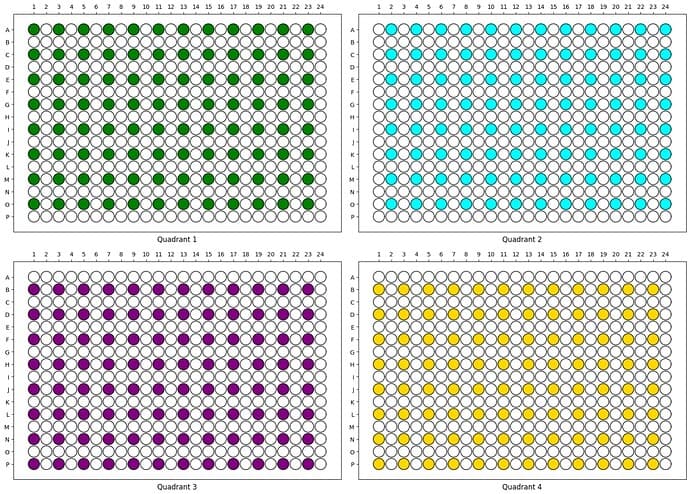
Why can’t you dispense into a more automation friendly quadrant layout on the 384w plates?


(visual stolen from 384-well plate dispensing with CO-RE 96 head - #19 by CamilloMoschner )

Are you trying to do this?

How are you supporting 480 samples? A single 384w plate that only ever has one source plate in there? What are you doing for replicates? Is this a 1x 96 → 1x384 w/ 4 replicates and you have 5 plates of each on deck sort of deal?

Going from the layout I understand you to be doing to the one above would save you a lot of time pipetting. It would also enable you to use the 96w head which would save you even more time pipetting. Being able to stamp would make this a 10-20 minute protocol.

If you absolutely can’t change the plate layout (and saving literal hours as a result), the HSLSeqSortingLib mentioned above is definitely the way to go.

2 Likes

We are using your second image as how we want to 384-well plate to be laid out. I agree that the top image is more automation friendly but we would like to segregate each sample replicate across the plate as oppose to having all in adjacent wells.

We are supporting 480 samples by having up to 5 96-well plates on the deck at a time, each with anywhere between 1-96 samples. We load only enough 384-well plates to support the number of samples currently loaded on the deck to avoid labware waste.

Unfortunately, our system does not have 96MPH so I’m expecting this method to be long regardless but I’d like to cut time anywhere that I can. I’m looking into the HSLSeqSortingLib now to see if it meets my needs.

Thanks for the suggestion. I’ve been testing this (as part of the STAR Channel Tools Lib) and am finding some odd sorting that I’m not sure why it’s occurring.

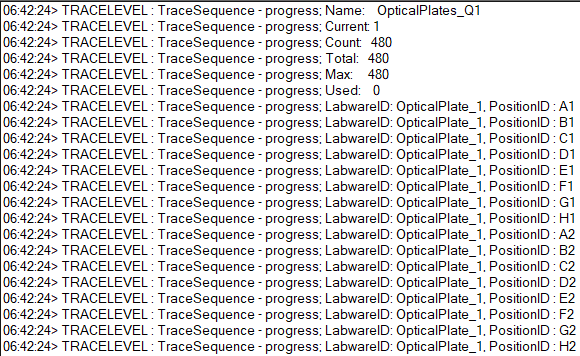
This the the sequence I am trying to sort. It’s ordered by columns.

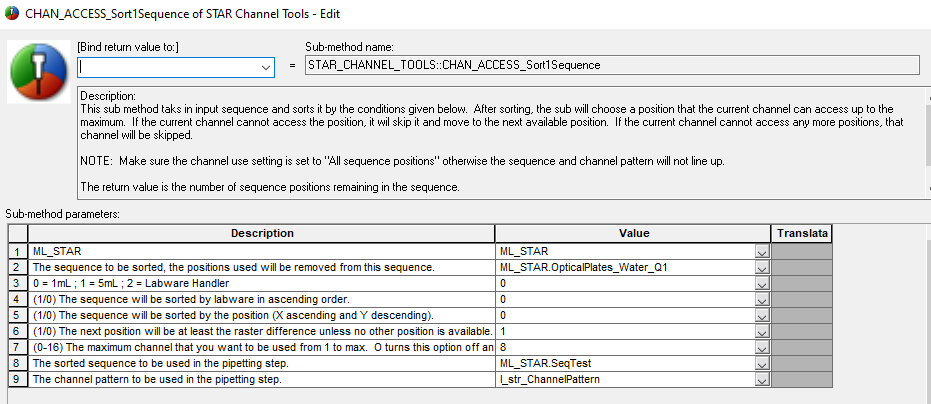
Here’s is the parameters for the Sort1Sequence.

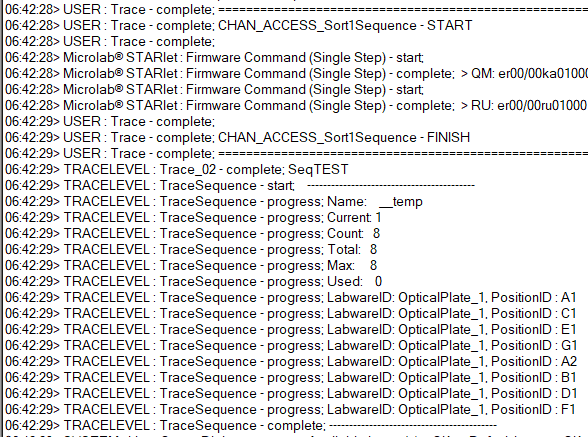
Here is the sorted sequence. It seems to be sorting by every other row for the first 4 positions, then it moves over to the next column to pull A2, and then returns to the first column to pick up 3 of the 4 remaining positions. I would’ve expected that it would’ve sorted the sequence be be every other row instead of including A2 within the middle of this.

Any thoughts on why this might have occurred?

I can’t answer your question about A2 popping in for Sort1Sequence but you’ll want to sort both of the sequences (and array of volumes if needed) simultaneously. Otherwise you’re going to have a hard time figuring out where everything goes after your source sequence is changed.

Since the HSLSeqSortingLib lets you define the raster, you can use it’s sorting to ensure that you have a 2 step aspirate and then a 2 step dispense like what you indicated. These algorithms only optimize one of the sequences to minimize the number of moves, so it won’t try and do any backwards looking checks to see if a 1 step aspirate and 8 step dispense is more/less efficient than a 2 step aspirate and 2 step dispense.

edit: you could probably just sort the destination with the standard raster as well

Should make it the most efficient it can possibly be!

You can also just have a mega sequence that includes all of your sources and all of your destinations. Then sort it once and let it rip. Need to make sure you’re not going to cross contaminate if you reuse tips for your replicates though…

1 Like

Hi @EH421,

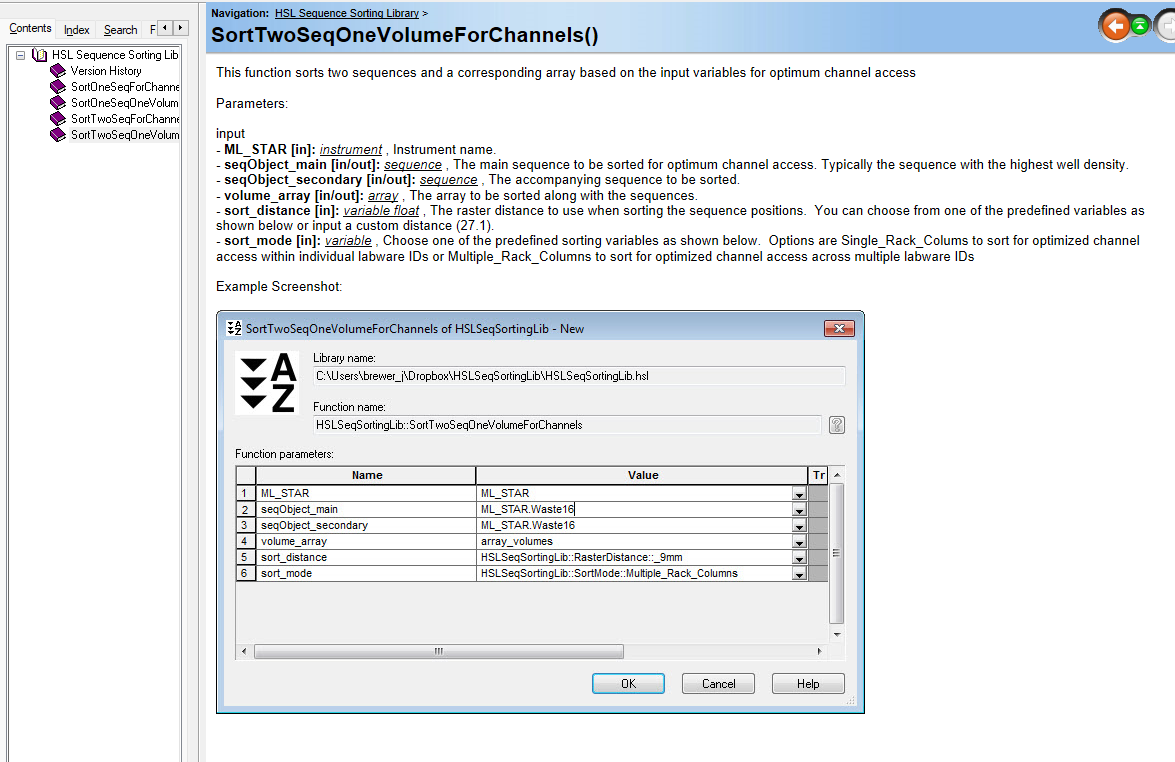
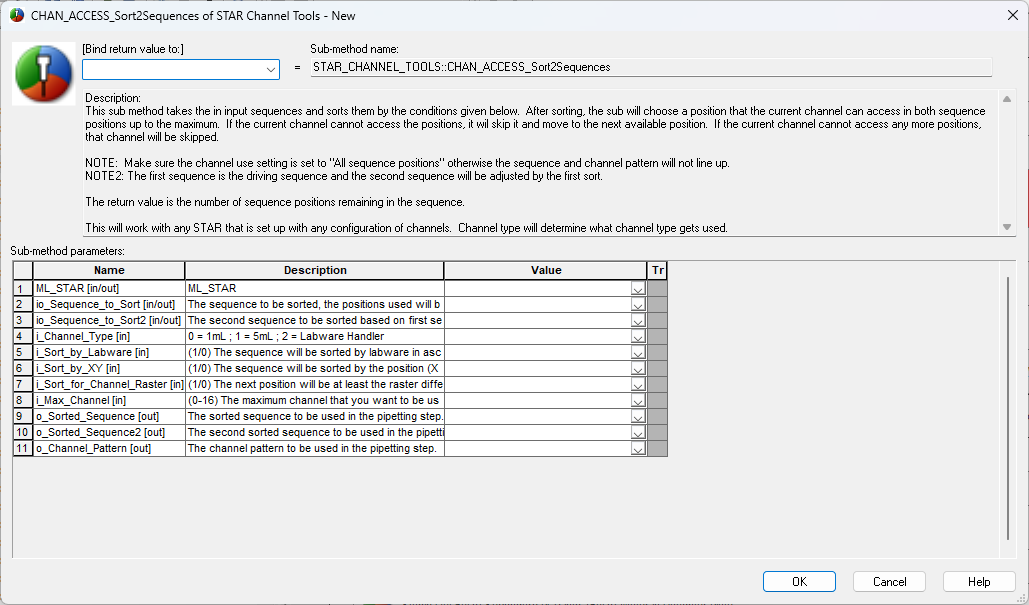
I think you are actually going to want to use either of two different commands from that library. You have a single 96 well plate that is going in replicates to the target 384 well plate. In that case you will want to make sure your source sequence and destination sequence have equal numbers of positions and their positions between the two sequences line up. Then you will use the sort 2 sequences or sort 2 sequences 1 array (if using vairable volumes) to get the output sequences that you desire:

Matt

1 Like

Hi @EH421 ,

This is happening because your quadrant ends the column at H1 and then moves to the next column. When the logic is getting the next position (9 mm raster so skipping every other column) it keeps moving forward while skipping over not valid positions (under 9 mm raster). That’s why it is moving on to the next column. On loop 2, you would see it pick up the positions that it missed.

To fully optimize this transfer, I would recommend concatenating your 4 individual aspiration and dispense sequences (they can remain individual in the deck) to make two transfer sequences of all the positions to aspirate and all the positions to dispense. Then let STAR Tools do its algorithm. If they are positioned on the same carrier, you should notice that all 8 channels will skip the necessary row for both the source and target so that it is a single aspirate and single dispense.

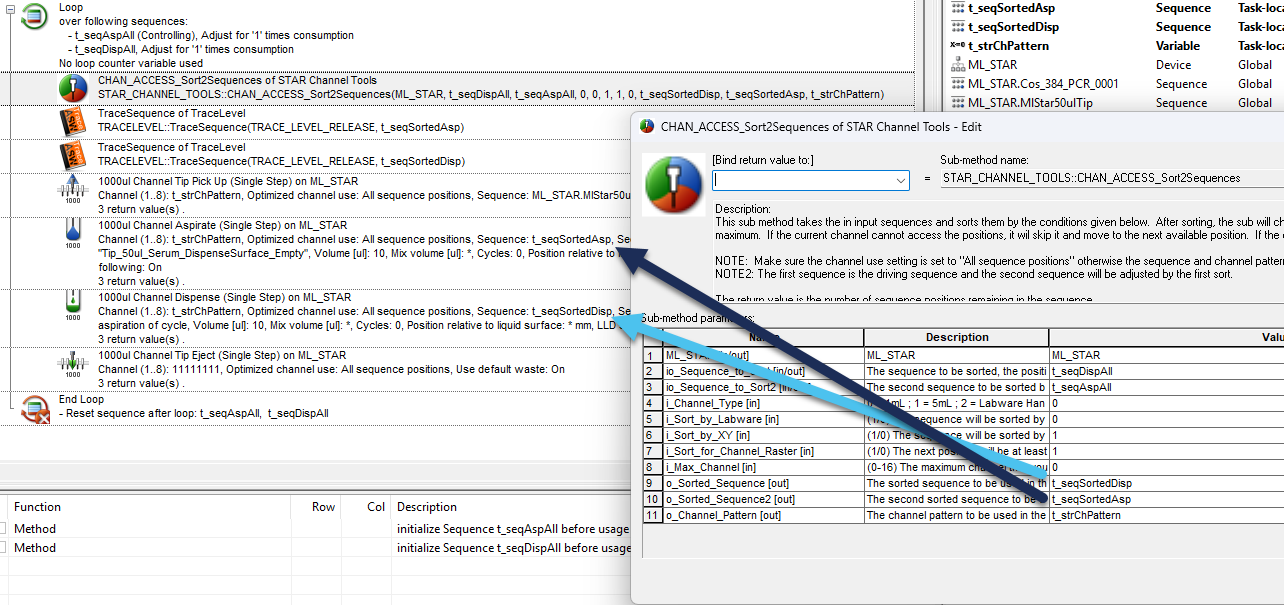
Since I want the dispense to be the most optimized (most affected by raster), I put the dispense sequence first in the sorting within the CHAN_ACCESS_Sort2Sequences function. Then loop over the starting sequences until they are both complete.

As long as the source plates are on the same carrier and the relatively in the correct order (Q1 plate on top, then Q2 plate, etc) you should get a spread 8 one move aspiration followed by a one move dispense which should be your fastest transfer speed. Green highlight is the aspiration for one command, blue highlight is the dispense for one command.

This should continue to work even if you have partial plates, just keep in mind that it will likely lead to multiple moves depending on which plate is partial and at how partial it is.

steal away - PyLabRobot is free and (MIT license) open-source for everyone :blush:

(thanks for the shoutout though)

2 Likes