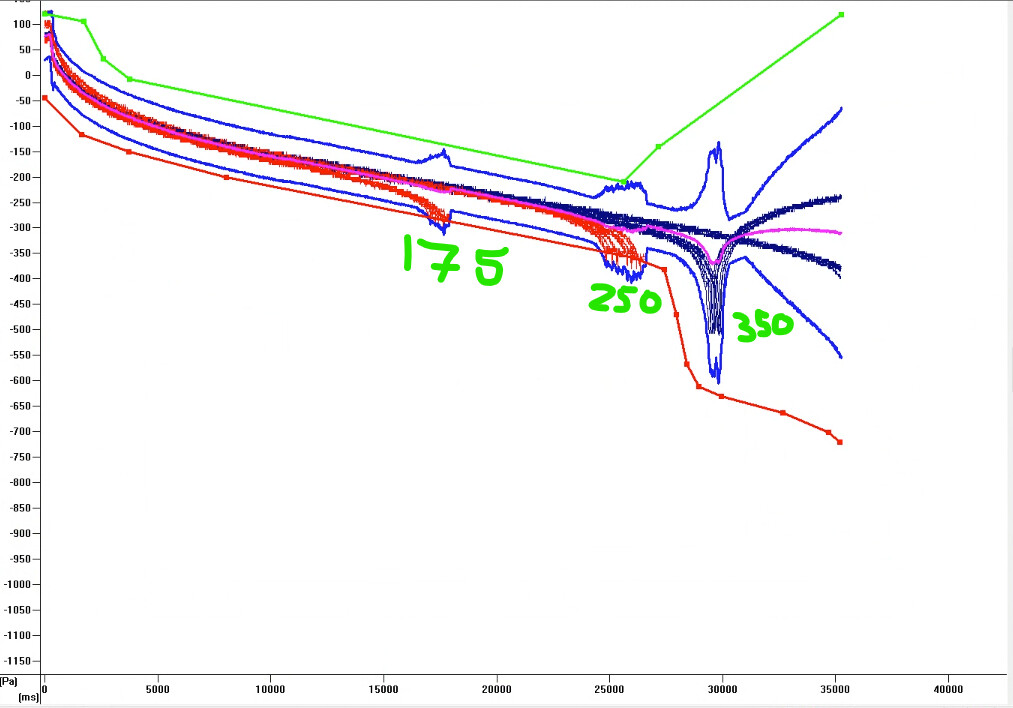
We have started to look into how we could use TADM in our applications. We have a step in our processes where in best case 350uL is aspirated from a tube but an acceptable aspirate is 280. Using 1000uL pipette tips we are doing a fixed height aspiration set to 350uL. With an “aspirate all” we tested numerous different volumes 350,280,250 and 175 to see how the curves look for these different volumes at this step. There is definitely a clear delineation between the values but when we added bounds to these, TADM did its job but it was reported as a “clot error”. Ideally we would like to have it where if its 280uL or above it will continue without error which the current lower bound will allow. If there is less than 280uL aspirated flag that sample as a low volume sample and report that out in sample tracking. But anything under that instead of throw a short of liquid error it is throwing a clot error. probably due to the pressure drop. Please help I know i am probably doing something wrong but I know we’re close. The aspiration curve is below Thank you so so so much!
That‘s an interesting use case! Whenever the lower TADM limit is breached, it is reported as „clot“ error, so that‘s normal. What I don’t understand is that you get a clot error if you run out of liquid. If the tip is drawing in air, that leads to the TADM curve going above the limit, not below. Is it possible that the tip is touching the bottom of the tubes during aspirate following? Edit: just realized you mentioned it‘s fixed height pipetting. That‘s really odd.
Either way, what you could do is custom error handling. There are numerous great threads and examples on this forum, e.g:
In addition, during error handling it is possible to query what is currently in the tip:
Enable custom errorhandling in the respective „Aspirate“ command. Set it to „Cancel“ for the errors you want to catch. When there is insufficient volume and the error is thrown, the Aspirate will stop immediately, the tip will retract.
Around the Aspirate step, you need to wrap the error handler command. On error, the aspirate is canceled and the steps you define will be executed.
In the error handler, you grab the volumes for each tip and decide for each tip what to do. You build „error pipetting sequences“. If the tip holds >280uL you transfer them, in a second sequence you add all the tips with less than 280uL and e.g return that to the source. Notice that your Dispense liquid class will have to be „DrainTip“.
I was digging in that directon before, „Aspirate all“ and „TADM“ don‘t seem to go together.
You‘re welcome Mark! I noticed I forgot to add the link to the thread with the „QueryAspiratedVolume“ Library I mentioned. I added it in the post above in case you still need it.