VerisFlow v0.6 & v0.7 Updates — Conversational UI, Protocol-to-Flowchart & Hamilton Venus Custom Dialog

It’s been a while since my last update — here’s what’s new across three core areas:

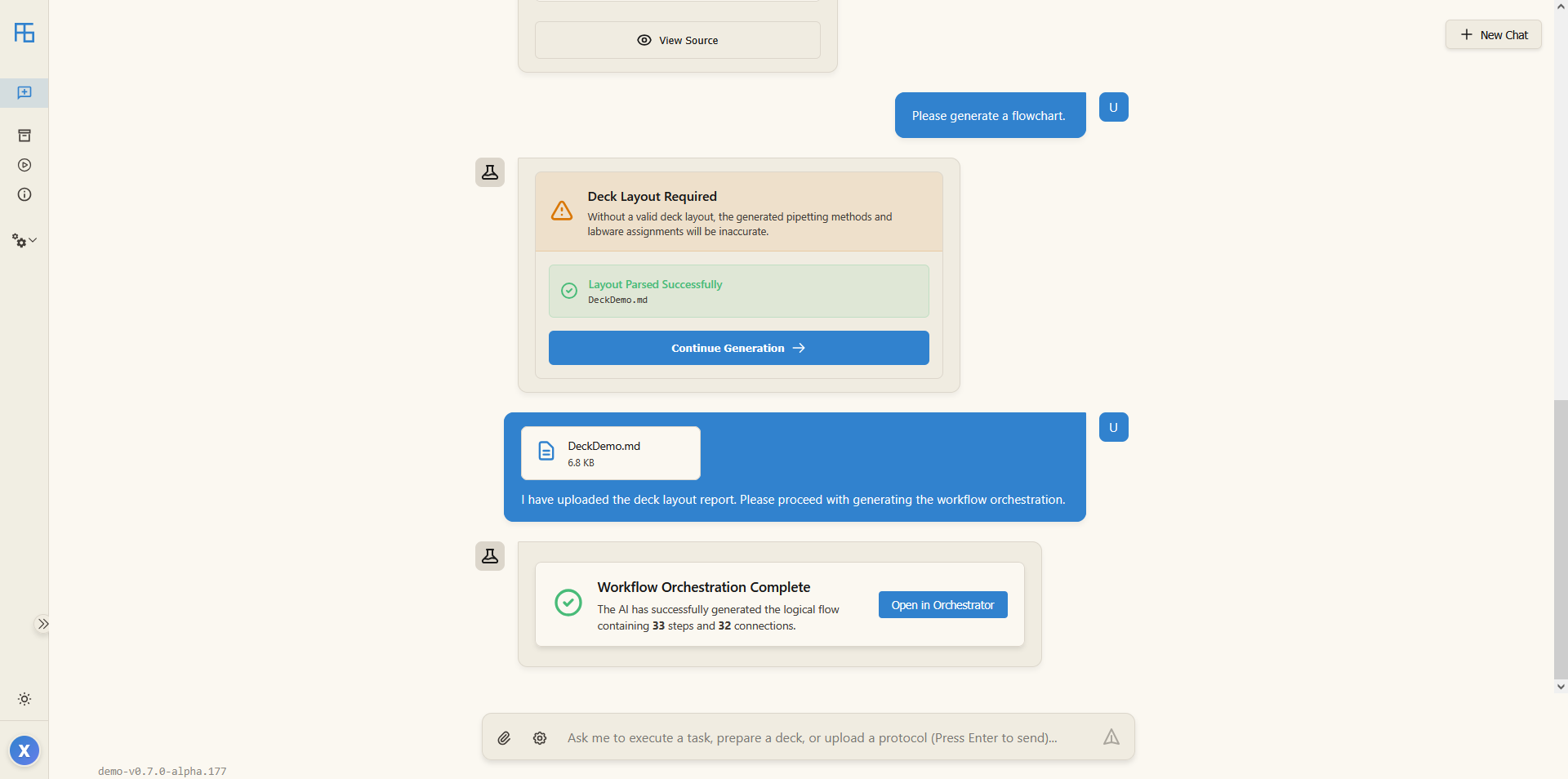
Unified Conversational Interface

The new version replaces the previous multi-page navigation with a unified AI chat interface. Simply type in natural language, and the system interprets your intent and surfaces the relevant features on demand. This shift from “searching for features” to “features coming to you” significantly reduces operational overhead and keeps your workflow focused and uninterrupted.

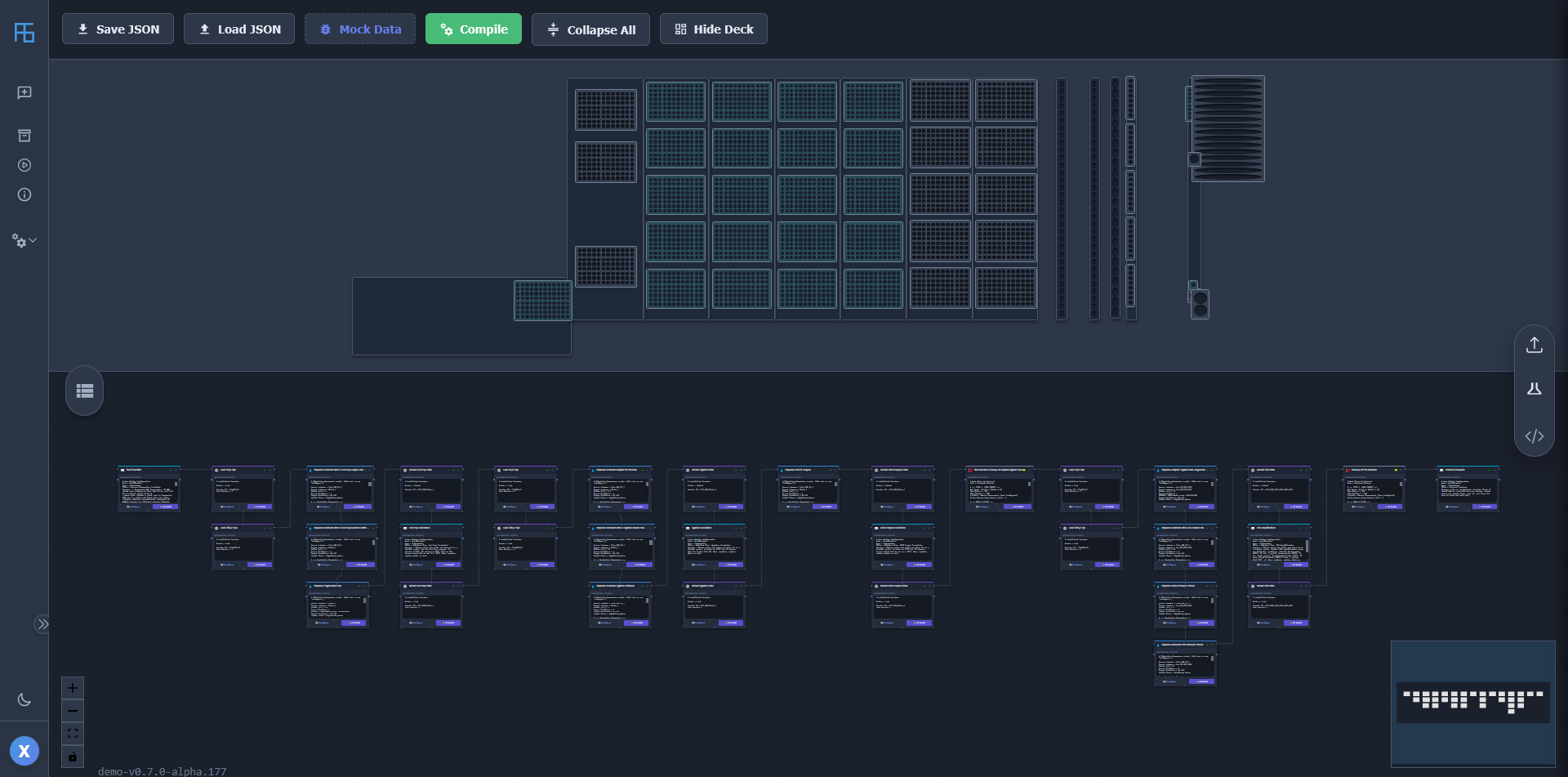
Protocol-to-Flowchart Conversion

You can now import an experimental Protocol and have it automatically parsed into a visual flowchart. Parameters can be reviewed and edited directly on each node. Once confirmed, the system compiles the flowchart structure and node data into a final executable method.

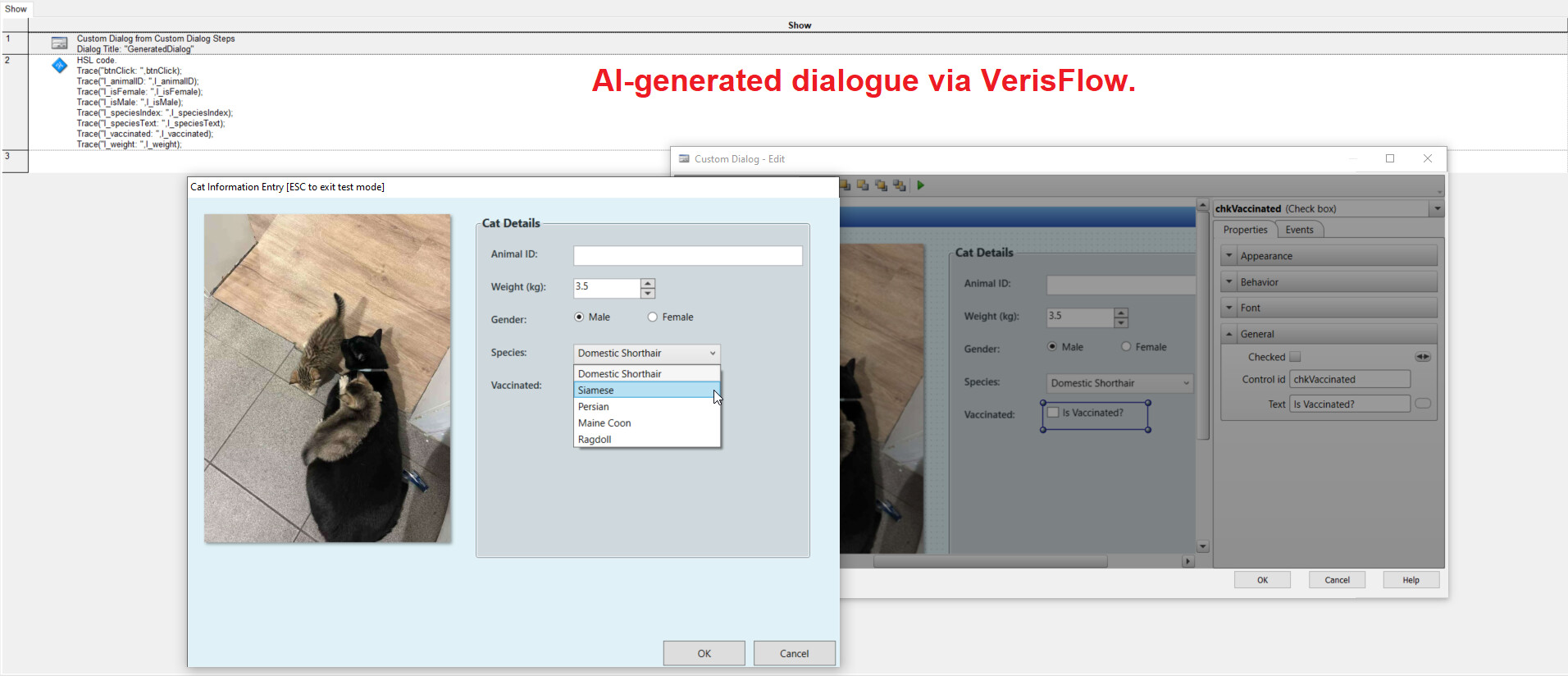
Hamilton Venus .med File Support

In addition to existing HSL (Hamilton Scripting Language) generation, this version introduces initial support for Hamilton Venus .med file generation — starting with Custom Dialog code. Full .med method file support is planned for upcoming releases.

:globe_with_meridians: Website: www.verisflow.com :play_button: Demo Video: https://youtu.be/AoETvdR66AE

4 Likes

Hi @Xianghua, this is a very powerful tool I’d love to do beta testing with in my lab. Is there a possibility of getting access to some of the tools in development currently?

@Sushil Hi, messages like yours are crucial for ensuring VerisFlow solves the right problems—it genuinely means a lot to me. We are currently in active development and refinement. I’ll be in touch as soon as we’re ready for external testing. Thank you for your patience—I’m determined to make it worth the wait!

1 Like

This is very interesting. I’m lookin forward to hearing more about this in the future.

1 Like

This is amazing! When the time comes, if you are looking for any additional beta testers, I’d also happily volunteer!

1 Like

Thanks so much for the kind words and for offering to help! That really means a lot. We are still a little ways out from having a testable version, but I will make sure to keep you in the loop and reach out the moment we are ready for beta testers.

3 Likes

Look real cool. Just curious will AI call existing Hamilton library or write all logics in plain hsl only?

2 Likes

Hi it’s super cool, promising work ! Let us know when you are looking for beta testers as well if needed, we have around 40 platforms to test on

2 Likes

40 platforms — that’s amazing! That would genuinely help us catch issues we’d never find on our own. We’ll absolutely be in touch when the time comes.

Thanks for asking, and sorry for the delayed response!

The AI calls Hamilton’s existing libraries as well as our own custom ones. It does not write all logic in plain HSL from scratch.

In my opinion, reinventing everything from the ground up wouldn’t make much sense. There are already many well-tested, verified libraries available, both from Hamilton and ones we’ve built ourselves. I’m building on what already works, teaching the AI how to use these proven tools correctly in new processes.

Hi Xianghua, Very cool work. If it is possible, I would also love to have an invite and to help with the beta-testing for this, once it is available?

1 Like

Hi DeskHold,

Please excuse the delayed response. Thank you for the kind words and your interest in helping with the beta-testing.

I would be glad to send you an invite once it becomes available. I will keep you posted!

Best regards,
Xianghua

1 Like

Hi,

Thank you all for the interest and feedback. Here is the progress on generating native Hamilton Venus .med methods.

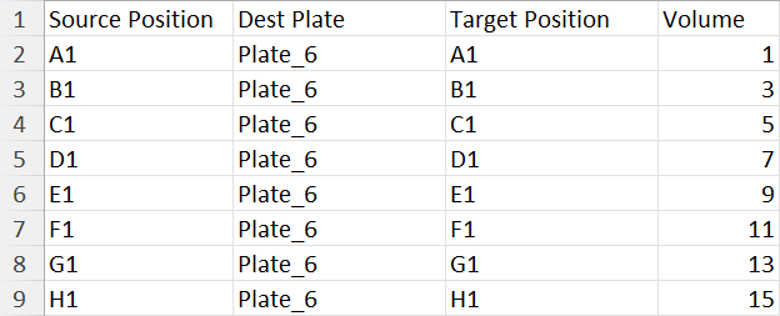
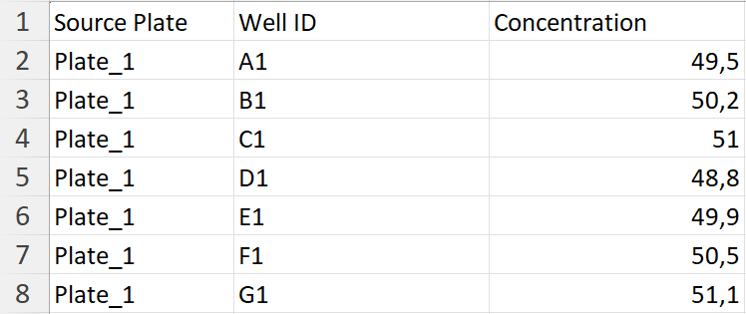
I began testing this capability by focusing on worklist handling. The goal is straightforward: upload a sample worklist, and the AI generates a complete .med method featuring a custom dialog for file selection. This generated method can then process any subsequent worklist that shares the same format.

I evaluated the AI software using three scenarios: a basic worklist, a serial dilution worklist, and a normalization worklist. The first two were used to optimize the AI software, making the normalization worklist a unseen test case.

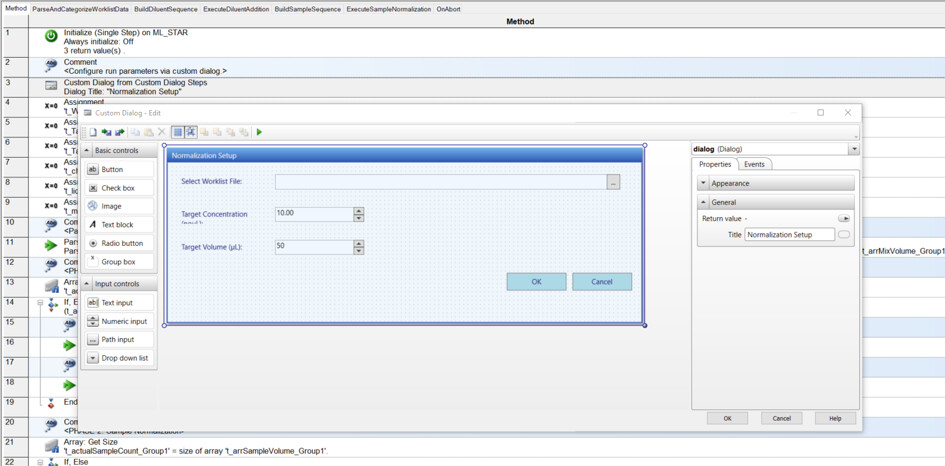
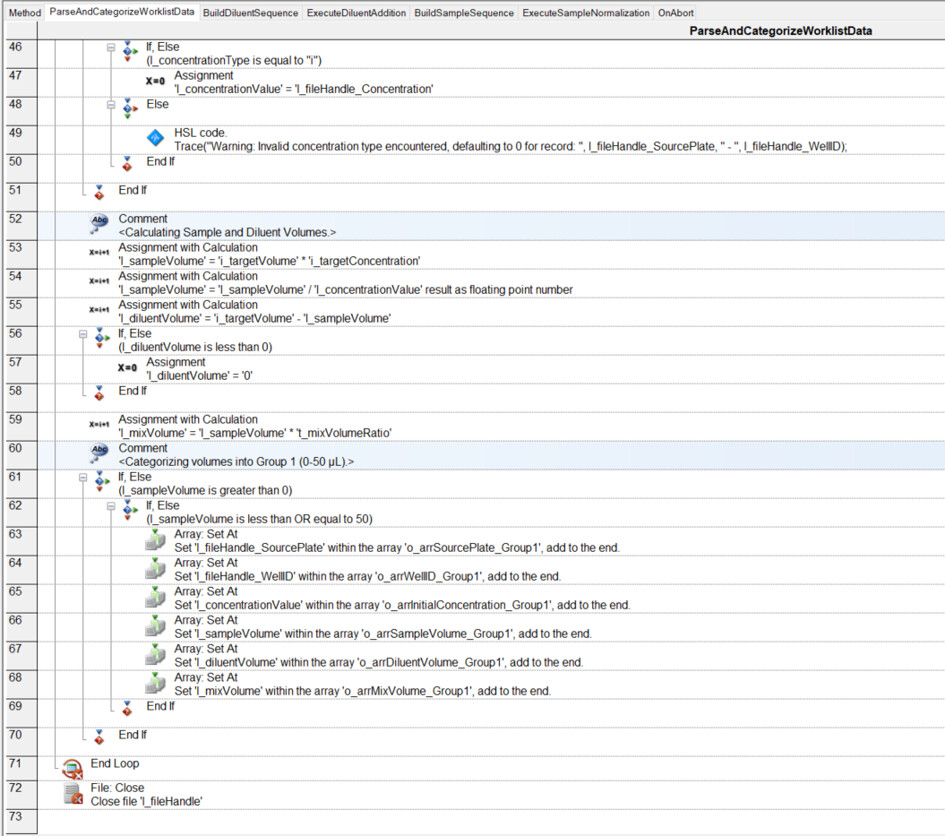
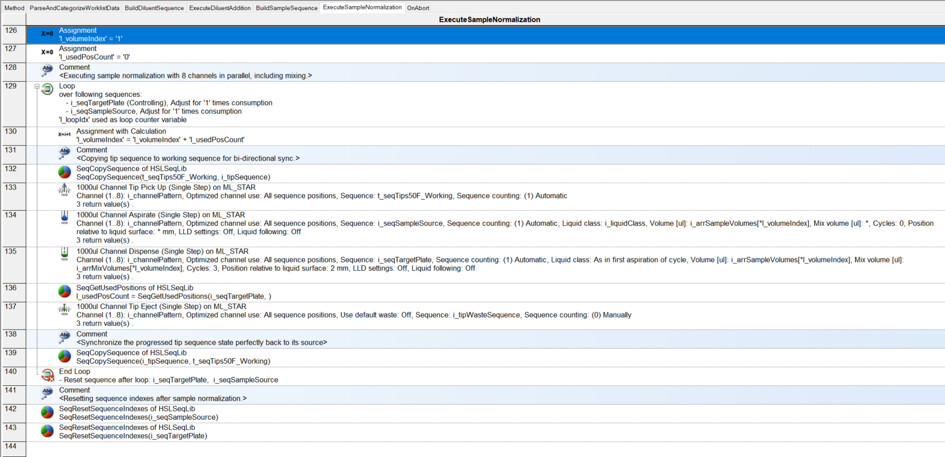
Below are the formats of these worklists, alongside the .med method generated specifically for the normalization task.

Initial testing shows a reasonably high first-pass success rate for generating functional methods. When errors do occur, they are typically minor, easily fixable syntax mistakes related to variables, arrays or sequence objects. However, the primary limitation at this stage is that the AI still struggles to utilize sequence objects in more advanced, complex ways.

I welcome your feedback and any questions you might have.

Best regards,

Xianghua

Demo video: https://youtu.be/wwiHBR2tH-s

1. Basic Worklist: Volumes range from 1 to 1000 µL. The method successfully groups volumes and automatically assigns appropriate tips and liquid classes.

2. Serial Dilution Worklist: Based on the format discussed here: Help with worklist for serial dillutions

3. Normalization Worklist: The AI successfully generated a custom dialog featuring input textboxes for target concentration and target volume.

Below are parts of the .med method generated specifically for the normalization task. It was generated entirely by AI without a single manual correction, and it is functional.

Impressive work ! Do you mind explaining how it is able to generate .med files ? For hsl code I get it, but for the .med I don’t see how it can generate steps like aspirate/dispense/displacement.

1 Like

@Yass

Thanks for the question! That is exactly the most complex part of the project. I began seeking a solution for generating Venus .med files when I started working on HSL generation last year.

Generating HSL is relatively straightforward since it is scripting text. The .med files, however, are essentially sequential and interlinked data structures that map to the visual steps (Aspirate, Dispense, tip handling, etc.) within the Venus GUI.

To tackle this challenge, I prepared my .med files as training samples, cleaned them, and extracted the underlying patterns. I spent a massive amount of effort manually mapping out the exact parameter settings and data structures required for these visual steps. This was an incredibly time-consuming process.

The architecture essentially splits the workload into two phases. First, the AI engine acts as a logical orchestrator—it translates the raw intent (e.g., from a worklist) into a sequence of intermediate, validated instruction data structures. Second, I built an independently developed, pattern-driven generator that takes this clean intermediate data and reconstructs it into the native .med data structures that Venus expects.

For instance, when generating an “Aspirate” step, the engine fills out a pre-mapped data template with data from a series of instructions, including parameters such as volume, liquid class, and others. This ensures the Venus software interprets it natively without throwing structural errors.

Ultimately, it is about extracting patterns from specific data structures, letting AI generate a schema according to intent, and then reconstructing the schema into those data structures.


Below is an example of creating a calculator in Venus software.

The prompt:

Generate a Venus method with a simple calculation function.

Use numerical input boxes for values and a drop-down menu for operators. Clicking "OK" (its value is 1) triggers the calculation, and the result must be displayed.

Display the window using a loop. Initialize variables before the loop, not inside it. Clicking "Cancel" (its value is 2) must trigger a "Break Loop" command.

Thoroughly check that variable names on the UI match those in the calculation logic to prevent calculation, display, or program errors.

Use layout: Deck Layout: Method1.lay

The video demo: https://youtu.be/x1cxZD9JNe4

I’ve done a similar job of trying to reverse engineer the different files and how they are connected (between med, stp, sub, res etc). Are you able to share your mapping for these?

@Gareth This post outlines the architecture and relationships between the core Venus files: Understanding the 6 main files in VENUS - #10 by BrandonBare_Hamilton